Route data plane alerts to Slack, webhooks, or PagerDuty
From 0.9.0, the health findings that the doctor reports for a self-hosted data plane can raise alerts. Each alert goes to the alert destinations configured for that data plane: Slack channels, signed webhooks, or PagerDuty services. A finding that means traffic is failing pages someone; every other finding only notifies. Destinations are managed on the Developer Console's Alert Destinations page, and through the API.
Persona: Platform operator responsible for a self-hosted data plane, working in the Developer Console.
Estimated time: 10 minutes to add a destination and confirm a test alert arrives.
Prerequisites
- Alerting turned on for the organization. Alerting is off by default. It is switched on in the management plane's configuration, which Tetrate operates, so it is requested from Tetrate support rather than set by the customer.
- The doctor reporting from the data plane. Alerts are raised from the reports the in-cluster
tare-doctorCronJob uploads every five minutes. See Doctor. - The alert destination permissions. The page needs
alert_destinations.read, and adding, changing, and deleting destinations needalert_destinations.create,alert_destinations.edit, andalert_destinations.delete. Sending a test alert needsalert_destinations.edit. The permissions are granted at organization scope. Among the built-in roles only Super Admin holds them; Viewer does not, because a destination carries a delivery credential. Anyone else is given them through a custom role, as described in Manage roles and permissions. - A credential for each destination:
- Slack: an incoming webhook URL for the channel.
- Webhook: the receiver's URL and a signing key shared with it.
- PagerDuty: the routing key of an Events API v2 integration on the service.
What raises an alert
Each finding code in a doctor report belongs to one severity class, and the class decides which destinations receive the alert:
| Class | Findings | Meaning |
|---|---|---|
| Page | DataplaneKeypairRevoked, DataplaneSelfDisabled, AllClustersNoEndpoints, ZeroTrafficServed, NoUpstreamReached, DBConnectionExhaustion, PodOOMKilled, PodCrashLoopBackOff | The data plane is down, cut off, or serving nothing, so customer traffic is already failing or about to. |
| Notify | AuthTokenVerificationFailed, DNSResolutionFailure, ConfigWriteFailed, BedrockSigningFailure, UpstreamProviderError, InvalidAPIKey, RouteDeploymentNoRoutes, ElevatedErrorRate, ProviderUnreachable, ClusterNoEndpoints, RouteMatchDiverged, VhostShadow, TrafficUnattributable, AuthRejectionsPresent | A real problem that is partial, recoverable, or needs judgment rather than an immediate interrupt. |
A finding code not listed here, such as one a newer doctor reports first, is classed Notify, never Page. The class is a routing decision and is separate from the doctor's own ERROR, WARNING, or INFO severity, which travels with the alert.
Step 1: open the Alert Destinations page
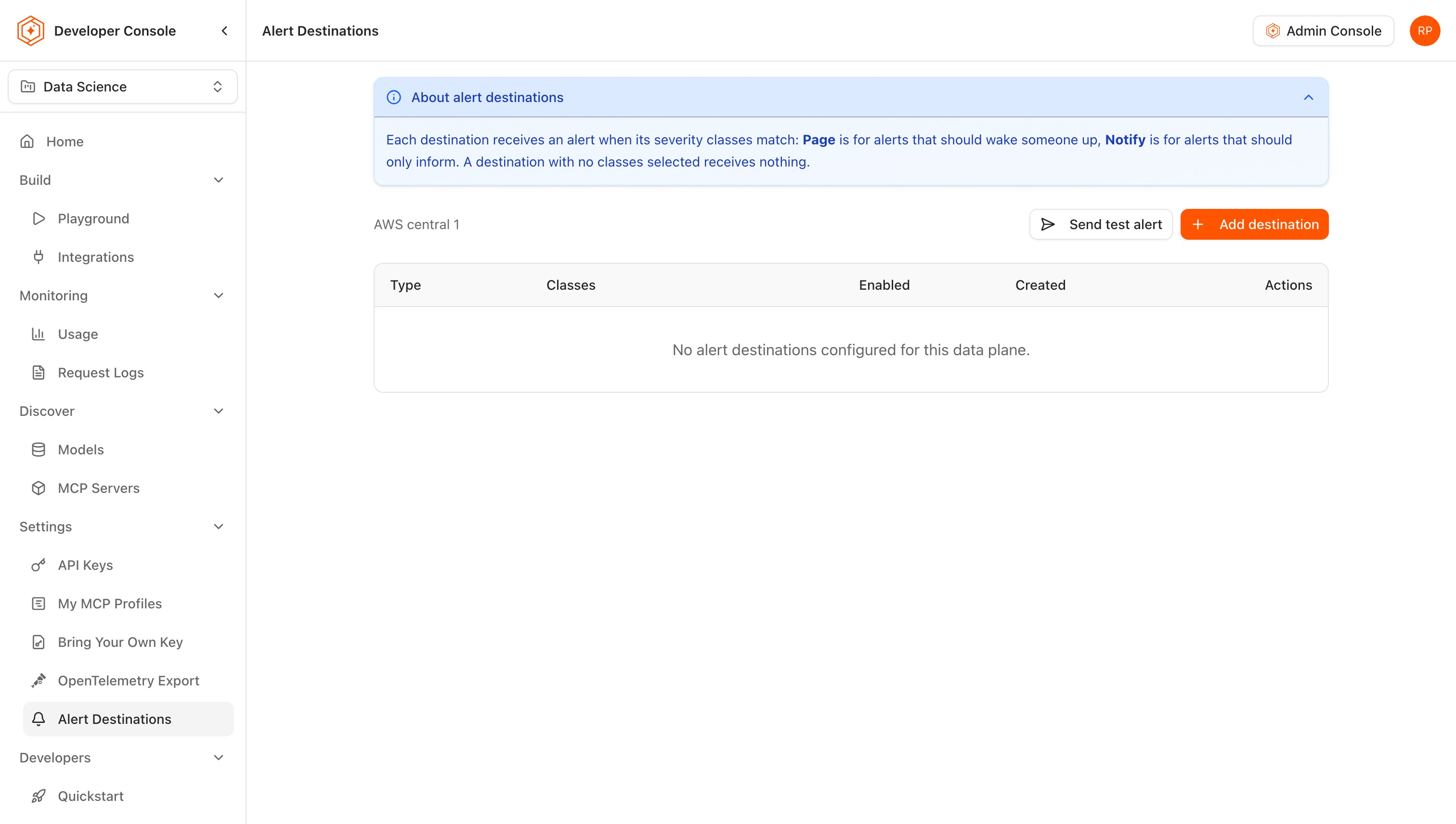
In the Developer Console, go to Settings → Alert Destinations. The page lists the destinations of one data plane, named above the table, with each destination's type, classes, whether it is enabled, and when it was created. About alert destinations at the top of the page summarizes the two classes.
Step 2: add a Slack or webhook destination
- Select Add destination.
- Under Type, select Slack or Webhook.
- Enter the credential:
- For Slack, the Slack incoming webhook URL.
- For Webhook, the Webhook URL and the Signing key the receiver verifies deliveries with.
- Under Severity classes, select Page, Notify, or both. The dialog does not create a destination with no class, because it would receive nothing; the API accepts one, which routes nothing until it is updated.
- Select Create destination.
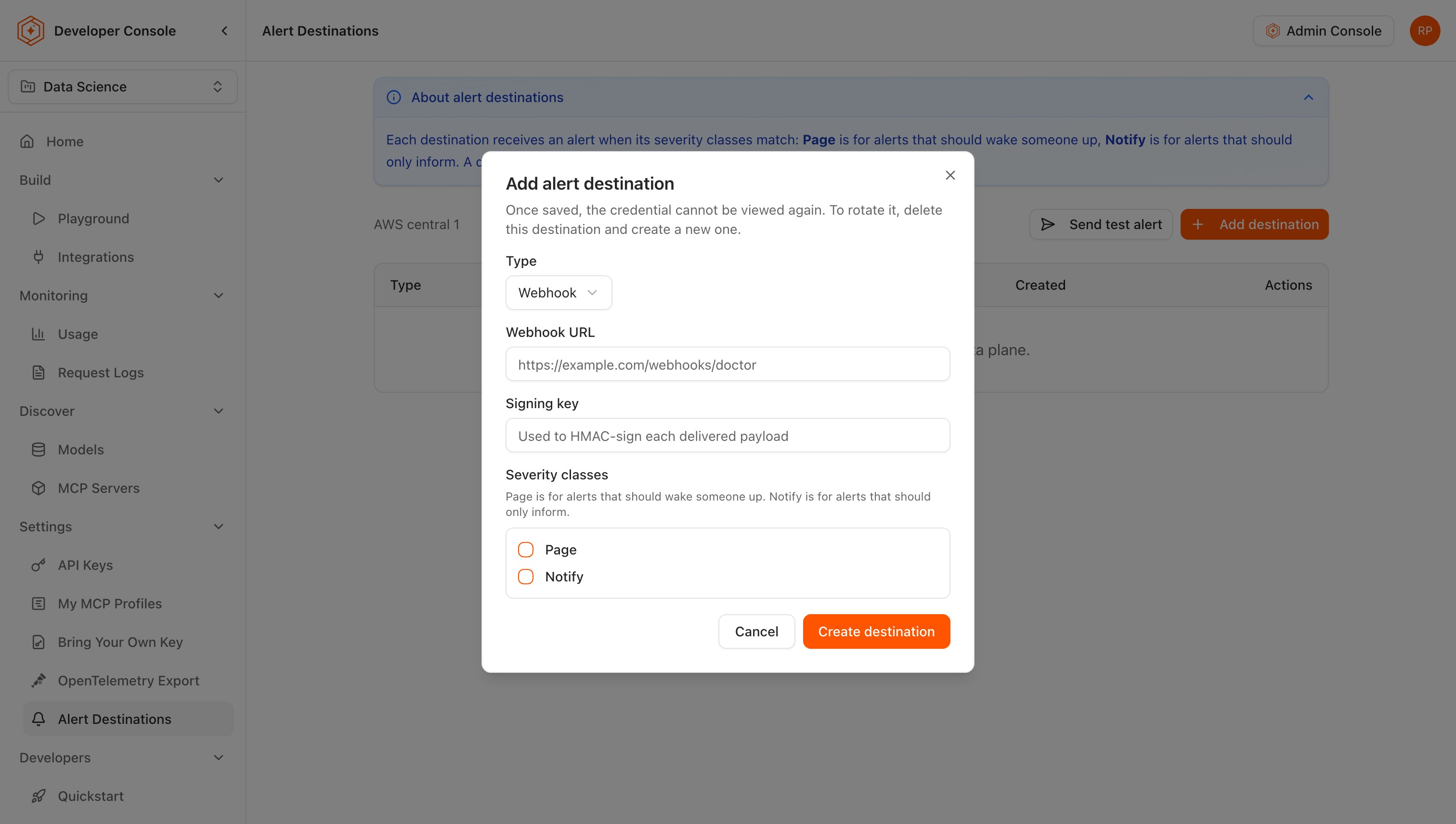
The credential is write-once: it is stored when the destination is saved and never shown again. To rotate it, the destination is deleted and created again with the new credential. A Slack or webhook URL has to name a public host: loopback, private, link-local, and cloud metadata addresses are refused when the destination is saved, and checked again at every delivery.
An alert that fires before any destination exists is held, and delivered once one is configured, so the order of turning alerting on and adding destinations does not matter.
Step 3: send a test alert
Select Send test alert. The test exercises the data plane's whole delivery path rather than one destination: it raises one synthetic alert, already closed, which goes to every enabled destination subscribed to Notify. A destination subscribed only to Page receives no test alert. The page confirms that the test is queued; whether it arrived is checked in Slack, at the receiver, or in PagerDuty.
Add a PagerDuty destination through the API
The page lists, edits, and tests PagerDuty destinations, but its form adds only Slack and webhook ones. A PagerDuty destination is created with CreateAlertDestination, where the credential is the routing key and workspace_id is the data plane's ID:
curl -sS -X POST "https://management.example.com/v1/customers/${CUSTOMER_ID}/dataplanes/${DATAPLANE_ID}/alert-destinations" \
  -H "Authorization: Bearer ${USER_TOKEN}" \
  -H "Content-Type: application/json" \
  -d '{
    "type": "ALERT_DESTINATION_TYPE_PAGERDUTY",
    "secret": "<events-api-v2-routing-key>",
    "classes": ["ALERT_SEVERITY_CLASS_PAGE"]
  }'
The same service lists (GET), updates (PATCH …/alert-destinations/{id}), and deletes (DELETE …/alert-destinations/{id}) destinations of every type, and sends a test alert (POST …/alert-destinations/test-send). An update changes only the classes and whether the destination is enabled; the credential cannot be changed after creation.
Change, disable, or remove a destination
Each row's actions edit the destination's classes and Enabled setting, disable or enable it, and delete it. A disabled destination keeps its credential and receives nothing until it is enabled again. Saving an edit that leaves no class selected asks for confirmation first, because the destination then receives nothing.
How an alert fires, clears, and fires again
- The first alerts after turning alerting on. Alerting covers every problem still present, however old, so the first run sends a burst for whatever is wrong at that moment. Each alert says how long its finding has been firing.
- Delivery. A failed delivery is retried with backoff, up to eight attempts. An alert still unrouted after a day, for example because no destination ever subscribed to its class, is given up on and logged.
- Clearing. An alert clears once its finding has been absent from the data plane's reports for 15 minutes and the cluster has reported again. A data plane that stops reporting altogether keeps its alerts open.
- Firing again. A problem that returns within 10 minutes of clearing waits out that window before anyone is told, and is never announced if it clears again first.
Both windows are management plane settings that Tetrate can change on request.
Webhook deliveries
A webhook receives a JSON POST for each alert and each clearing, with type set to alert.fired or alert.resolved, and the data plane, cluster, finding code, affected resource, severity class, first-observed time, and the doctor's evidence and severity in the body. The body carries a schema_version; fields are only ever added, so a receiver ignores fields it does not know. Three headers accompany it:
| Header | Value |
|---|---|
X-TARS-Signature | sha256= followed by the hex HMAC-SHA256 of the raw request body, keyed with the destination's signing key |
X-TARS-Timestamp | The send time (RFC 3339), equal to timestamp in the body, so the signature covers it |
X-TARS-Event-Id | The alert event's ID, for deduplicating retried deliveries |
A receiver recomputes the HMAC over the body as received, compares it with the header, and rejects a delivery whose timestamp falls outside the window it accepts.
Upgrading to 0.9.0 with destinations created earlier
From 0.9.0 a destination, and each pending alert, belongs to an organization rather than to a workspace name. On upgrade each one is matched to its owner only where the workspace name has only ever belonged to one workspace. A destination whose workspace name was reused at any point, matches no live workspace, or is held by more than one stops being listed, edited, and delivered to, and a pending alert in the same position is never delivered. Nothing is deleted. After upgrading, each data plane's Alert Destinations page is checked against what is expected, and anything missing is created again. A problem behind a dropped alert raises a fresh one on the next doctor report.
Terms introduced on this page
| Term | Meaning |
|---|---|
| Alert destination | A Slack channel, signed webhook, or PagerDuty service that receives the alerts raised for one data plane, filtered by severity class. Its credential is write-once. |
| Severity class | The routing class of an alert: Page for findings that should wake someone, Notify for findings that should only inform. Set per finding code, independently of the doctor's own severity. |
Where to go next