Enforce budget caps with policies
A budget measures; the action attached to it is what stops a caller once the budget is exhausted. Nine scenarios illustrate how an enforcing action behaves instead of leaving the budget to report.
Enforcing actions are authored in the Admin Console's budget drawer. A budget created earlier keeps measuring exactly as it did; enforcement is opted into per budget, by its action. The creation walkthrough is in Set a budget and track spend against it; this page is about choosing the arrangement.
Persona: Platform operator working in the Admin Console, implementing a spend ceiling agreed with finance or a business owner.
Estimated time: 10 to 15 minutes to read; 5 minutes per budget to create.
About the scenarios
1. The scenarios use three short action names
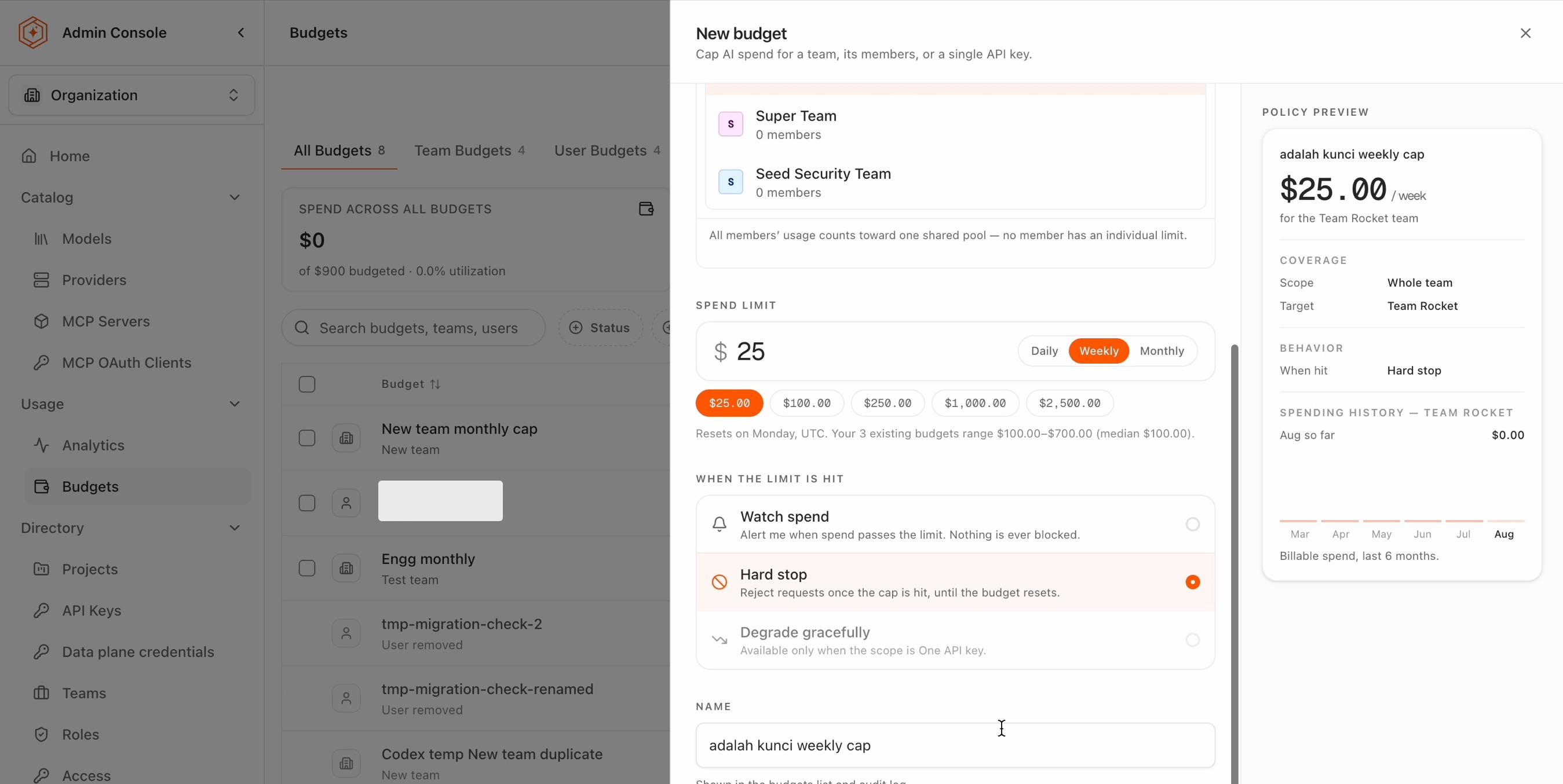
The Admin Console's budget form offers the action under When the limit is hit, with longer labels than the scenarios repeat. The mapping, once:
| In the scenarios | In the Admin Console | At the limit |
|---|---|---|
| monitor | Watch spend | An alert is raised. Nothing is ever blocked |
| blocking | Hard stop | Requests are rejected, with an error naming the exhausted budget, until it resets |
| degrade | Degrade gracefully | Requests keep being served, rerouted to the chosen fallback model |
Enforcement happens in the gateway, so blocking and degrading act on live traffic, not only on dashboards, and both release on their own when the period resets; nothing is manually re-enabled. Enforcement lags the spend by a few minutes, because spend is totaled from usage rollups before it reaches the gateway, and it fails open: a request is served rather than refused while the totals catch up. Not every action is available at every scope: degrading is offered only when the scope is one API key, and an each-user budget only monitors. A disabled action states its reason in the form rather than disappearing.
Where several budgets cover one key, the most specific one sets the key's allowance and the action taken at it, and every broader budget is still a ceiling on top: a spent team pool stops a key whatever its own budget says. The full rule, with its one exception, is in Overlapping budgets all apply.
2. Every scenario has the same four parts
The parts always appear in this order, so a scenario can be scanned rather than read:
- Goal states the outcome wanted, in the terms the people involved would use.
- Set it up lists the budgets to create, and nothing else.
- What happens traces the result, usually as a table of events in order. Where one member's keys fare differently from the rest, a second What happens covers them.
- Watch out for covers the part that surprises people. That is nearly always the point where a second budget interacts with the first.
3. DynaBank runs through every scenario
Budgets get hard to reason about when a second one lands on a key the first already covers. Seeing that requires the same people, keys, and workloads to recur, so one fictional company runs through all nine scenarios.
DynaBank is a fictional retail bank, and its card division issues credit and debit cards and handles what follows: approving transactions, resolving disputes, and answering the cardholders who call about them. Two parts of that work use models.
| The work | What it does | Models it uses |
|---|---|---|
| customer chat | answers cardholders and handles disputes | opus, haiku |
| fraud screening | scores transactions for fraud | opus only |
Neither is large enough to warrant a team of its own, so one team runs both.
| Team | Users |
|---|---|
card-ops | Anna, Ben |
Three API keys carry the traffic. Each is issued for a single job, following the key-per-purpose convention set out in Onboard developers and issue keys, which is what makes a budget on a key mean anything precise.
| API key | Used for | Owner | Notes |
|---|---|---|---|
| K1 | customer chat | Anna | |
| K2 | customer chat | Ben | |
| K3 | fraud screening | Anna | an agent, running on its own |
K3 is the key to watch. No person sits behind it: it is an autonomous agent Anna created, so its spend counts against Anna even though Anna is not the one making the calls. Several scenarios turn on that mismatch.
Small as the setup is, it covers every subject a budget can take, and it produces the overlaps worth studying: a team with more than one member, one member holding more than one key, and a key whose spending is not really its owner's doing.
"Customer chat" and "fraud screening" are names for the work, not things in the product. A budget never refers to them: it covers a team, a user, or an API key. They appear here because that is how the people at DynaBank describe what each key does.
Applied to DynaBank, the two routes a budget takes to a key are the team card-ops, which means K1, K2 and K3, or naming a key, which means exactly that key.
Every budget below is monthly, the cadence finance works in, though any could equally be daily or weekly, and a budget's period can be changed without recreating it. Haiku costs a tenth of opus, and fraud screening has only opus turned on, so it has nothing cheaper to degrade to.
Match the situation to the subject
The subject is the whole of the decision. Once it is settled which subject the amount goes on, the rest of a scenario is mechanical.
| Scenario | Use it when | Subject the budget goes on |
|---|---|---|
| 1: One application, one ceiling | one application, running on one key, needs a fixed monthly cap | one API key |
| 2: One shared total for a team | a group has one number between them and the split does not matter | a team |
| 3: A shared team total plus a cap on one key | a group has one number, and one key inside it needs a ceiling of its own | a team, and one API key |
| 4: The same allowance for every member | each member's spending should be visible against the same line (monitor only) | each user on a team |
| 5: Extra room for one agent | one key needs more than its owner's allowance | each user on a team, and one API key |
| 6: A cheaper model instead of a refusal | service has to continue past the number, on a cheaper model | one API key, and a team behind it |
| 7: A warning before the cap | someone should know a limit is approaching before it is reached | any subject, plus thresholds |
| 8: The budget that blocked a key | a key is refusing requests and the reason is not obvious | none: this is a diagnosis |
| 9: Monitoring before enforcement | the effect of a budget should be known before it stops anyone | any subject, in monitor |
Budget cap limitations and workarounds are listed at the end, with what to do instead. Reading that section first is worthwhile when the wanted outcome is not in the table above, because the nearest scenario is often a workaround rather than a fit.
1: One application, one ceiling
Goal. Fraud screening should stop at $600 a month. It runs on one key, K3, and nothing else uses that key.
Set it up. Put a $600 budget on K3, blocking. An API key is used by one application, so capping the API key caps the application. Nothing else to create. Blocking is the only action open here: fraud screening has only opus enabled, so there is no cheaper model to degrade to.
What happens. Fraud screening stops at $600. Nothing else is affected, because no other key is covered.
Watch out for. Two things.
The budget survives a key rotation. Since 0.3.0, a key budget binds to the client behind the key rather than to the credential: rotating K3 carries the budget to the replacement key, the period's spend is summed across both keys of the rotation pair while both are live, and nothing has to be recreated. Before 0.3.0 the budget was stranded on the retired key, so on an older release see keep a key budget through a credential rotation.
One key per application is what makes this work. If an application uses several, there is no way to give them one shared number: each API key can only be capped on its own, and three keys at $200 is not the same as $600 they can share between them.
2: One shared total for a team
Goal. The card division has $1,000 a month for everything it does with models, and how that divides between Anna and Ben does not matter.
Set it up. Create a budget on the team card-ops for $1,000, as a shared total for the whole team.
What happens. Everything Anna and Ben run draws on that one number: K1, K2 and K3, both pieces of work.
Watch out for. It follows the people, not the work. So it covers whatever else they are working on. Anna's fraud agent draws on the card team's budget even though it has nothing to do with cards.
3: A shared team total plus a cap on one key
Goal. The team keeps its $1,000, and the fraud agent is separately held to $600, so one investigation cannot consume the division's whole month.
Set it up. Two blocking budgets:
- Create a team budget on
card-opsfor $1,000, blocking. - Create a budget on K3 for $600, blocking.
Nothing reconciles the two. They coexist.
What happens. Event by event:
| Event | Team | K3 | Result |
|---|---|---|---|
| The agent spends $600 | $600 / $1,000 | $600 / $600 | K3's own budget is spent |
| Anna sends on K3 | Blocked | ||
| Anna sends on K1 | rising | not covered | Allowed, K1 has its own room and $400 of team money left |
| Anna and Ben spend $400 more | $1,000 / $1,000 | The team total is spent, everything blocked |
Watch out for. Both apply. A blocking budget stops the request when it runs out. Neither weakens the other and neither comes first. The team budget picks keys by who owns them; K3's budget names one key. The same key gets picked by both, for different reasons.
Note that K3's $600 counts toward the team's $1,000 in this arrangement, because the exception in when several budgets cover the same key applies to an owner's each-user amount, not to a team's shared total.
4: The same allowance for every member
Goal. Anna and Ben get $200 each, tracked separately, so one member's heavy month is visible on its own rather than inside a shared total.
Set it up. Create the card-ops budget as each user, $200, rather than as a shared total, in monitor.
What happens. Anna and Ben get $200 apiece, each measured against their own spending. The amount reports; it does not block. Since 0.3.0, an each-user budget accepts only the monitor action: creating one with a block or degrade action is rejected with an error naming the limitation, because enforcement does not evaluate those actions at this scope. Before 0.3.0 such a policy was accepted and reported spend but never gated a request, so the error makes explicit what was already true.
What happens to Anna. Her $200 covers every key she owns, so K1 and K3 draw on one amount between them. Customer chat and the fraud agent share the allowance, and exhausting it is Anna's overage alone, visible against her line rather than the team's.
Watch out for. Three things.
An each-user amount cannot stop anyone. To stop a member's spending, put a blocking budget on the keys that member owns (1), or a shared blocking total behind the per-member view (2). The each-user amount is the visibility layer, not the ceiling.
Decide which of the two is meant. "The team gets $200" could be a shared total or $200 each, and the two behave differently the first time one person needs more than the rest. A shared total absorbs an uneven month; an each-user amount holds everyone to the same line and names the heavy spender.
Alert thresholds do not work on an each-user amount. A shared total can carry them, this arrangement cannot. See 7: A warning before the cap.
5: Extra room for one agent
Goal. card-ops is on $200 each. The fraud agent K3 needs $1,000 during an investigation, with an enforced ceiling of its own.
Set it up. Two budgets:
- Create the
card-opsbudget as each user, $200, in monitor. - Create a budget of $1,000 on K3, blocking.
What happens. K3 draws on its own $1,000, which is the enforced ceiling. The each-user $200 is monitor only (4), so it reports without stopping anything. Ben is unaffected.
What happens to Anna. K3's spend still counts toward her $200 line. Her monitor totals every key she owns, the exception key included, so the investigation shows her far over while nothing is blocked. Anyone reading the per-member numbers during the investigation needs to know the overage is the agent's, not hers.
Watch out for. Three things.
An API key budget is not a raise. It gives K3 its own number for its own spend; it lifts nothing above it. Add a team budget on card-ops and K3 stops when the first of the two runs out, its own $1,000 or whatever is left of the team's.
Rotating K3 keeps its budget. The budget binds to the client behind the key (1), so the exception survives a rotation. Before 0.3.0 it disappeared at the first rotation and the agent dropped back to Anna's $200.
The increase has no end date. See set a budget that ends on a date for why an investigation-sized amount is better tied to a key that can be revoked.
6: A cheaper model instead of a refusal
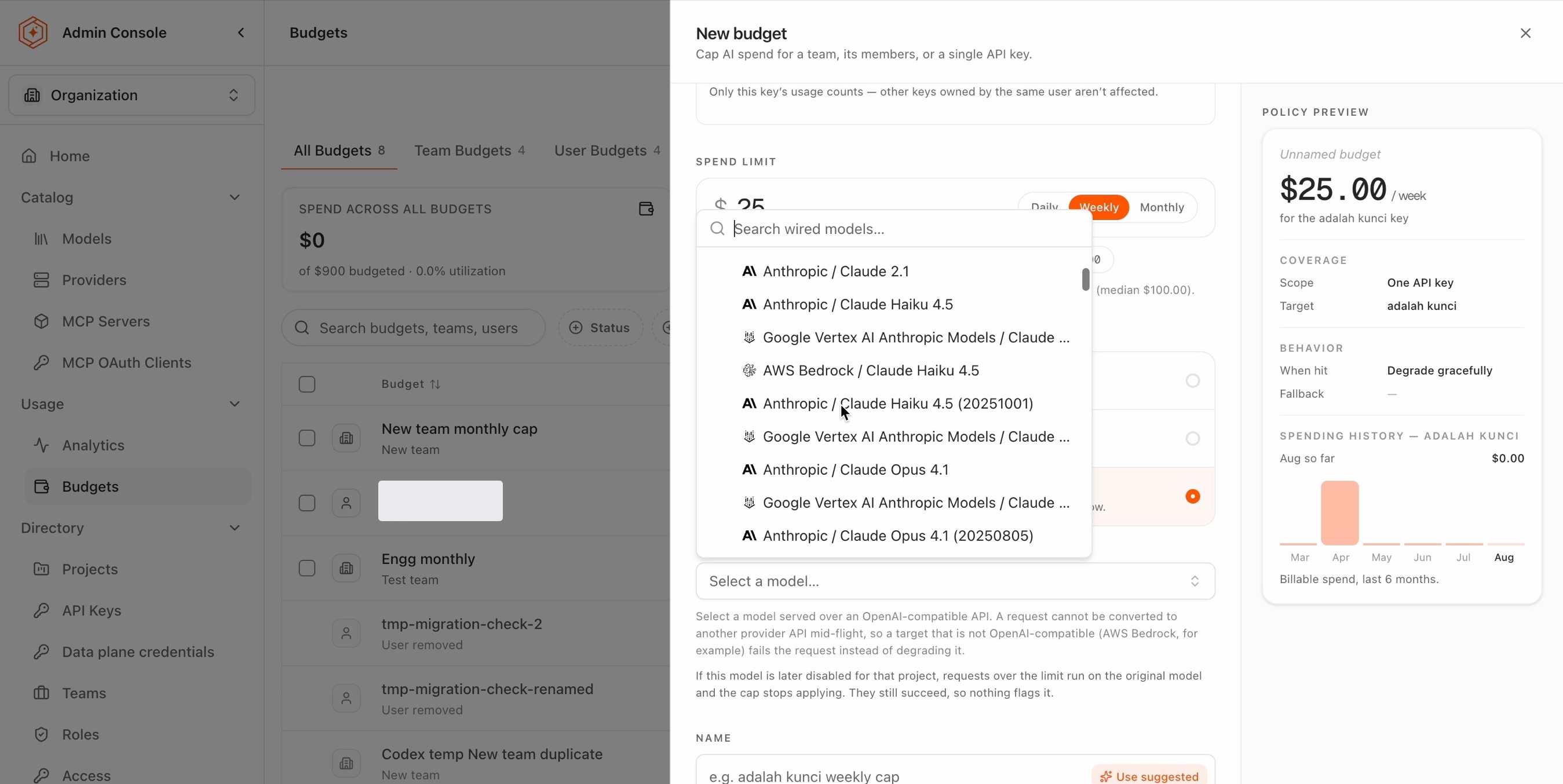
Goal. Customer chat should move to haiku before any cardholder loses service, with a real ceiling behind it. The fallback model can equally sit with a different provider, so the traffic bills to another account.
Set it up. Two steps:
- Create a budget on K1 for $600, degrading to haiku. Do the same for K2.
- Create a team budget on
card-opsfor $1,000, blocking.
What happens. Stage by stage:
| Stage | What happens |
|---|---|
| K1 reaches $600 | K1 switches to haiku and keeps serving. K2 is unaffected, it has its own $600 |
| Traffic continues | At a tenth the cost, the remaining team money buys roughly ten times the volume |
card-ops reaches $1,000 | Everything the team runs blocks, including the traffic already on haiku |
Watch out for. Four things.
A degrading budget never stops spending by itself. Past its number it changes which model is used and nothing more: same API key, same budget, still over, and the spend after the switch is not attributed anywhere else. Without a blocking budget behind it, spending carries on until the period resets. The $600 on its own is not a limit. It is the point where the traffic moves.
One budget per API key. Customer chat uses two API keys, so degrading means setting it twice and keeping the two numbers in step by hand.
The fallback model must be served over an OpenAI-compatible API. A request cannot be converted to another provider API mid-flight, so a fallback target that is not OpenAI-compatible (AWS Bedrock, for example) fails the request instead of degrading it. The model picker in the form states this beside the selection.
A fallback model later disabled for the project silently stops the cap. Requests over the limit then run on the original model and keep succeeding, so nothing flags it. Disabling a model is the moment to re-check any budget that degrades to it.
7: A warning before the cap
Goal. Somebody should know that card-ops is approaching its $1,000, rather than discovering it at the moment the team stops.
Set it up. Add alert thresholds to the existing team budget, at 50% and 80%. Thresholds belong to the budget that carries them; a warning is not a second budget.
What happens. Each threshold is recorded once for the period as it is crossed, and the record is readable through the API.
Watch out for. Two things.
Nothing is sent to anyone. Crossing a threshold writes a record. It does not email, message, or call. Being told means something goes and looks, on a cadence: see Catch spend drift before the invoice does, or wire the telemetry export in Get alerted to cost spikes as they happen.
Thresholds are not available on an each-user amount. The figure recorded there is the team's total rather than the individual member's, so a threshold would quote a different number from the one doing the stopping. A team with a shared total can carry thresholds; the per-member arrangement in 4: The same allowance for every member cannot.
8: The budget that blocked a key
Goal. Anna's key K1 has spent $40 this month and it is blocked. Work out why.
What happens. Three budgets cover K1, each set by a different person:
| Covering K1 | Limit | Spent | State |
|---|---|---|---|
team card-ops | $1,000 | $1,000 | spent |
| Anna's allowance, $200 each | $200 | $40 | fine |
| K1's own budget | $500 | $40 | fine |
The team ran out of money, and Anna is on the team. Ben spent most of the $1,000. The team budget covers every key owned by a user, so it stops Anna's keys too. Anna's $200 and K1's own $500 have plenty left, they are simply not the ones that ran out.
Watch out for. The budget that stops a key is usually one it shares with keys its owner has no say over. The number on the key itself is the misleading one, because a key can sit far short of its own limit and still be blocked.
The effective policy view is where this is read. It lists every budget covering a key, how much is left in each rather than only the limit, which one stopped the request, and which are running in monitor rather than enforcing. It is reachable from the key and from the project.
Where the 429 came from a rate limit rather than a budget, no budget will be exhausted; the 429 itself does not name which limit fired, so the key's rate limits are read the same way. See Stop runaway workloads before they burn the budget.
9: Monitoring before enforcement
Goal. See what a budget would have done to card-ops before it stops Anna or Ben.
Set it up. Create the card-ops budget in monitor, on whichever subject the eventual budget will use. Setting the subject correctly now is the point of the exercise, since the recorded figures only describe the subject that was chosen.
What happens. The budget records what it would have done and changes nothing. No request is refused and no model is switched. What it reports is a count, the number of requests it would have affected over the period, and that count sits on the budget itself, beside the control that turns enforcement on.
Watch out for. Spending still adds up while it watches. Switching it to blocking halfway through the month may cut people off straight away, because the month's spend to date is already counted against the limit. Switch at a period boundary, or raise the number to cover what has already been spent.
Retire a budget
Removing a budget is a two-step model:
- Deactivate stops enforcement. Deactivating a budget (in the Admin Console, or with
DeleteBudgetPolicythrough the API) sets it inactive: enforcement stops, and the row remains, listed under the inactive budgets, so the history of what was capped stays readable. - Delete removes. In the Admin Console, Delete permanently… removes an inactive budget after a confirmation step; the API equivalent, available since 0.4.0, is
PurgeBudgetPolicy. A budget still active is refused, deactivate it first, and the check is part of the removal itself, so a budget reactivated concurrently is left in place rather than destroyed. Without the admin scope, purge reaches only project and API key budgets in the request's own project; the admin scope also reaches inactive budgets in other scopes.
The Admin Console steps are walked through in Raise a spend ceiling without interrupting delivery.
Creation is also narrower than it once was. Since 0.4.0, creating a budget accepts only the released scopes, team, each member of a team, and API key, which are the three subjects the drawer above offers. Budgets created earlier in other scopes are untouched: they stay readable, editable, enforced, and resolvable; they can no longer be authored new.
Budget cap limitations and workarounds
Each gap below is followed by what to do instead, where there is something to do.
Give several API keys one shared number. An application built on three keys gets three budgets, not one pot of $600 they draw from.
This is also the limit behind "cap all production traffic", or everything customer-facing, or one region. If that work has its own API key, capping the key is enough: there is nothing special about production. It only becomes impossible when the work spans several keys, and then it is this gap rather than a separate one. Caller-set tags can report across keys; they cannot cap across them.
The subject this gap waits on is the agent: a non-human principal owned by one team, scoped to one project, holding one or more API keys, with spend attributed across all of them. A budget on an agent would give those keys one number. The construct is being specified rather than built.
Be told before a budget runs out. Alert thresholds record a crossing; nothing delivers it. No email, no message, no webhook. Reading a threshold means going to look, on a cadence: see 7: A warning before the cap and Catch spend drift before the invoice does.
Keep a key budget through a credential rotation. Resolved in 0.3.0: a key budget binds to the client behind the key, follows the rotation to the replacement key, and sums the period's spend across every key of that client in the project, so both keys of a rotation pair are governed while both are live. The binding's write-time rules, one active per-key budget per project, client, and intent, and the refusals that protect it, are in A subject reaches keys by owner or by name. Before 0.3.0, rotation stranded the budget on the retired key with no warning; on an older release, treat a key budget as unreliable on any credential with a rotation schedule.
Cap someone who is on no team. A budget reaches a key through its owner or by naming the key, and the owner route runs through team membership. Somebody who belongs to no team has nothing above their own keys, so the team total that keeps everyone else honest never reaches them.
Run a short cap underneath a longer one. Daily, weekly, and monthly budgets all enforce, but they do not stack. A subject holds one active budget per target, so a daily amount set on a subject that already carries a monthly one replaces it rather than sitting under it. Where a ceiling for the month and a short-window control are both wanted on the same traffic, the short window belongs to a rate limit, which is enforced inline and independently of the budget.
Put one number on the whole company. There is no organization-level budget. A team with everyone in it is the nearest thing, and it misses anyone left off the team, so it only works while the team list is kept up to date.
Give one person a different total from the rest of their team. The each-user amount already caps a person across every key they own, but it is one number for the whole team. There is no per-person budget. A team of one produces the number, at the cost of creating a team only to carry a budget and leaving it behind after the reason for it has gone.
Set a budget that ends on a date. A temporary increase stays until someone lowers it again. Tie the end to a key that can be revoked, rather than to a number someone has to remember to change back.
Always stop a runaway loop. A budget cannot always stop one on its own: it only acts once spending has been totaled up and sent to the data plane, which takes a few minutes. Pair it with a rate limit, the token control the data plane enforces inline. The same applies to a leaked credential, where the response is containment rather than a spend ceiling.
Cap one model, one conversation, or one agent run. A budget cannot be attached to any of those. A key dedicated to that work is the nearest equivalent, which is the reasoning behind 1: One application, one ceiling.
Budget in another currency. US dollars only.
Where to go next
Cost and quota management
The three stages of cost control, and what is available in each.
Set a budget and track spend against it
The budget behavior available today: create it, read the meter, change the number.
Choose the right cost control for each workload
Whether the workload calls for a budget, a rate limit, or an analytics review.
Stop runaway workloads before they burn the budget
The inline control for every gap a budget cannot close, enforced at the gateway today.
Raise a spend ceiling without interrupting delivery
Unblock a key that hit its limit, and keep the change auditable.