Reduce cost with traffic splitting
A traffic split is a policy in which all backends sit at the same priority and share traffic by weight: where a fallback chain reaches its secondary backends only on failure, a traffic split sends a deliberate fraction of requests to each backend on every call, so a 70/30 split produces approximately a 70/30 distribution across a reasonable sample.
Persona: Developer working in the Console.
Estimated time: 10 to 20 minutes for the initial configuration, plus an evaluation period that depends on traffic volume.
When this guide applies
Traffic splitting is the right tool when traffic should be distributed across backends by design, not only on failure. The three common use cases are:
| Use case | What the split does |
|---|---|
| Cost reduction | Sends a portion of traffic to a cheaper backend while keeping the rest on a higher-capability model. The split can be widened over time as quality data is gathered. |
| A/B evaluation | Distributes traffic between two backends so their behavior can be compared under real production conditions, rather than synthetic benchmarks. |
| Gradual migration | Rolls a new backend out behind an existing one, typically starting at a small weight (5 to 10%) and increasing as confidence grows. |
For pure resilience (keeping requests successful when the primary backend fails) the right tool is a fallback chain, covered in Improve resilience with fallbacks. The two patterns are not mutually exclusive; combining them is covered later in this guide.
What is available today
Traffic splitting is available today: weighted backends sharing one position, weight changes that take effect on save, the Enable toggle, and per-request attribution in Request Logs are all current behavior. Attribute-based routing, referred to at several points below as the mechanism a split cannot substitute for, is planned for the v0.7.0 release.
Splits are routinely confused with the other mechanisms that decide which backend serves a request, and those mechanisms do not all ship at the same time.
| Mechanism | What decides the backend | Availability |
|---|---|---|
| Traffic splitting | A weight set on the API key's traffic-splitting policy, applied by chance on each request | Available today |
| Fallback | The chosen backend failing | Available today |
| Advanced routing rules | A logical model name resolved to a provider model on the key's policies | Available today |
| Attribute-based routing (one of the two smart-routing mechanisms) | What the calling application declares the request to be | v0.7.0 |
A split therefore selects requests by chance, never by what a request is. Where a specific class of requests has to reach a specific backend, the mechanism is attribute-based routing, documented ahead of its release in Smart routing.
Outcomes
By the end of this guide:
- A traffic split with at least two weighted backends is attached to a working API key.
- Test traffic has been generated and the resulting distribution observed in Request Logs.
- The split has been adjusted at least once, and the new distribution observed after allowing a minute for the change to reach the gateway.
- Where appropriate, the split is layered with a fallback chain to combine deliberate distribution with on-failure resilience.
Prerequisites
This guide assumes the foundational developer setup from Route requests across providers is in place: a working API key in the Console that routes to at least one backend. The setup created in that guide, and refined in Improve resilience with fallbacks, is replaced or layered here, depending on the chosen approach.
Other prerequisites:
- Two or more enabled models in the Admin Console. The models do not need to come from different providers; a within-provider split between a frontier and a budget model is the most common cost-reduction shape.
- A terminal with
curl(or a Python environment with theopenaipackage) for the verification step.
Step 1: choose the weight distribution
A split is defined by which backends it includes and what weight each backend receives. The right starting weights depend on the goal of the rollout.
- Cost reduction. Start conservative: 80 to 90% on the primary backend, 10 to 20% on the cheaper alternative. The conservative weight makes the rollout safe to leave running while the application team gathers quality data on the cheaper option's outputs. As confidence grows, the split is widened.
- A/B evaluation. Use a balanced or near-balanced split (50/50, 60/40) so each backend serves a statistically usable sample within a reasonable evaluation window. Heavily skewed splits make the comparison slow.
- Gradual migration. Start with a small canary weight on the new backend, 5%, sometimes less. Increase in stages (5%, then 20%, then 50%, then 100%), pausing between stages long enough to see error rates and latency stabilize.
Weights are percentages, and the values across a split have to total 100; the entry controls are described in the field reference below.
A typical first cost-reduction split:
| Position | Example backend | Weight | Share of traffic |
|---|---|---|---|
| Primary | gpt-4o | 80 | ~80% |
| Alternative | gpt-4o-mini | 20 | ~20% |
The first entry carries the Primary badge, and its model name is the one the calling code requests. The alternatives are reached only through the split, so the weights, not the order, determine which backend serves each request.
Step 2: configure the traffic split
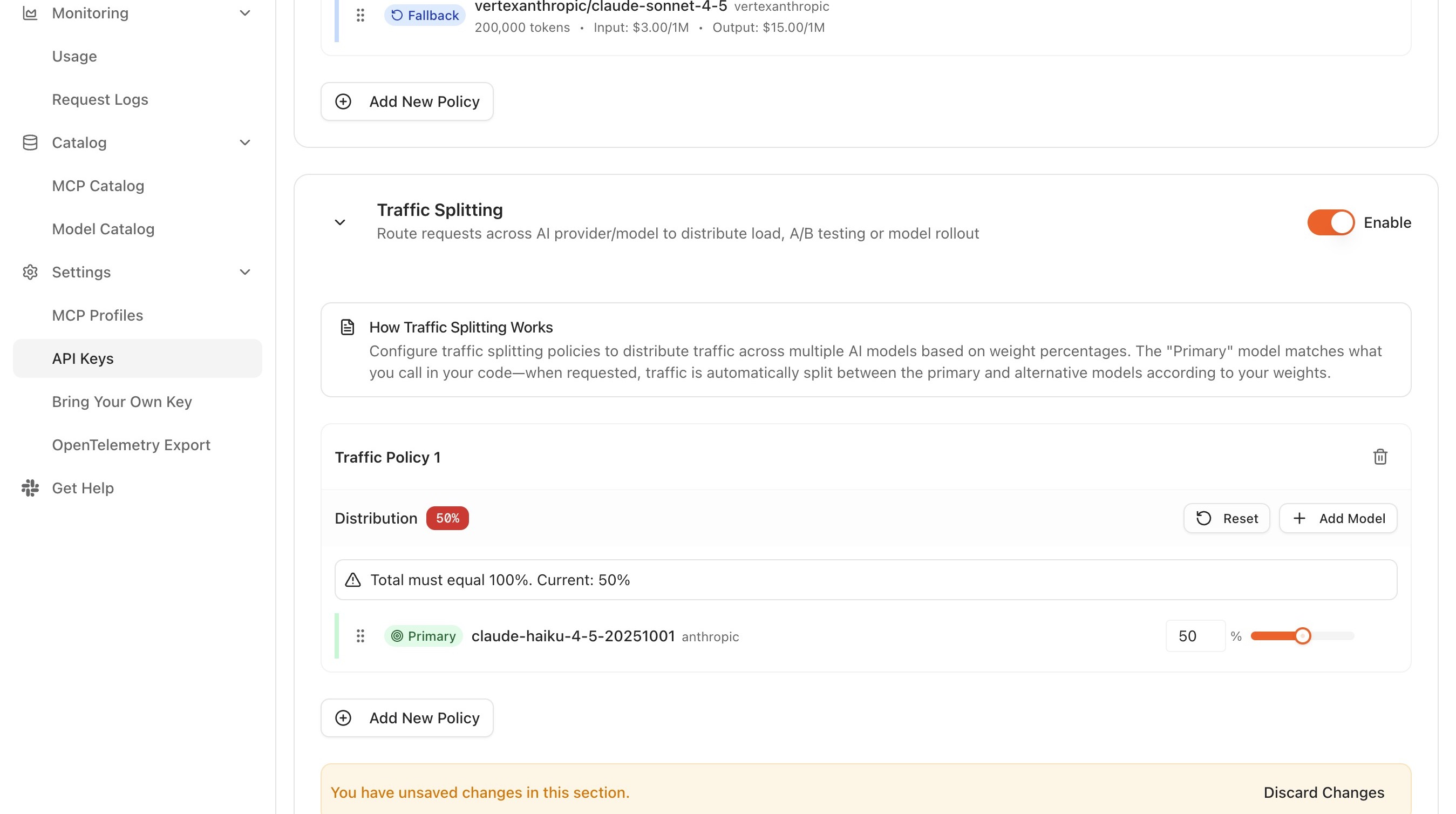
Traffic splitting is its own section on the key, enabled independently of the fallback sections above it. The two can be layered (see Combining splits and fallbacks below).
- From the API Keys page in the Console, click Configure on the row for the key the split should apply to. The Configuration column reads
Not configureduntil a section on that key is set up. - Scroll to the Traffic Splitting section and set its Enable toggle on.
- Under Traffic Policy 1, add the primary model and set its weight (for example,
gpt-4oat 80). The first entry takes the Primary badge, and its model name is the one the calling code requests. - Click Add Model, add the second model, and set its weight (for example,
gpt-4o-miniat 20). - Repeat to add further backends if a three-way or higher split is required.
- Confirm the weights total 100. The Distribution badge shows the running total, and a warning names any total other than 100.
- Save the configuration.
Weight adjustments reach the gateway in under a minute; no in-flight requests are affected, and the new distribution applies to every request after that. This makes incremental rollouts inexpensive to manage: a small weight change, observed for a few hours, then another small change, with no service restart anywhere.
Traffic-split field reference
The traffic-split configuration UI exposes the following controls:
- Model. Selected from the model dropdown. The first entry carries the Primary badge; as the Console puts it, the primary model "matches what you call in your code", and traffic is split from there between the primary and the alternative models according to the weights.
- Model scope. The picker offers the models assigned to the project the API key belongs to, whatever project the project switcher is on. A model assigned to a different project is not listed, and a split naming one is rejected on save with an error identifying the model. A model missing from the list is a question of the project grant, covered in Add providers and models to projects.
- Weight. A percentage per model, set with a slider or entered directly in a field carrying a
%suffix. The weights across a split have to total 100, and the Distribution badge shows the running sum until they do. - Add Model. Appends another backend to the split. After selection, a weight must be assigned to the new model.
- Reset. Returns the policy's weights to their last saved values.
- Remove. A control next to each model removes it from the split. Remaining weights are then adjusted as needed before saving.
Unsaved edits are tracked per section: the Console reports You have unsaved changes in this section with a Discard Changes control, so a split can be abandoned without disturbing the fallback sections on the same key.
Step 3: generate test traffic and observe the distribution
A configured split is most useful when its real distribution has been confirmed against expectations. The distribution is probabilistic, so individual requests do not follow the weights exactly; the law of large numbers takes over only across a reasonable sample.
A simple loop is sufficient for verification. PROXY_URL stands for the proxy endpoint from the Console Dashboard, scheme included and ending in /v1:
for i in {1..50}; do
  curl -s PROXY_URL/chat/completions \
    -H "Authorization: Bearer YOUR_API_KEY" \
    -H "Content-Type: application/json" \
    -d '{
      "model": "gpt-4o",
      "messages": [{"role": "user", "content": "Reply with a single word."}]
    }' > /dev/null
done
Then, in the Console:
- Open Monitoring → Request Logs.
- Filter by the API key the split is attached to.
- Filter by the time window covering the loop above.
- Group or sort by Resolved model, and confirm the proportions are in the neighborhood of the configured weights. A 50-request sample is too small to read closely: for an 80/20 split at that size, about four samples in ten fall outside 75/25 to 85/15 with nothing wrong, so a narrow band produces false alarms rather than findings. A band of 70/30 to 90/10, which is 35 to 45 of the 50 requests on the majority backend, covers about 19 healthy samples in 20. Confirming a split to within a few points of its target takes several hundred requests, which makes a deviation that persists across a longer window better evidence than any single sample.
For longer-term observation, Usage analytics is the better surface, because it aggregates across larger windows and presents the distribution as cost and token counts in addition to request counts.
Step 4: adjust and re-verify
The point of the split is to be tunable. After observing the initial distribution and any quality signals from downstream evaluation, the weights are adjusted:
- Open the existing traffic-split configuration on the API key's detail page.
- Edit the weight values.
- Save.
- Confirm in Request Logs that the new distribution takes hold from the moment of save.
The same flow handles adding a third backend, removing a backend that has fallen out of favor, or rebalancing once a migration has progressed.
The split can also be disabled without being deleted. Setting the Enable toggle off causes subsequent requests to bypass the split entirely, which is a quick way to confirm that the split, rather than some other configuration, is responsible for the observed distribution. Toggling it back on restores the configured weights immediately.
For migrations and canary rollouts, log the current weights in a tracking document along with the date and the rationale for each change. Distributions tend to drift over time as engineers iterate, and a short audit trail removes a lot of guesswork later about why a particular split looks the way it does.
Combining splits and fallbacks
A traffic split decides which backend handles a given request under normal conditions. A fallback chain decides what happens when the chosen backend fails. The two are configured in separate sections of the same key and are enabled independently, so they compose: the split distributes traffic at the primary position, and the fallback chain sits behind it.
A common shape:
| Section | Backend | Weight | Role |
|---|---|---|---|
| Traffic Splitting | gpt-4o | 80 | Normal-traffic share |
| Traffic Splitting | gpt-4o-mini | 20 | Cheaper share |
| Manual Availability Fallback | claude-sonnet-4-20250514 | n/a | Fallback behind both split backends |
Under normal conditions, the split distributes traffic across its two backends at the configured ratio, and the weights total 100 within the split alone. If the backend chosen for a given request fails, the gateway walks to the fallback chain and serves the request from the secondary. Fallback rows carry no weight, so the fallback backend is not counted toward the split's total. This composition gives the cost or evaluation benefits of the split and the resilience benefits of a fallback chain without forcing a choice between them.
For the deeper fallback semantics, see Improve resilience with fallbacks.
Scenarios
Cost reduction is the most common reason to split traffic, but not the only one. The four cases below account for most of the splits that get configured, and each states the problem, the setup it needs, the resulting behavior, and what to watch for.
Two models need comparing on the application's own traffic
The scenario. A developer wants to see how a second model behaves on this application's requests rather than on a published benchmark. Both models are enabled, and the open question is which one answers this traffic better.
The setup. A balanced two-backend split, so that each backend accumulates a usable sample inside a reasonable window:
| Position | Example backend | Weight | Share of traffic |
|---|---|---|---|
| 0 | gpt-4o | 50 | ~50% |
| 0 | claude-sonnet-4-20250514 | 50 | ~50% |
The calling application is not changed at all; it keeps sending the same requests to the same endpoint. A traffic split is attached to one API key, so an evaluation that should stay off the production path goes on a separate key rather than on the key that production traffic already presents.
What happens. Each backend serves roughly half the requests, and every request is recorded with the backend that produced the answer. Request Logs filtered by the key, with the resolved model read off each row, gives the two populations to compare, and Usage analytics shows how many requests each model carried across a longer window.
What to watch for.
Nothing here judges which model is better. The split produces two comparable populations of real requests; reading the outputs and deciding between them is a human job, or a job for whatever evaluation the application team already runs.
The split selects requests by chance, not by who sent them. Consecutive requests from one user can land on different backends, so a split cannot hold a named group of users on one model for the length of an evaluation. Following a group instead of a percentage is attribute-based routing, which arrives in v0.7.0.
A new model version should not take all the traffic at once
The scenario. The application owner has a newer version of the model the application already runs on, and no appetite for moving every request onto it on a provider's release schedule. The new version should carry a small share of real traffic first.
The setup. A split on the key the application already uses, with both entries carrying the same logical model name and the current version holding almost all of the weight:
| Position | Logical name | Resolved model | Weight | Share of traffic |
|---|---|---|---|---|
| 0 | chat-model | gpt-4o-2024-08-06 | 95 | ~95% |
| 0 | chat-model | gpt-4o-2024-11-20 | 5 | ~5% |
The logical name is the value the application sends in the model field, so the calling code stays fixed while the versions behind the name change, including at cutover. Defining that name is covered in Apply advanced routing rules. The weight on the candidate is then raised in the stages described in Step 1, each stage held long enough for error rates and latency to settle.
What happens. The candidate version serves about one request in twenty from the first stage onwards, on the application's own production traffic. The application itself is untouched throughout: every stage of the rollout is a weight edit on the key, in effect from the moment it is saved.
What to watch for.
Rolling back is a weight edit, not a redeploy. Lowering the candidate's weight, or dropping it with the Remove control, applies to every subsequent request. Setting the Enable toggle off is the blunter version of the same move, since it takes the whole split out of the path.
A 5% stage is 5% of requests, not 5% of users. The split is applied per request, so one user's session can cross both versions. Where a named group has to sit on the candidate version for the duration of the rollout, a split is the wrong mechanism, and running a new model on an enrolled cohort is the pattern that expresses it.
The frontier model is answering requests that do not need it
The scenario. Spend on one application is dominated by a frontier model, and the team's own reading of its traffic is that a good share of it is routine enough for a cheaper model to handle.
The setup. The conservative cost split from Step 1, 80 on the frontier backend and 20 on the cheaper one, left in place long enough to produce a comparison rather than retuned daily.
What happens. About one request in five is served by the cheaper backend. Usage analytics shows how many requests each model carried over the window, and Request Logs filtered by the key carries the cost, the token counts, and the request body of each individual call, so the saving is read off actual traffic instead of estimated from list prices, and what the cheaper backend was asked to do is read off the same rows.
What to watch for.
The saving is proportional to the share moved, and to nothing else. A split has no view of what any individual request is, so widening it moves demanding and routine requests alike. The weight is the only lever, and the ceiling on the saving is how far that weight can be widened before output quality is affected.
A split cannot send only the routine requests to the cheaper backend. Choosing a backend from what a request is, rather than by chance, is attribute-based routing, which arrives in v0.7.0. Traffic that is known in advance to be routine is separated today by giving it its own key, as in the scenario below.
A split lowers what traffic costs; it does not bound what can be spent. Limits on how fast a credential may consume are operator controls, covered in Stop runaway workloads before they burn the budget. Tracking a team's monthly spend against an agreed ceiling, and alerting on it, is a budget, covered in Set a budget and track spend against it.
Only one kind of traffic should move to the cheaper backend
The scenario. One application makes two kinds of call: interactive requests with a customer waiting, and background work with nobody waiting. Only the background work should move to a cheaper backend.
The setup. Not a weight change. A traffic split is attached to one API key and applies to every request presented with that key, so the two kinds of call are separated by issuing the background work a key of its own and configuring the split on that key alone. The key that interactive traffic presents keeps the configuration it has today.
What happens. Background work is split, interactive traffic is not, and the two are already separated in Request Logs and Usage analytics, since both filter by API key.
What to watch for. The separation is only as good as the application's use of the two keys. Nothing inspects a request to decide which key it should have been sent with, so background work sent with the interactive key is interactive traffic as far as the split is concerned. Selecting a backend from what the calling application declares a request to be, on a single key, is attribute-based routing, which arrives in v0.7.0.
Where to go next
The split configured above remains attached to the key for subsequent guides.
Apply advanced routing rules
Run the split over a stable logical model name, so the application's model value stays fixed.
Use your own provider credentials
Bring BYOK credentials into one or more positions in the split.
Monitor traffic and usage
Extend the verification step into ongoing dashboards, including cost per thousand requests.
Export telemetry to an observability stack
Push the distribution and the per-backend cost into the organization's existing dashboards.