Agent Router Enterprise Self-Hosted Data Plane
Already running the open source Agent Router in Kubernetes? Read Moving from the open source project first. The Enterprise data plane needs a cluster of its own, beside the one the current gateway runs in.
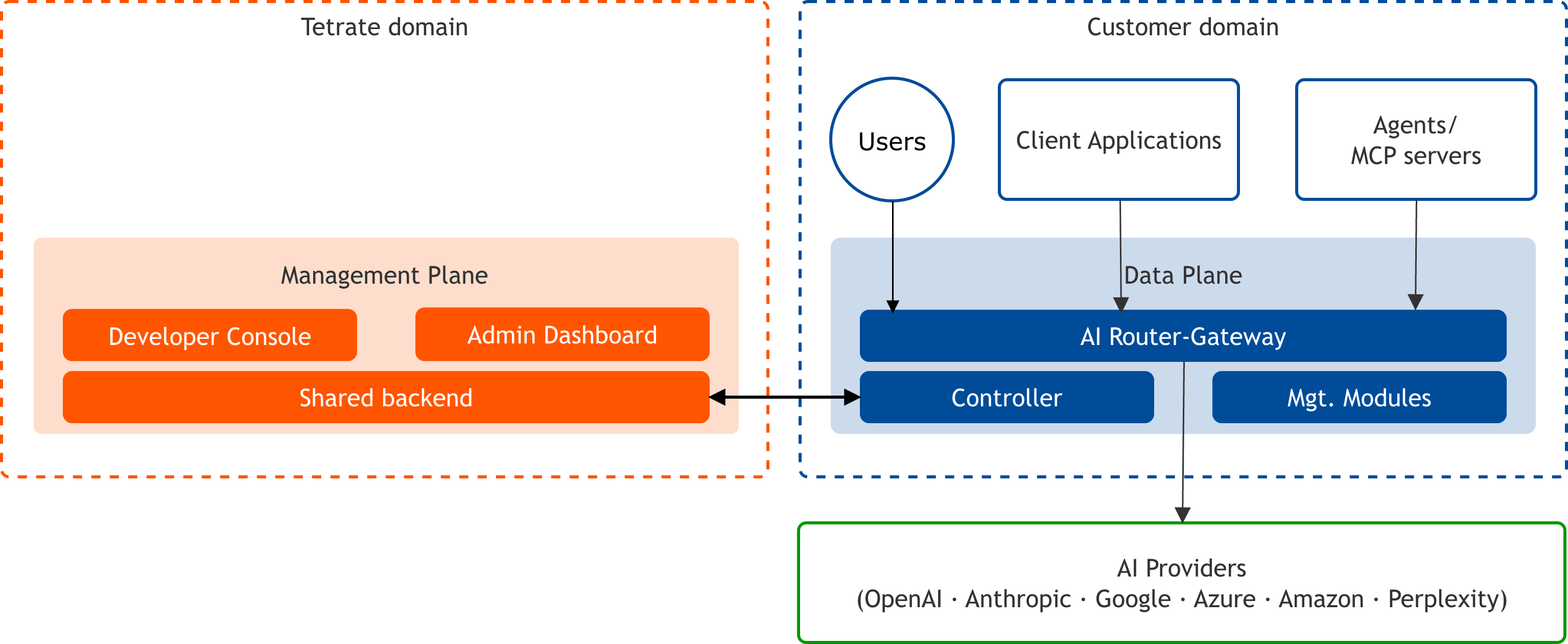
Agent Router Enterprise · Self-Hosted Data PlaneInstall the data plane in a self-managed Kubernetes cluster; Tetrate hosts the management plane.
In Agent Router Enterprise Self-Hosted Data Plane, you run the data plane in your cluster while Tetrate continues to host the management plane; that is what keeps traffic inside your boundary. Prompt and response data never leaves your environment; the management plane only ever holds configuration.
Key benefits
01
Prompts and responses never transit Tetrate systems
Every request travels through the data plane in your cluster and nowhere else.
02
No inbound firewall rules. None.
The data plane opens a single outbound HTTPS connection to poll for configuration.
03
You choose the geography, and residency is enforced twice
The data plane runs in any cloud region or your own data centre, satisfying residency at the infrastructure level. Routing policies add a second layer — US or EU confinement per policy — so one deployment can carry different guarantees for different traffic.
04
Model traffic can stay off the public internet entirely
Providers can be reached over Azure Private Link, AWS PrivateLink, or GCP Private Service Connect by pointing the endpoint at the private address.
05
Your uptime stops depending on your vendor's
Provider failures are absorbed one request at a time down the fallback chain, inside the same request lifecycle — no cluster-wide cutover, no operator paged.
06
Nothing about this reaches the application code
The gateway is OpenAI-compatible: change the base URL, keep your SDK.
Installation path
Step 2
Management plane onboarding
Organization details, SSO, providers, models, and the data plane credential.
Management plane onboarding →Step 3
Data plane installation
The Controller and the AI Gateway using the credential from onboarding. Three paths: the tetrate CLI on a managed cloud, plain Helm with no CLI, or GitOps from rendered manifests (Flux, Argo CD).
Data plane guides →Step 4
Gateway installation
Inbound access and request routing for the data plane.
Gateway installation →Step 5
Console quickstart
API key and a first routed request once the gateway is reachable.
Console quickstart →After installation