Claude Desktop
Claude Desktop sends model inference through a Tetrate Agent Router gateway in third-party inference mode, which covers both the Cowork and Code surfaces in the app. tare integrate claude-cowork writes that configuration from the logged-in session, and the same values can be entered by hand in Claude Desktop's Developer menu.
Persona: Developer running Claude Desktop against an Agent Router gateway.
Estimated time: 10 minutes.
Outcomes
By the end of this guide:
- Claude Desktop is configured for third-party inference through the Agent Router gateway.
- Either
tare integrate claude-coworkhas written theconfigLibraryentry and made it active, or the same values were entered in the Developer dialog by hand. - Claude Desktop traffic appears in Request Logs in the Developer Console, tagged with
X-Title: Claude-CoworkandX-Provider: Tetrate AgentRouter.
Prerequisites
-
A fully set up management plane and data plane.
-
Claude Desktop installed from claude.ai/download. Neither an Anthropic subscription nor a Claude.ai account is required, because the gateway supplies inference.
-
Claude Desktop launched at least once on the machine, so that the
Claude-3puser-data directory exists. Without it,tare integratereports that auto-config is unavailable and only the manual path applies. -
The
tareCLI installed:curl -fsSL https://tare.tetrate.ai/tools/install.sh | bashConfirm the installed version:
tare --versiontare version v0.3.0Where a newer release exists, the command appends an upgrade notice naming it. Re-running the
install.shscript above installs the newer version, andTARE_NO_UPDATE_CHECK=1silences the notice. -
The CLI authenticated against the management plane:
tare api login --base-url https://api.<tenant>.tetrate.ai--base-urlis the management plane API host, not the gateway Base URL shown in the Console. How to derive<tenant>is covered under Configure coding tools with the tare CLI.
Inference is authenticated with the Agent Router inference key as Authorization: Bearer, and it is billed through Agent Router.
Signing in with a Claude.ai account (Google or email) bypasses Agent Router entirely: Claude Desktop still runs, but traffic does not appear in Request Logs, cost is not attributed through Agent Router, and inference is billed to the Anthropic subscription instead.
Passthrough mode, which keeps a Claude Max or Pro subscription as the billing path while the gateway routes and observes traffic, is supported for Claude Code through tare integrate claude-code --passthrough. Passing --passthrough to tare integrate claude-cowork raises no error, but it has no effect: the command still writes gateway mode, so the traffic is billed through Agent Router.
Configure integration with the tare CLI (recommended)
After a successful tare api login (see Prerequisites), the CLI writes the third-party provider configuration for Claude Desktop.
Step 1: identify the data plane
List the data planes the account can route through:
tare integrate dataplanes
Example output:
DATAPLANE   NAME              GATEWAY URL
acme-prod   Acme Production   https://acme-prod.gateway.example.com
acme-dev    Acme Dev          https://acme-dev.gateway.example.com
--dataplane takes the id from the DATAPLANE column (for example acme-prod), not the display name in NAME. Where the flag is omitted, the data plane on the logged-in profile is used.
Step 2: preview the change
--dry-run prints the planned changes with the API key masked, and writes nothing:
tare integrate claude-cowork --dataplane acme-prod --dry-run
Detected Claude Cowork: /Users/you/Library/Application Support/Claude-3p exists
? Select model:
    claude-fable-5
    claude-fable-5-1
    claude-haiku-4-5
    claude-opus-4-5
↓   claude-opus-4-6

Claude Cowork (/Users/you/Library/Application Support/Claude-3p/configLibrary/6167656e-7472-4000-8000-6f7574657200.json):
register Cowork third-party-inference entry "Tetrate AgentRouter" (id 6167656e-7472-4000-8000-6f7574657200) via the official configLibrary:
    inferenceProvider          = gateway
    inferenceCredentialKind    = static
    inferenceGatewayBaseUrl    = https://acme-prod.gateway.example.com
    inferenceGatewayApiKey     = sk-eyJhb...
    inferenceGatewayAuthScheme = bearer
    inferenceCustomHeaders     = {X-Title: Claude-Cowork, X-Provider: Tetrate AgentRouter}
    inferenceModels            = [claude-fable-5]
  _meta.json
    appliedId = 6167656e-7472-4000-8000-6f7574657200 (this entry becomes active; switch later in the Configure dialog)

--dry-run: no changes written.
The model prompt is interactive: arrow keys scroll the catalog and / toggles search. The offered list is what the key is entitled to call, so it is narrower than the full catalog where the key's project grants a subset. Passing --model skips the prompt, and --yes skips every confirmation, including the prompt to mint a key.
Step 3: apply the change
tare integrate claude-cowork --dataplane acme-prod
On apply, the CLI:
- Writes the entry shown in the dry run, registering a third-party inference provider named
Tetrate AgentRouterin the Claude DesktopconfigLibrary. - Reuses the logged-in session's data plane, model catalog, and inference key, minting a key only where none is cached for that profile and data plane. Override any of them with
--gateway-url,--api-key, or--model. - Restricts
inferenceModelsto the selected model, so further models are added later from the Configure third-party inference dialog. - Points
appliedIdinconfigLibrary/_meta.jsonat that entry, so it becomes active on relaunch. - Validates the key against the gateway and reports the result.
Configuration is written under the Claude Desktop user-data directory:
| Platform | Path |
|---|---|
| macOS | ~/Library/Application Support/Claude-3p/configLibrary/ |
| Linux | ${XDG_CONFIG_HOME:-~/.config}/Claude-3p/configLibrary/ |
| Windows | %LOCALAPPDATA%\Claude-3p\configLibrary\ |
The entry file is 6167656e-7472-4000-8000-6f7574657200.json, and _meta.json indexes it alongside any other saved configurations.
Claude Desktop reads configLibrary only at launch. Where the app is running when apply happens, the CLI warns Claude Desktop appears to be running. Quit it (Cmd-Q / File > Quit) before applying. Quit the app fully, then apply.
Step 4: relaunch and continue through the gateway
After apply, quit Claude Desktop completely and reopen it. It opens on Welcome to Claude, confirming that Claude is set up to run through a custom inference gateway using the configuration saved on the device. Select Continue to start through the gateway. The Or sign in with Claude.ai link below it returns to the standard Anthropic sign-in and bypasses the gateway.
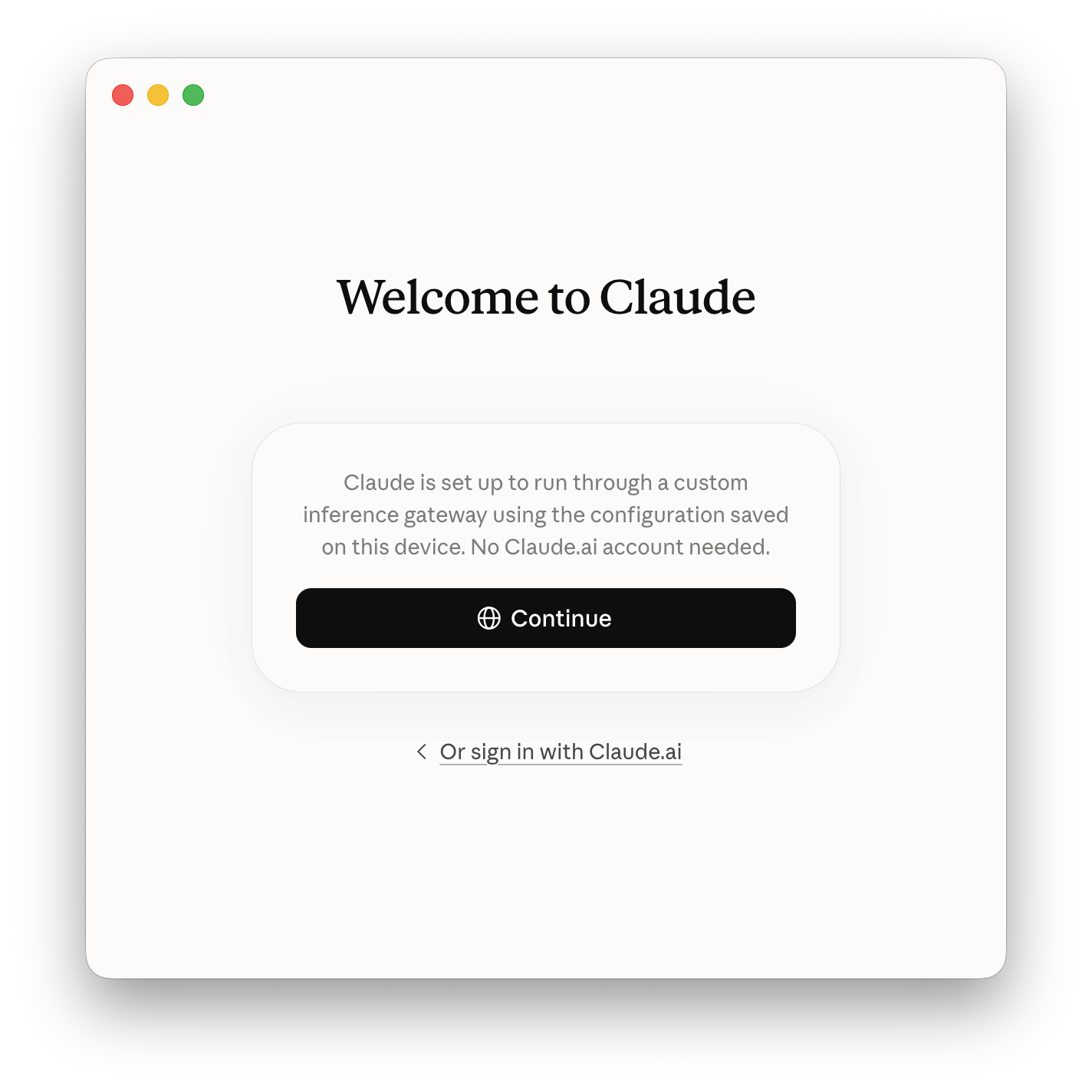
Where more than one configuration is saved, the active entry is switched in Developer, then Configure Third-Party Inference..., not from either sign-in screen.
Configure integration by hand in Claude Desktop
Third-party inference is also configured in Claude Desktop directly, either because the in-app path is preferred or because tare integrate cannot write files, for example when the Claude-3p directory does not yet exist.
Step 1: enable Developer Mode
Developer Mode is available from the sign-in screen, without signing in to an Anthropic account first:
- On macOS, use the menu bar.
- On Windows, open the application menu at the top left of the sign-in screen.
In both cases, go to Help, then Troubleshooting, then Enable Developer Mode.... A confirmation dialog follows, after which Claude Desktop restarts.
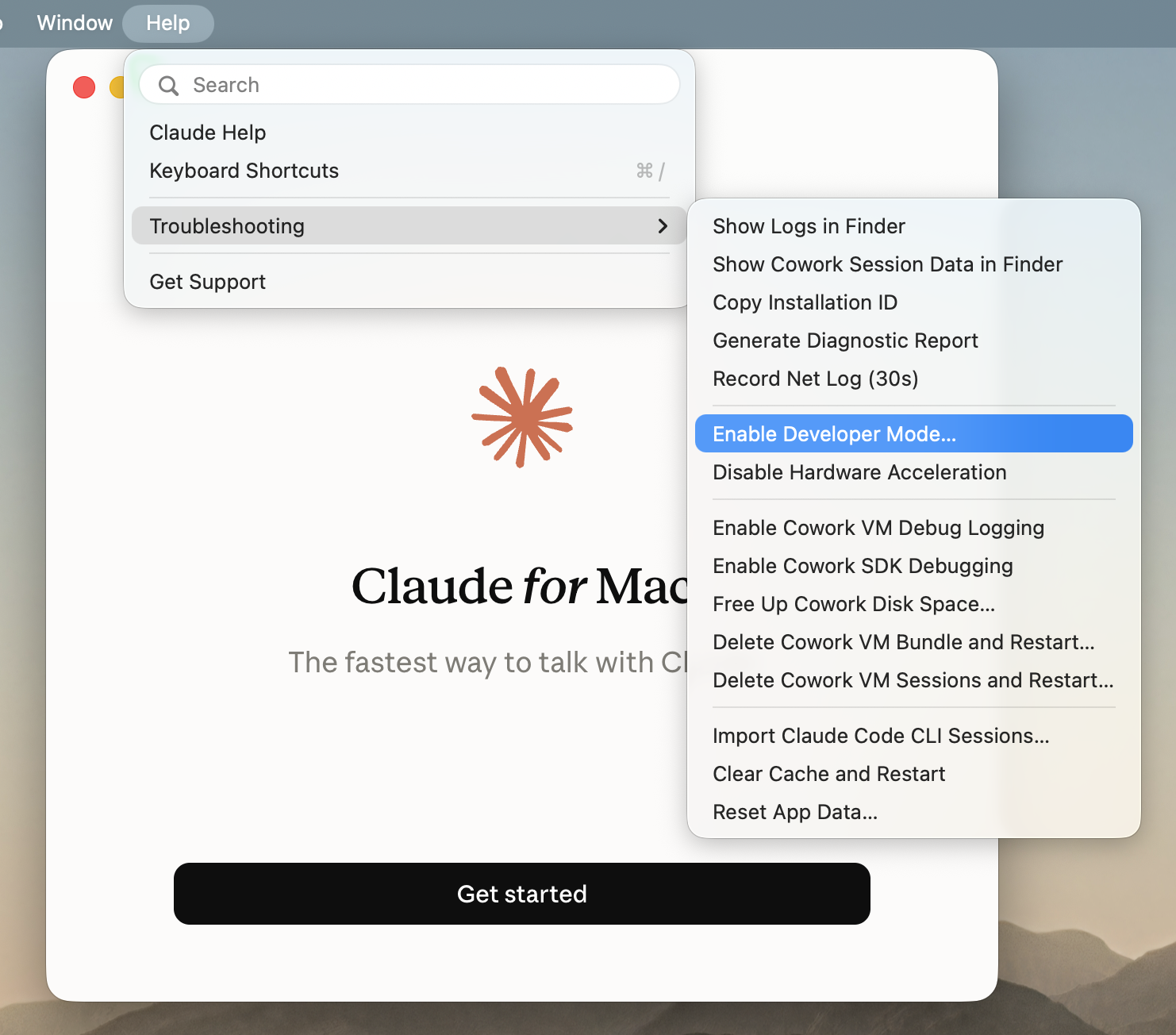
Step 2: open third-party inference settings
After the restart, go to Developer, then select Configure Third-Party Inference....
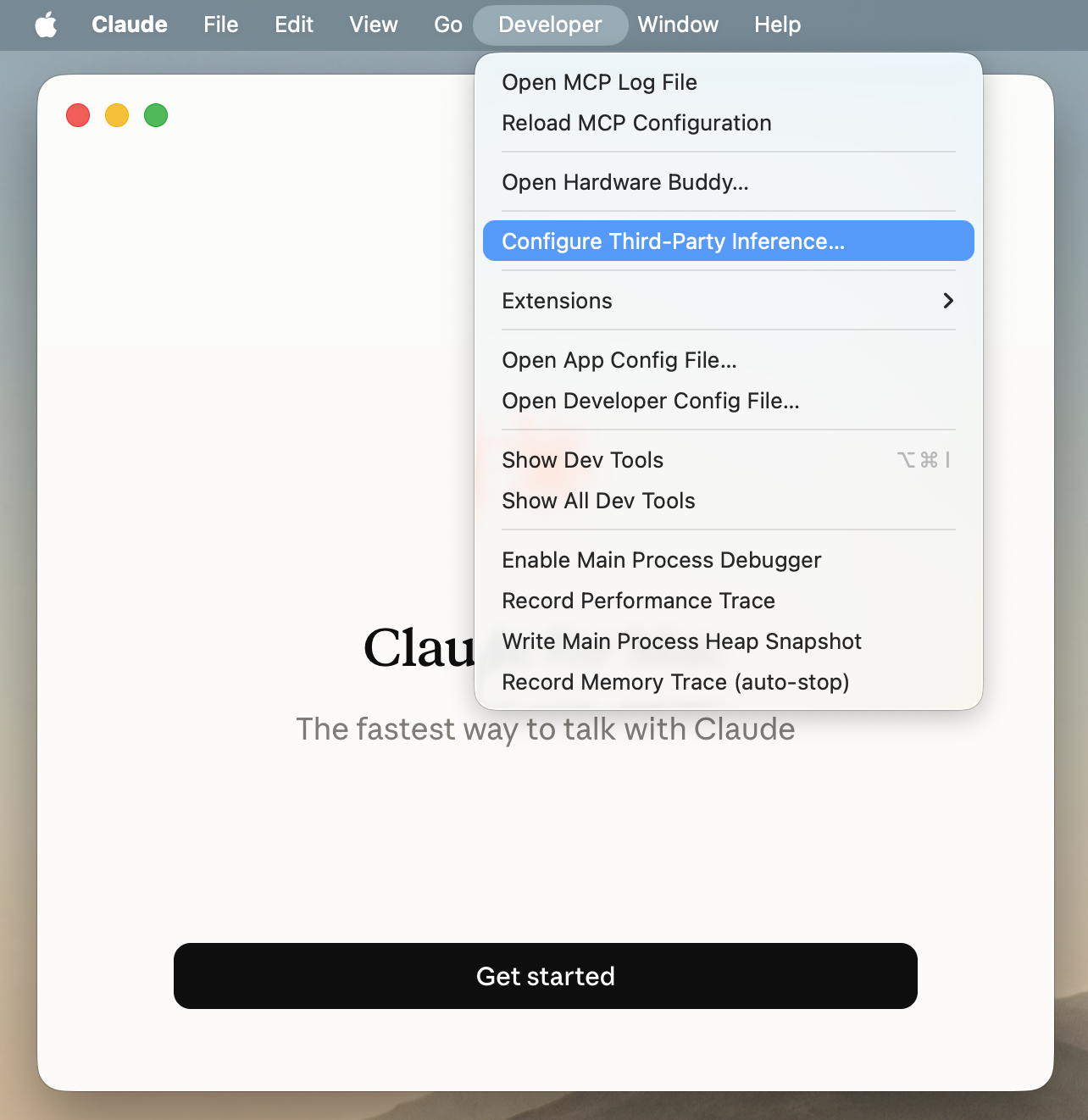
Step 3: enter the gateway settings
On the Connection tab, enter or select the following values:
| Field | Value |
|---|---|
| Connection | Gateway (the default selection) |
| Credential kind | Static API key |
| Gateway base URL | The GATEWAY URL for the data plane, from tare integrate dataplanes (scheme and host only, no /v1 suffix) |
| Gateway API key | An inference key for that data plane, either the one minted by tare integrate claude-cowork or a new key created in the Console |
| Gateway auth scheme | bearer |
| Artifact preview iframe origin | Leave blank, so that previews default to the commercial host |
| Custom inference headers | Select + Add twice and enter X-Title: Claude-Cowork and X-Provider: Tetrate AgentRouter |
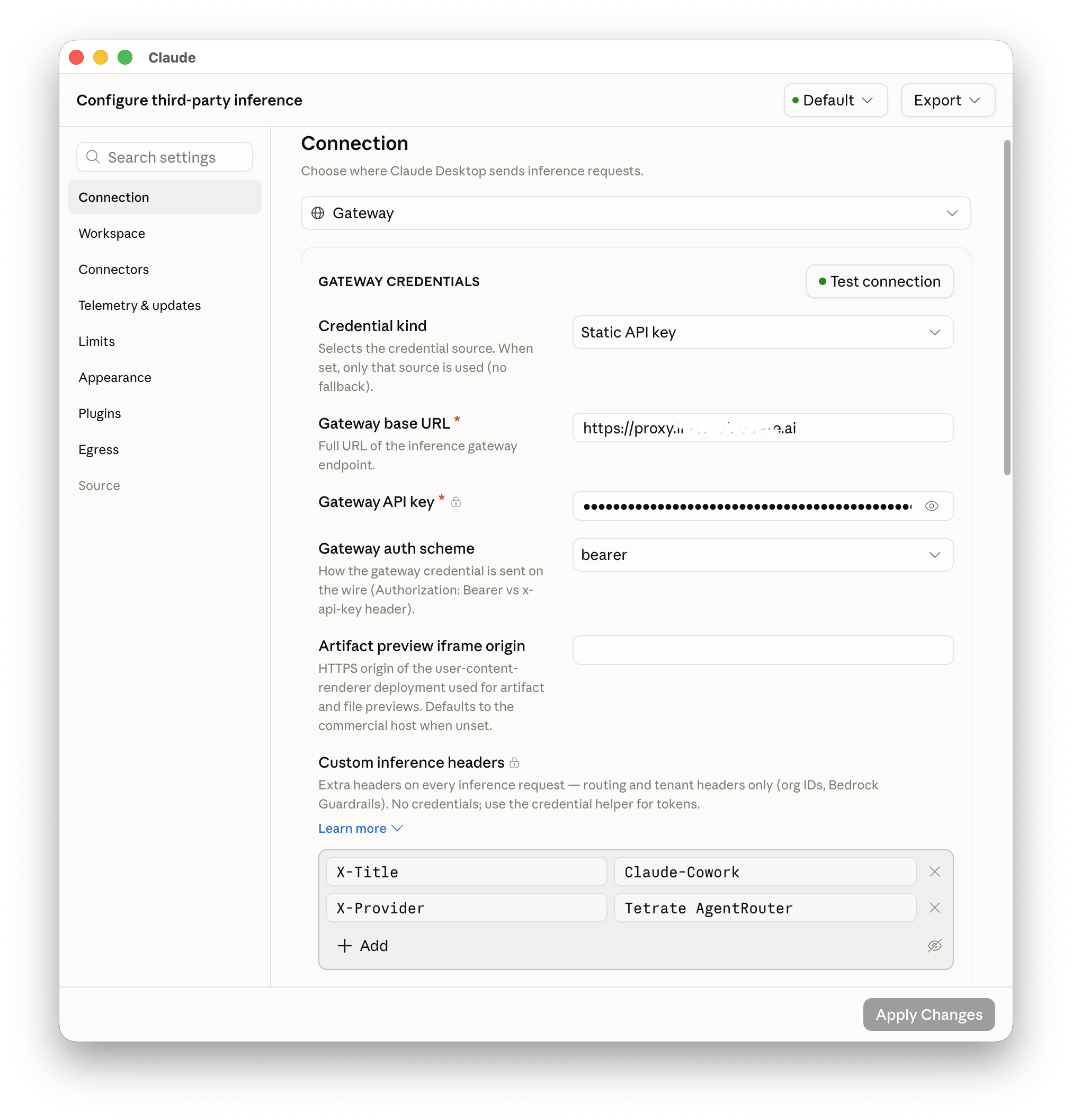
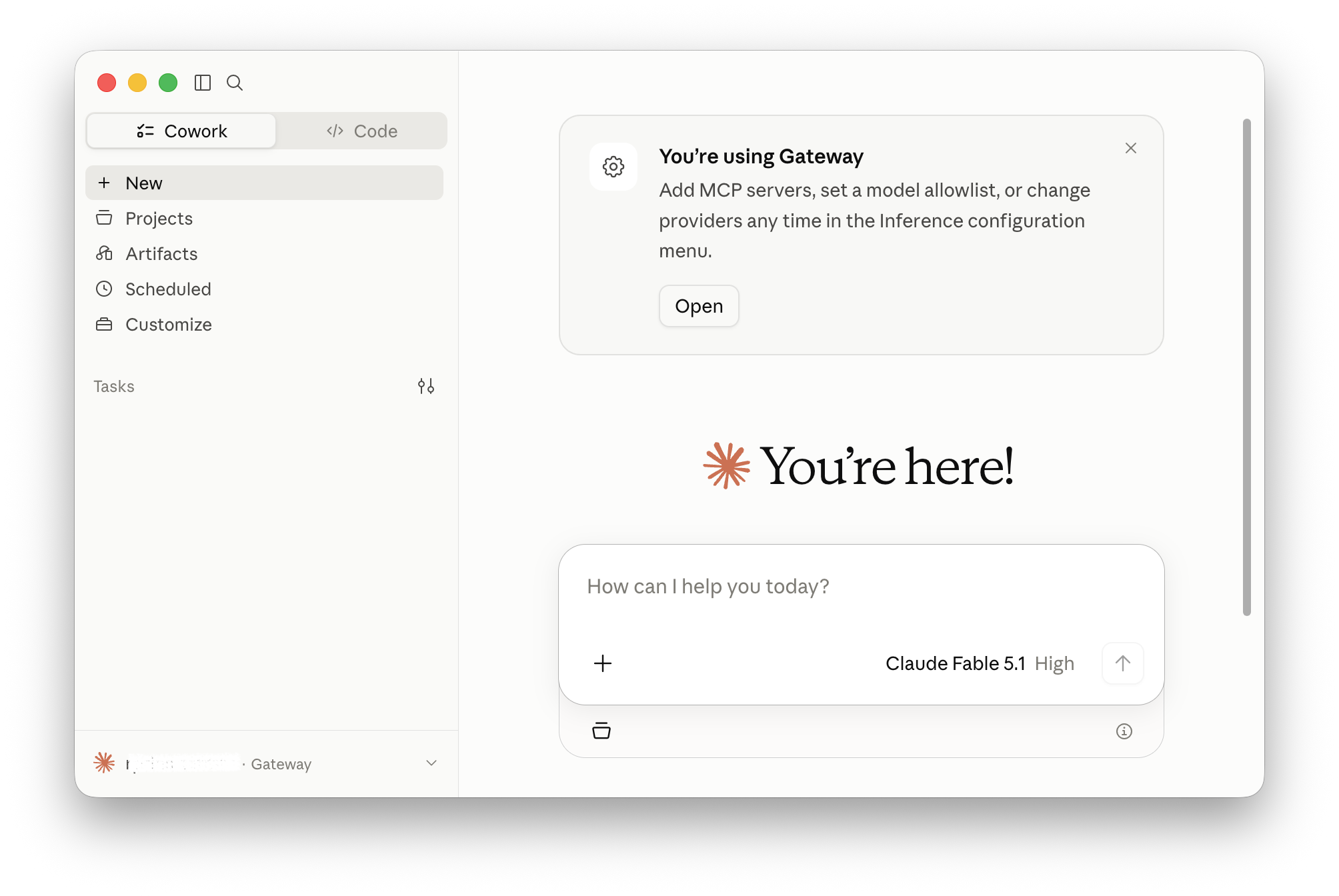
Select Test connection to validate the base URL and key. Once it reports success, select Apply Changes, then Save & Restart in the confirmation dialog. Claude Desktop restarts and shows a You're using Gateway card, and the account row at the bottom of the sidebar is labeled Gateway.
Select a model
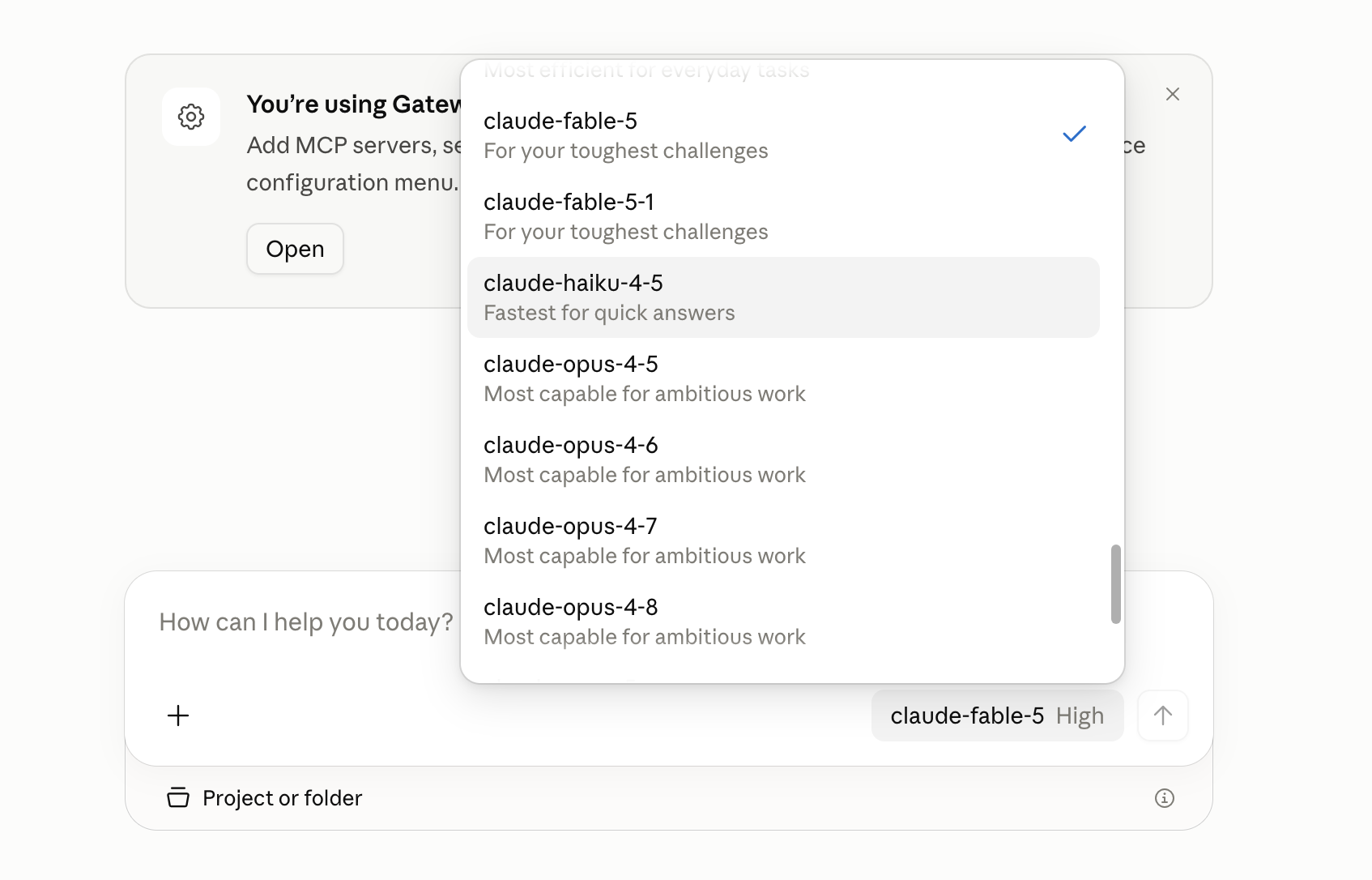
The composer on the Cowork and Code tabs shows the active model and its effort level. Selecting the model name lists the models the key can call, with the active one checked.
Models are listed by gateway model id, such as claude-fable-5, rather than by marketing name, because the list is the gateway's catalog filtered to the key's entitlements. A model enabled organization-wide also has to be granted to the key's project before it appears here.
Verify
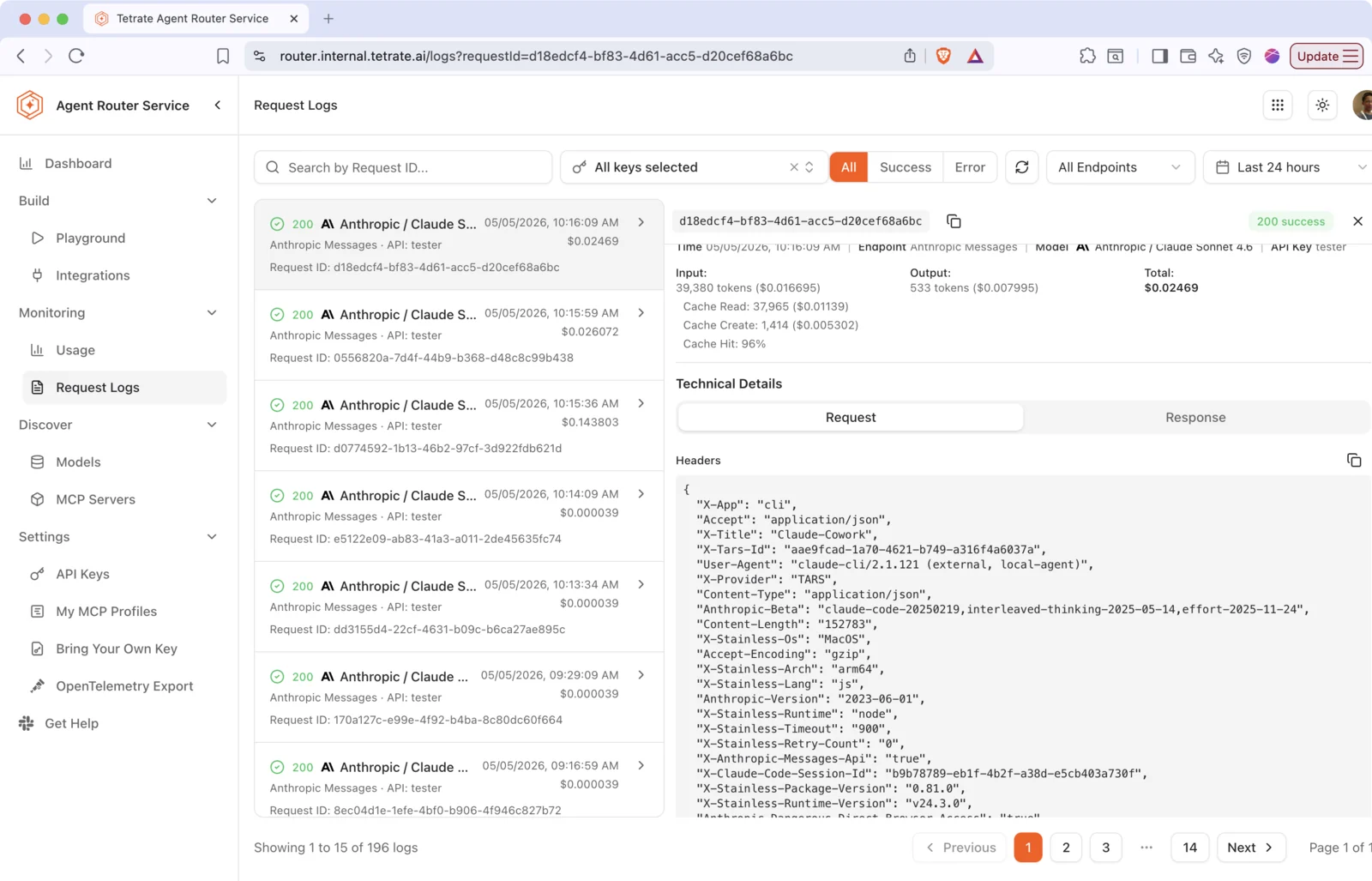
Send a prompt on the Cowork or Code tab, then open the Console, go to Monitoring, and select Request Logs. The request appears as Anthropic Messages traffic against the selected model and the key used for the integration.
Expanding the entry and opening Technical Details, then Request, shows the headers the integration adds:
{
  "X-Title": "Claude-Cowork",
  "X-Provider": "Tetrate AgentRouter"
}
Those two headers distinguish Claude Desktop traffic from other tools sharing the same key.
Troubleshooting
| Symptom | Likely cause | Fix |
|---|---|---|
Auto-config unavailable: Claude-3p user-data dir does not exist | Claude Desktop never launched on this machine | Launch Claude Desktop once, then re-run tare integrate claude-cowork |
Claude Desktop appears to be running warning on apply | The app holds the configuration it read at launch | Quit fully (Cmd-Q, or File then Quit), then re-run the command |
| Welcome to Claude screen missing after apply | Claude Desktop was not fully quit before relaunch, so the new configLibrary entry was never read | Quit completely, reopen, then select Continue |
| Claude Desktop works but no traffic in Request Logs | Signed in with a Claude.ai account instead of continuing through the gateway | Sign out, reopen, then select Continue on Welcome to Claude |
| Gateway settings present but not in effect | A different configLibrary entry is active | Check appliedId in configLibrary/_meta.json, or switch entries with the configuration selector in Configure Third-Party Inference... |
| Fewer models listed than the administrator enabled | Discovery returns only what the key can call, and inferenceModels narrows it further | Grant the model to the key's project, then widen the model allowlist in the Configure dialog |
| Validation warning after apply | Wrong data plane, revoked key, or unreachable gateway | Re-run with --dry-run, confirm the --dataplane id against GATEWAY URL, then re-run with --yes to mint and write a fresh key |
| Manual steps not printed | The confirmation prompt was declined | Re-run with --yes to print paste-ready values, including the API key |
Where to go next