Set rate limits on projects and keys
A rate limit caps how fast a caller may send, never how much it may spend. Eight scenarios show which subject a limit goes on, how two limits covering the same key resolve, and where the control runs out.
Requests per minute, requests per hour, and tokens per minute are enforced by data planes on 0.8.0 or later. A limit that sets one of them is refused with FailedPrecondition while any data plane serving the project runs an older build or reports none, and the message names that data plane. A project no data plane serves yet is not checked. Tokens per hour works on earlier data planes as well.
Persona: Platform operator working in the Admin Console, bounding a workload agreed with the team that owns it.
Estimated time: 10 to 15 minutes to read; 5 minutes per limit to create.
About the scenarios
1. Every scenario has the same four parts
The parts always appear in this order, so a scenario can be scanned rather than read:
- Goal states the outcome wanted, in the terms the people involved would use.
- Set it up lists the limits to create, and nothing else.
- What happens traces the result, usually as a table.
- Watch out for covers the part that surprises people. That is nearly always the point where a second limit interacts with the first.
2. DynaBank runs through every scenario
Rate limits get hard to reason about when a second one covers a key the first already covers. Seeing that requires the same people, keys, and workloads to recur, so the fictional company from Enforce budget caps with policies runs through all eight scenarios here as well.
DynaBank is a fictional retail bank, and its card division issues credit and debit cards and handles what follows. Two parts of that work use models.
| The work | What it does | Models it uses |
|---|---|---|
| customer chat | answers cardholders and handles disputes | opus, haiku |
| fraud screening | scores transactions for fraud | opus only |
Each piece of work has a project of its own, and three API keys are spread across them.
| Project | API key | Used for | Owner | Notes |
|---|---|---|---|---|
customer-chat | K1 | customer chat | Anna | |
customer-chat | K2 | customer chat | Ben | a test key, used while developing |
fraud-screening | K3 | fraud screening | Anna | an agent, running on its own |
Anna and Ben are both on the team card-ops, which is the subject their budgets are set on. A rate limit cannot be set on a team or on a person. Those are subjects a budget offers and a rate limit does not, which is why the cast is arranged by project here and by team on the budget page.
How a rate limit is put together
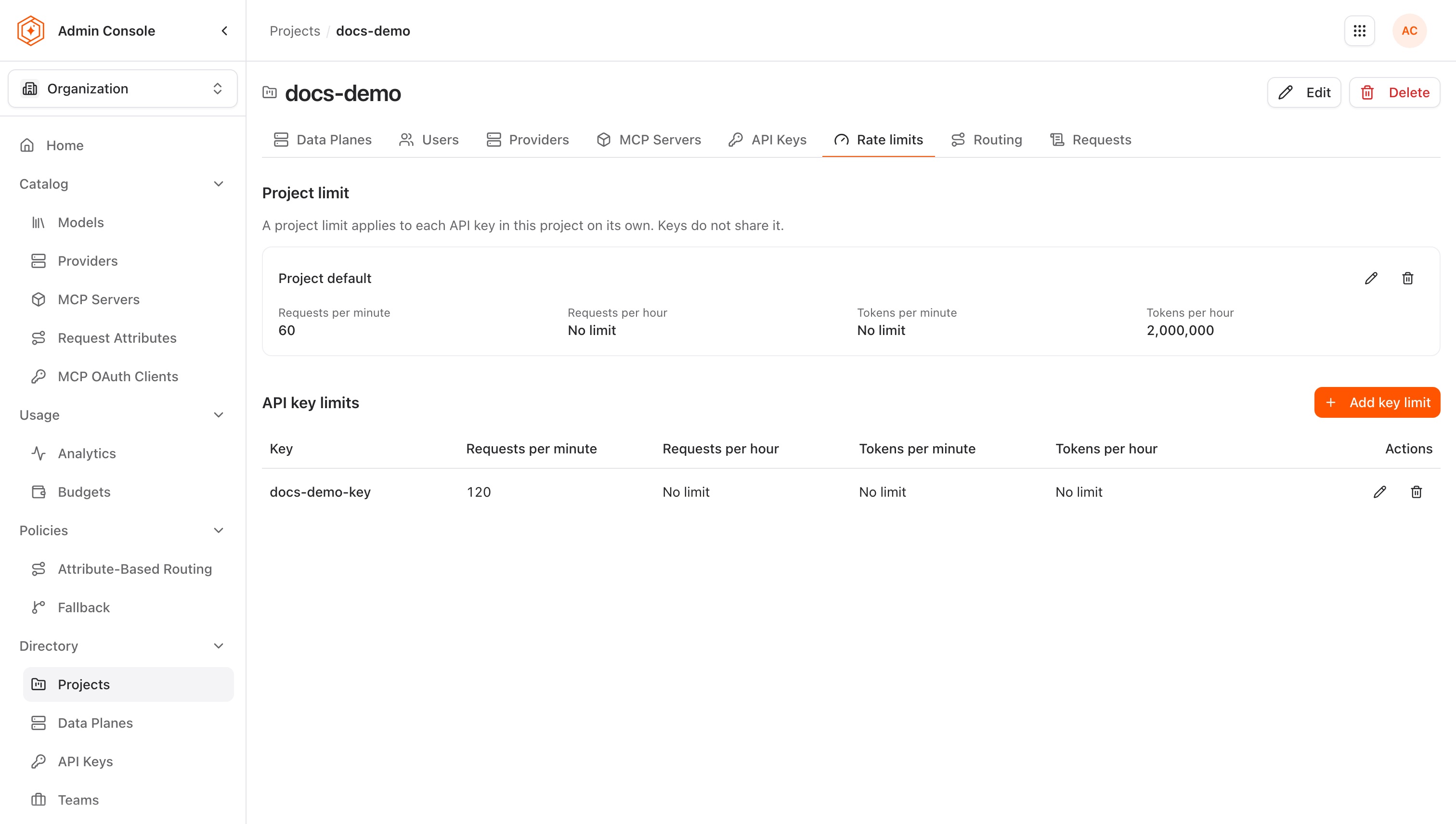
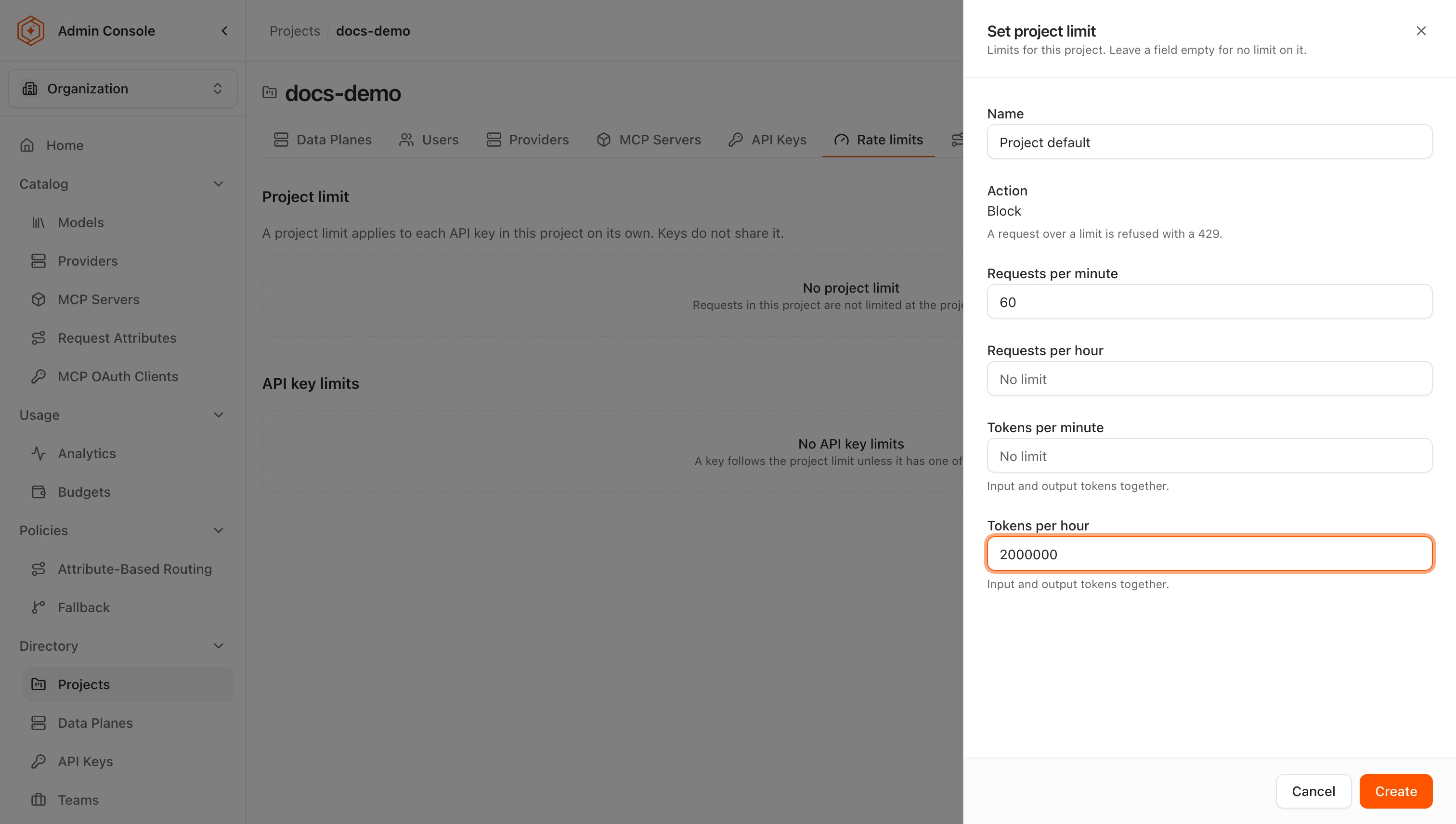
A rate limit is a number of requests or tokens for a short window, a subject that says whose traffic the number covers, and a refusal once the number is reached. Limits are created in the Admin Console on a project's Rate limits tab, which sets the project's limit and the limit of any API key in the project, and lists both with Edit and Remove. A project and each key carry one set of limits at a time. An API key's details sheet has a read-only Rate limits section listing the limit that applies to the key, and on some management planes the looser limits beside it.
| Part | What it is |
|---|---|
| Limits | requests per minute, requests per hour, tokens per minute, tokens per hour. Each one is optional, any mix of them can be set at once, and each is a whole number from 1 to 1,000,000,000. Emptying a field and saving removes that one limit |
| Subject | a project, or one API key |
| Window | the count resets at the start of each minute or each hour, on the UTC clock |
| Action | block: the request is refused with 429. It is the only action offered |
| Tokens | input and output added together |
A saved change reaches the data plane in about 5 seconds, and in at most about 10. On a data plane on 0.8.0 or later it also applies to requests on connections opened before the change. Requests to the token-counting endpoint (/anthropic/v1/messages/count_tokens) neither count against a limit nor are refused by one.
Five rules decide what a given key ends up with.
A project limit is each key's limit, not the project's total. A project set to 60 requests a minute gives every key in that project 60 requests a minute of its own. Two keys can therefore send 120 a minute between them, and ten keys can send 600.
Where several limits cover one key, the smallest number is the one in force. Each of the four limits is resolved separately, and a limit set on a key can only tighten what the project already allows. It can never raise it.
A key's limit covers every model it calls. On a data plane on 0.8.0 or later, a key holding 60 requests a minute sends 60 in total, whichever models and routes those requests go to. Before 0.8.0 each model route kept a counter of its own, so the same key could send 60 a minute to each model.
Each limit is checked on its own. A key carrying 60 requests a minute and 100,000 tokens a minute is refused on whichever is reached first. The refusal carries a rate_limit_exceeded error body, shown in scenario 8, and a retry-after header. Before 0.7.0 the 429 does not say which limit fired.
Each data plane counts on its own. Rate-limit counters live on the data plane that served the request and are not shared. A project served from two data planes therefore admits up to twice its ceiling, and a client that fails over to another data plane meets a counter that has never seen it.
Match the situation to the subject
| Scenario | Use it when | Subject the limit goes on |
|---|---|---|
| 1: A ceiling on one runaway key | one agent or application is sending far more than a healthy client would | one API key |
| 2: The same ceiling for every key in a project | no single key should take more than its share, and keys come and go | a project |
| 3: A tighter ceiling on one key inside a project | one key in a project should be held below the rest | a project, and one API key |
| 4: More room for one key than its project allows | one key needs to exceed the project ceiling for a while | none: this cannot be done |
| 5: A burst held back without lowering the hourly total | the hourly volume is acceptable and its shape is not | either subject, on both windows |
| 6: A ceiling on token volume rather than call frequency | few requests, each of them large | either subject, on the token limits |
| 7: A rate limit and a budget on the same key | how fast and how much both need bounding | one API key, plus a budget |
| 8: The rate limit that refused a request | a key is returning 429 and the reason is not obvious | none: this is a diagnosis |
Rate limit limitations and workarounds are listed at the end, with what to do instead. Reading that section first is worthwhile when the wanted outcome is not in the table above.
1: A ceiling on one runaway key
Goal. The fraud agent on K3 retries in a loop whenever a provider is slow, and one bad night sends tens of thousands of requests nobody asked for.
Set it up. Put a limit of 30 requests a minute on K3. The agent handles a few transactions a second at its busiest, so 30 leaves it room and still catches a loop inside the first minute.
What happens. The loop reaches 30 within a second or two, and everything after that is refused with 429 until the minute turns over. The next minute allows 30 more, spent just as quickly.
Watch out for. A rate limit slows a runaway, it does not end one. A loop that never stops goes on costing 30 requests a minute for as long as it runs, which is the rate that was chosen rather than everything the provider would accept. Ending it means revoking the key, as in Contain a leaked key.
2: The same ceiling for every key in a project
Goal. Nothing in customer-chat should take more than its share, and setting a number on each key as keys come and go is not workable.
Set it up. Put the limit on the project customer-chat: 60 requests a minute and 100,000 tokens a minute.
What happens. K1 gets 60 requests and 100,000 tokens a minute. K2 gets its own 60 and 100,000. A key created in that project next week carries the same, with nothing to remember.
Watch out for. The project number is each key's number. Two keys at 60 a minute means the project as a whole can send 120 a minute. Where the requirement is a ceiling on the project's total traffic, no such number can be set: see limitations.
3: A tighter ceiling on one key inside a project
Goal. K2 is the key Ben develops against. It should not be able to send as much as the production key beside it.
Set it up.
- Leave the project limit on
customer-chatat 60 requests a minute. - Add a limit of 5 requests a minute on K2.
What happens. K2 is refused at 5. K1 is untouched and keeps its 60.
Watch out for. Both limits apply and the smaller of the two decides. That is what makes this scenario work, and it is the same rule that makes scenario 4 impossible.
4: More room for one key than its project allows
Goal. customer-chat is held to 60 requests a minute. K1 runs a nightly backfill and needs 300 for a few hours.
Set it up. There is no way to do this. A limit of 300 on K1 does not give K1 300.
What happens.
| Covering K1 | Requests a minute |
|---|---|
project customer-chat | 60 |
| K1 | 300 |
| In force on K1 | 60 |
Every limit covering a key is applied and the smallest number governs, so the project's 60 holds however large the number on the key.
Watch out for. A limit on a key can only tighten. The two ways around it are to raise the project ceiling for the night and hold the everyday keys down with limits of their own, or to move the backfill into a project of its own. A project per workload that needs its own ceiling is the shape this model is built for.
5: A burst held back without lowering the hourly total
Goal. customer-chat should still serve 3,600 requests in an hour, but not all of them in the first twenty seconds.
Set it up. Set both windows on the project: 3,600 requests an hour and 120 requests a minute.
What happens. Traffic is refused as soon as it passes 120 inside a minute, even where the hour has most of its allowance left. The hourly number is the total worth serving; the per-minute number is the shape it is served in.
Watch out for. The window is fixed rather than rolling, and its boundary is the clock rather than the first request. Windows are aligned to UTC, so a limit of 120 a minute allows 120 between 10:00 and 10:01 UTC, and 120 more from 10:01, which puts 240 within reach of the seconds either side of the turn. A number that is still safe when doubled is the one to pick where a burst on the boundary matters.
6: A ceiling on token volume rather than call frequency
Goal. Fraud screening sends few requests, and each one carries a large transaction history. Counting requests says nothing useful about the load it places on the provider.
Set it up. Put a token limit on fraud-screening: 200,000 tokens a minute, with no request limit at all.
What happens. K3 may call as often as it likes until the tokens run out. A single request with a 200,000-token prompt uses the whole minute on its own.
Watch out for. Two things.
Input and output are counted together. Capping the prompt separately from the completion is not something the Admin Console offers. The policy API carries separate input and output ceilings per hour, and the Admin Console shows them read-only.
Tokens are counted once a response is finished. A request still running has not been counted, so several sent at the same moment can all pass the check and take the total past the limit for a moment. Requests count on the way in and are exact; tokens count on the way out and can overshoot.
7: A rate limit and a budget on the same key
Goal. Fraud screening must not exceed $600 a month, and must not burn a week of that in one afternoon.
Set it up.
- Create a blocking budget of $600 on K3, as in Enforce budget caps with policies.
- Create a rate limit of 30 requests a minute on K3.
What happens. Both are checked and neither knows about the other. The rate limit refuses whatever arrives too fast, minute by minute. The budget refuses everything once $600 is spent, however slowly it was spent.
Watch out for. The two act on different timescales. A rate limit acts on the request in front of it, immediately. A budget acts a few minutes late, because spend has to be totaled and sent to the data plane first. An afternoon that goes wrong is caught by the rate limit, because the budget will not notice in time. Choosing between the two for a given workload is covered in Choose the right cost control.
8: The rate limit that refused a request
Goal. K1 is returning 429 and nobody changed anything on it.
What happens. The refusal names the limit that fired. On a data plane on 0.8.0 or later, the body carries the display name of the policy that set the limit, the window (1m or 1h), and the seconds until the window turns over:
{"error":{"message":"Rate limit exceeded: this API key has reached a rate limit for the current window.",
  "type":"rate_limit_exceeded","param":null,"code":"rate_limit_exceeded","category":"rate_limit_exceeded",
  "rate_limit":"customer-chat requests per minute","window":"1m","retry_after_seconds":41,
  "reference_id":"..."}}
The request log records the same refusal under llm_parameters.rate_limit. Opening K1's details sheet in the Admin Console shows the rate limit that applies to the key, the number it carries, and where it was set. Depending on how the management plane resolves policies, the sheet also lists the looser limits that cover the key, marked Higher limit, also set:
| Covering K1 | Requests a minute | Set on | Marked |
|---|---|---|---|
project customer-chat | 60 | the project | Applies |
| K1 | 200 | the key | Higher limit, also set |
K1 is refused at 60. Its own 200 never applied, because the project's number is the smaller of the two. Where the sheet shows only the Applies row, the key's own limit is still listed on the project's Rate limits tab.
Watch out for. The label can be null. When two policies set the same number for the same window under different names, the data plane cannot tell which one fired, and rate_limit is null while the rest of the body is unchanged. A data plane before 0.8.0 names the window and the retry time, but is not documented to name the policy. A blocked budget refuses with 429 as well, with the code budget_exceeded, which is what separates a key that is over its rate from one that is out of money.
Rate limit limitations and workarounds
A ceiling on a project's total traffic. A project limit is each key's limit. Ten keys at 60 requests a minute is 600 requests a minute for the project, and no number covers all of them together. Where a true total is needed, the workaround is one key for the workload and the ceiling on that key.
A limit on a team, or on a person. Rate limits take a project or an API key in the Admin Console. Tag and system-wide policies are available through the management API, with the per-hour token limits only. Bounding what one person may send means finding the keys that person owns and setting a limit on each.
A limit that holds when the rate-limit service does not answer. Each data plane counts through its own rate-limit service and Redis. A request waits up to 10 seconds for an answer, and is served when none comes. While that service or its Redis is down, limited keys are served without a limit.
A cap on requests in flight at once. A limit of 60 a minute does not stop 60 arriving in the same instant and all running in parallel. There is no control for concurrency.
Certainty that a token ceiling is never passed. Tokens are counted as responses finish, so requests already running are not yet in the total. The count catches up, and briefly overshoots.
Separate input and output ceilings in the Admin Console. One token number covers both. The API carries separate input and output ceilings per hour, and limits already set that way go on being enforced. The Admin Console shows them read-only, and saving a limit there keeps them.
A limit per day. Minute and hour are the windows available. The API accepts a period of daily, weekly, or monthly, and it has no effect on how the count is kept. A daily target is divided by 24 for an hourly field, or by 1,440 for a per-minute one.
A limit on a tag. Limits already set on a tag through the API go on applying to the keys they match, and carry the per-hour token limits only. New ones cannot be created in the Admin Console, where a tag is not one of the subjects offered.
Pausing a limit. Remove is the only way to stop a limit in the Admin Console. There is no deactivate action, so a limit to be restored later is noted down before it is removed.
A cheaper model instead of a refusal. A budget can switch models once it is exhausted. A rate limit refuses. There is no queue and no second model.
Monitoring before enforcement. The Admin Console creates blocking limits only. A limit that records what it would have refused, and lets the traffic through, is what a budget offers in monitor and a rate limit does not.
A suggested value to start from. Nothing proposes a limit from the traffic a key already sends, and no screen shows how close a key is to the limit it carries. The first number is a judgment, and the way to test it is to set it and watch what gets refused. Sizing from observed traffic is covered in Stop runaway workloads.
A change made by the key's owner. Rate limits are set by an administrator. A developer holding a key can neither see nor change the administrator limits covering it. The hourly token limits a developer sets on a key in the Developer Console are a separate level: the key's details sheet lists them as Key setting, and they tighten like any other limit.
Upgrading from 0.7
Three changes apply once the management plane and a data plane are on 0.8.0:
- One counter per key. A key's limit covers every model at once, where each model route kept its own counter before. A workload that relied on a limit's worth of calls per model is held to one limit's worth in total, and existing limits are worth reviewing with that in mind.
- Counters start at zero. The per-key counters are new, so every key starts the first window after the upgrade with its full allowance.
- Project-wide limits saved before the upgrade. A project-wide limit is now enforced on keys with no settings of their own as well. One saved before the upgrade is enforced on those keys only once it is next saved. Traffic on those keys may have been running unlimited, so the limit is worth reviewing before it is saved again.
Where to go next
Stop runaway workloads
Sizing a limit from observed traffic, and confirming whether it is firing.
Enforce budget caps with policies
The spend cap that runs beside these limits, on the same keys.
Choose the right cost control
Which of the two controls fits a given workload.
Contain a leaked key
The response when the runaway is not legitimate traffic.