Claude Cowork
Claude Cowork sends model inference through a Tetrate Agent Router gateway in third-party inference mode. tare integrate claude-cowork writes the gateway config from the logged-in session.
Persona: Developer running Claude Cowork in Claude Desktop against an Agent Router gateway.
Estimated time: 10 minutes.
Outcomes
By the end of this guide:
- Claude Desktop is configured for third-party inference through the Agent Router gateway.
- A
tare integrate claude-coworkapply has written theconfigLibraryentry and set it active, or the same values were entered in the Developer dialog by hand. - Cowork traffic appears in Request Logs with
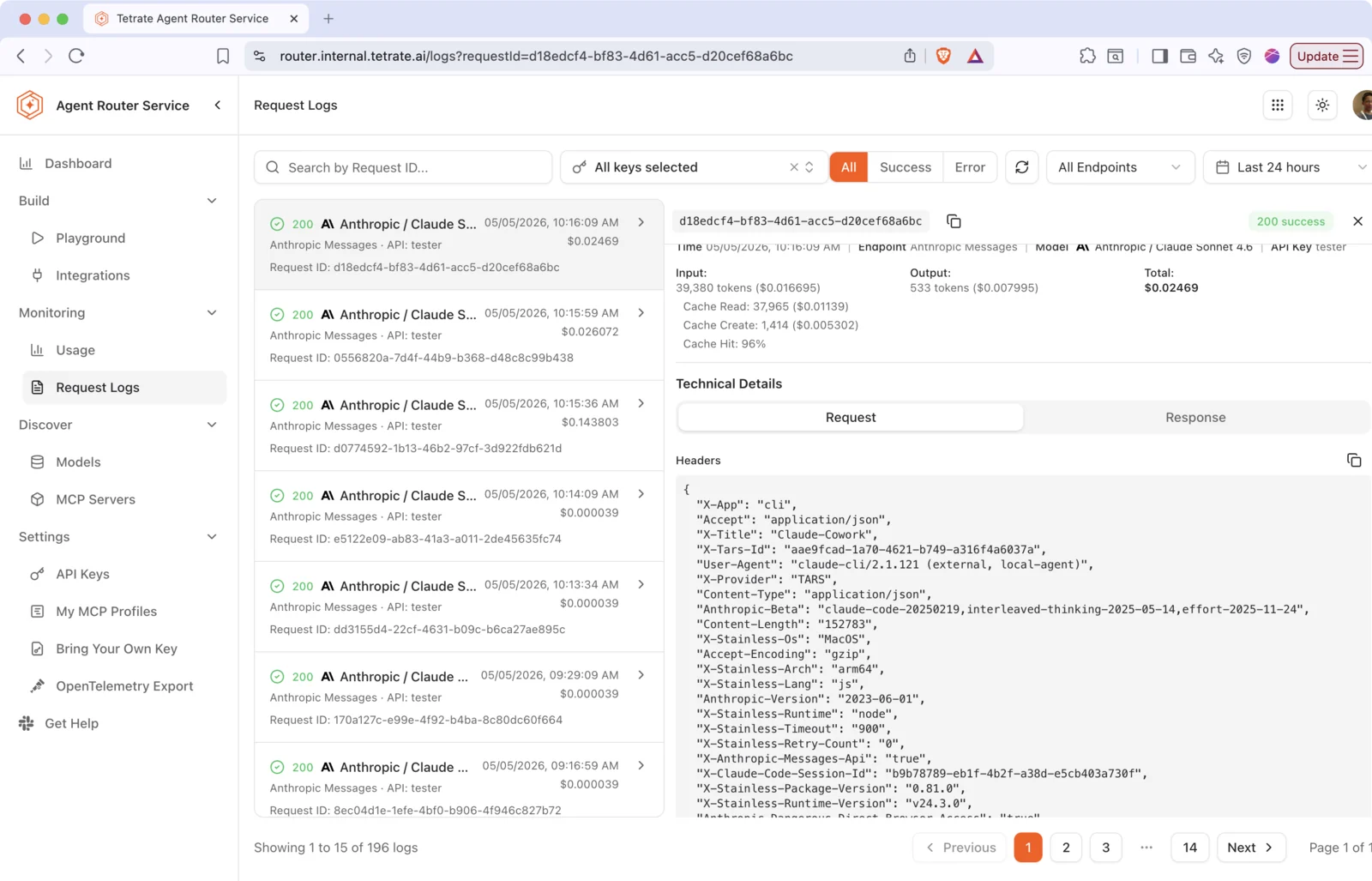
X-Title: Claude-CoworkandX-Provider: Tetrate AgentRouter.
Prerequisites
-
A fully set up management plane and data plane.
-
Claude Desktop with Cowork installed from claude.ai/download.
-
The
tareCLI installed and authenticated:curl -fsSL https://tare.tetrate.ai/tools/install.sh | bashtare --versiontare api login --base-url https://api.example.tetrate.ai--base-urlis the management plane API host (https://api.<tenant>.tetrate.ai), not the Console gateway Base URL. How to derive<tenant>is covered under Configure coding tools with the tare CLI.Login can be skipped on integrate by passing
--gateway-url,--api-key, and--modelexplicitly, but then nothing is reused from the account. -
A dataplane id for the gateway to route through. After
tare api login, list dataplanes:tare integrate dataplanesExample output:
DATAPLANE NAME GATEWAY URLacme-prod Acme Production https://acme-prod.gateway.example.comacme-dev Acme Dev https://acme-dev.gateway.example.com--dataplanetakes the workspace id from the DATAPLANE column (for exampleacme-prod), not the display name in NAME. -
Claude Desktop launched at least once on the machine so the
Claude-3puser-data directory exists. Without it,tare integratereports that auto-config is unavailable.
Claude Cowork through Agent Router runs in gateway mode only: the Agent Router inference key authenticates every request as Authorization: Bearer, and inference is billed through Agent Router.
Signing in with a Claude.ai account (Google or email) bypasses Agent Router entirely: Cowork runs, but traffic does not appear in Request Logs, cost is not attributed through Agent Router, and inference is billed to the Anthropic subscription instead.
Passthrough mode (keeping a Claude Max or Pro subscription as the billing path while the gateway routes and observes traffic) is supported for Claude Code via tare integrate claude-code --passthrough. It is not supported for Claude Cowork.
Configure integration with tare CLI (recommended)
After tare api login, preview then apply:
tare integrate dataplanes
tare integrate claude-cowork --dry-run --dataplane <dataplane-id>
tare integrate claude-cowork --dataplane <dataplane-id>
The optional --dry-run flag prints the planned changes with the API key masked and writes no files.
On apply, the CLI:
- Asks for confirmation.
- Allows selecting a default model.
- Configures Claude Desktop to use the gateway instead of the standard sign-in:
- Registers a third-party inference entry named
Tetrate AgentRouterin the Claude Desktop user-data directoryconfigLibrary. - Sets
inferenceProvidertogateway,inferenceCredentialKindtostatic, and writes the Agent Router inference key asinferenceGatewayApiKey. - Points
appliedIdinconfigLibrary/_meta.jsonat that entry so it becomes active on relaunch. - Validates the key with
GET /v1/modelsusingAuthorization: Bearer <key>.
- Registers a third-party inference entry named
Config files are written under the Claude Desktop user-data directory:
| Platform | Path |
|---|---|
| macOS | ~/Library/Application Support/Claude-3p/configLibrary/ |
| Linux | ${XDG_CONFIG_HOME:-~/.config}/Claude-3p/configLibrary/ |
| Windows | %LOCALAPPDATA%\Claude-3p\configLibrary\ |
The entry file is 6167656e-7472-4000-8000-6f7574657200.json; _meta.json indexes it alongside any other saved configurations.
If Claude Desktop is running when apply runs, the CLI prints a warning. Quit Claude Desktop (Cmd+Q on macOS, File then Quit on Windows) before applying, because the app reads configLibrary only at launch.
Sign in with Gateway
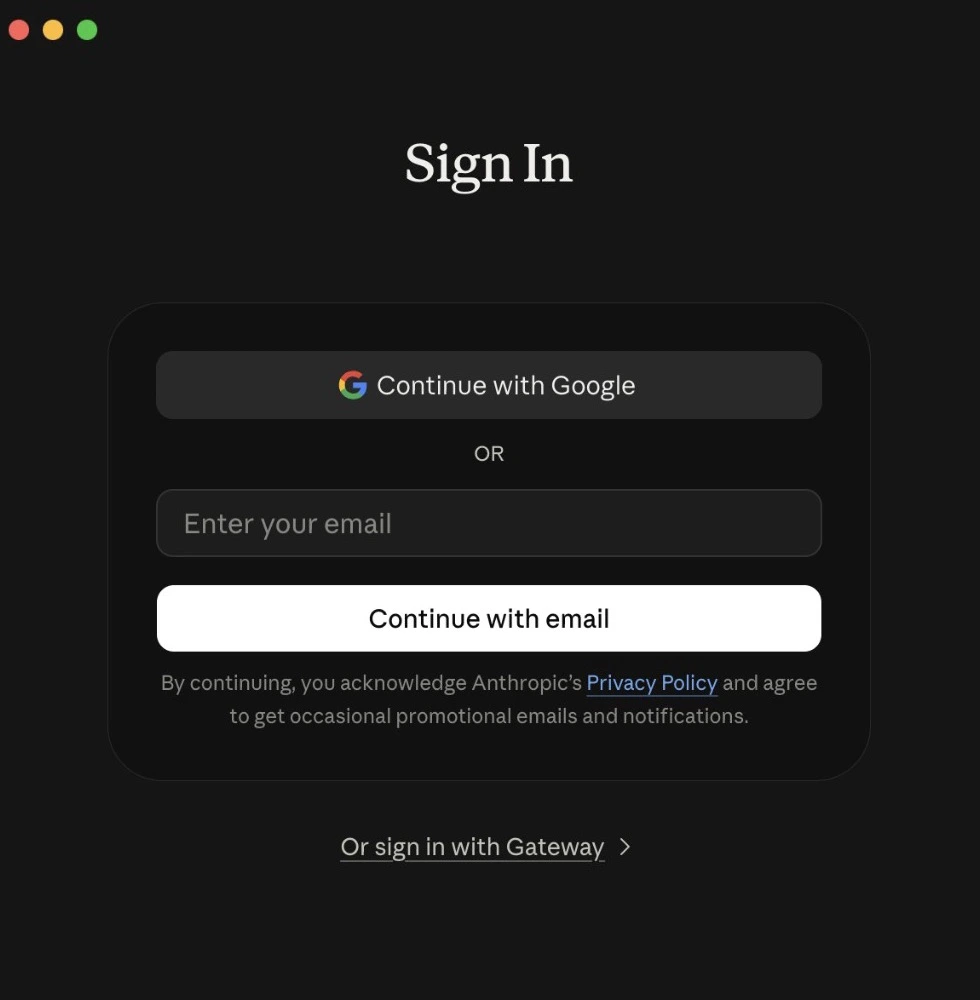
After apply, quit Claude Desktop completely and reopen it. The sign-in screen opens on the standard Anthropic options (Google and email). The gateway path is the Or sign in with Gateway link at the bottom, which appears only when a third-party inference configuration is present.
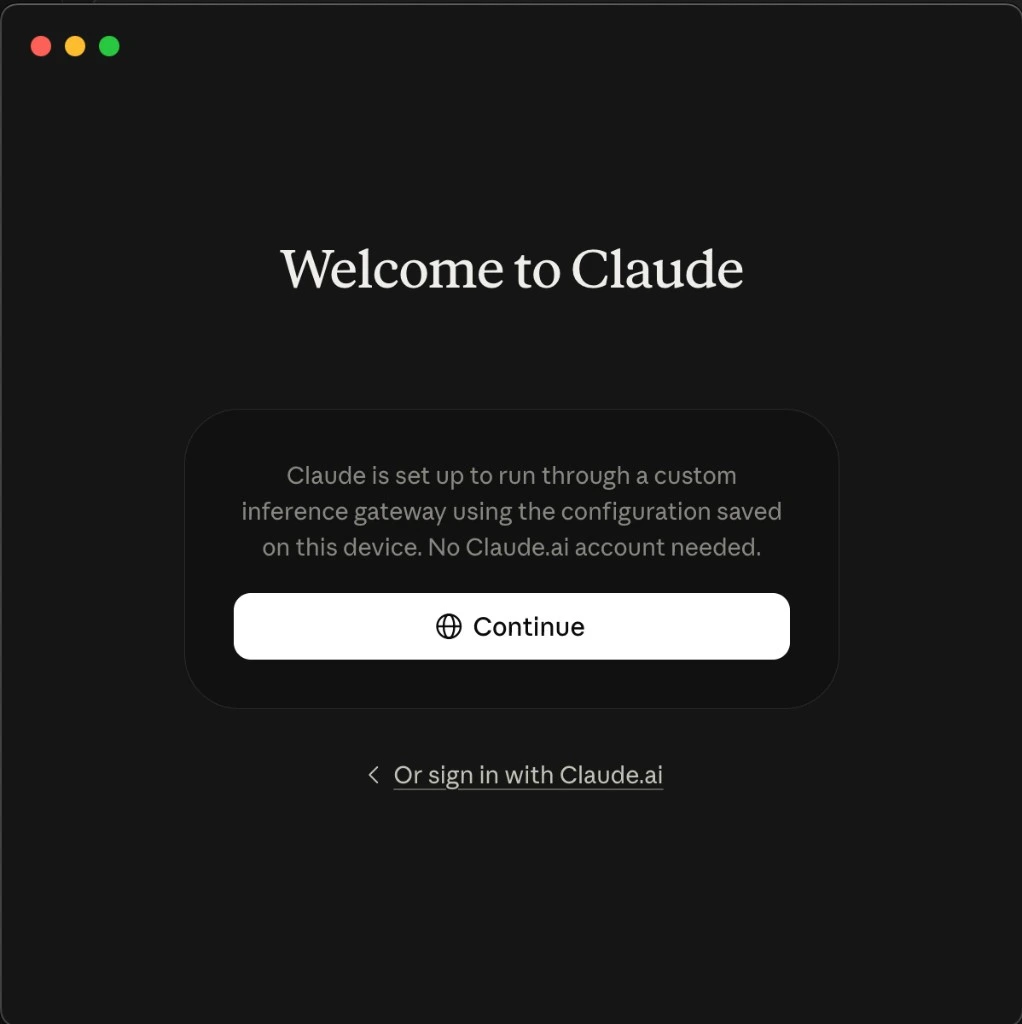
Selecting it opens Welcome to Claude, which confirms that Claude runs through a custom inference gateway using the configuration saved on the device. Select Continue to start Cowork through the gateway. Or sign in with Claude.ai returns to the standard Anthropic sign-in.
Where more than one configuration is saved, the active entry is switched in Developer, then Configure Third-Party Inference, not from either sign-in screen.
Alternative: manual configuration in Claude Desktop
Where tare integrate cannot write files, or the in-app path is preferred, configure third-party inference in Claude Desktop directly.
Enable Developer Mode
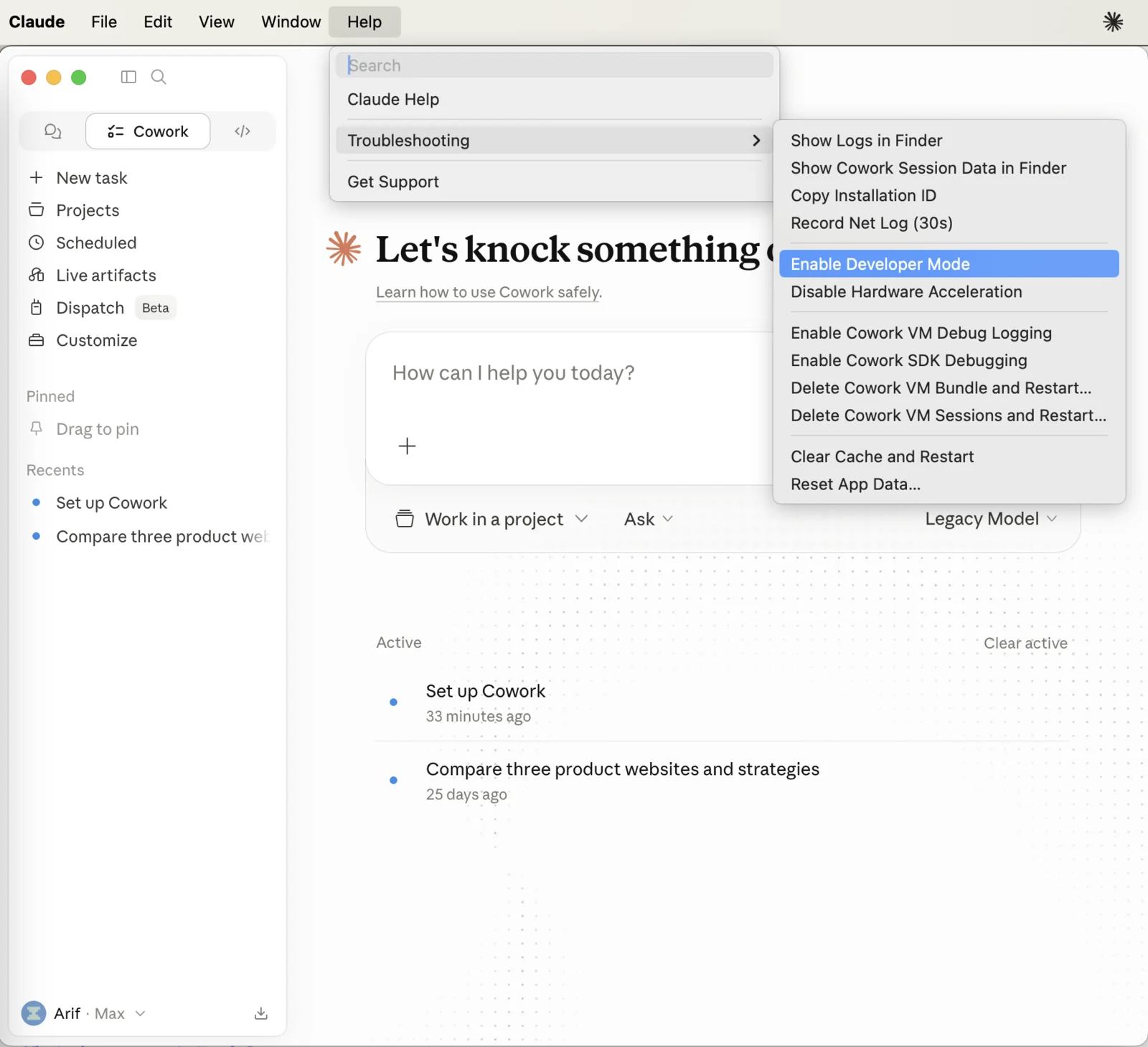
Developer Mode can be turned on from the sign-in screen without signing in to an Anthropic account first. On macOS, use the menu bar. On Windows, open the application menu at the top left of the sign-in screen. In both cases, go to Help, then Troubleshooting, then Enable Developer Mode.
Open third-party inference settings
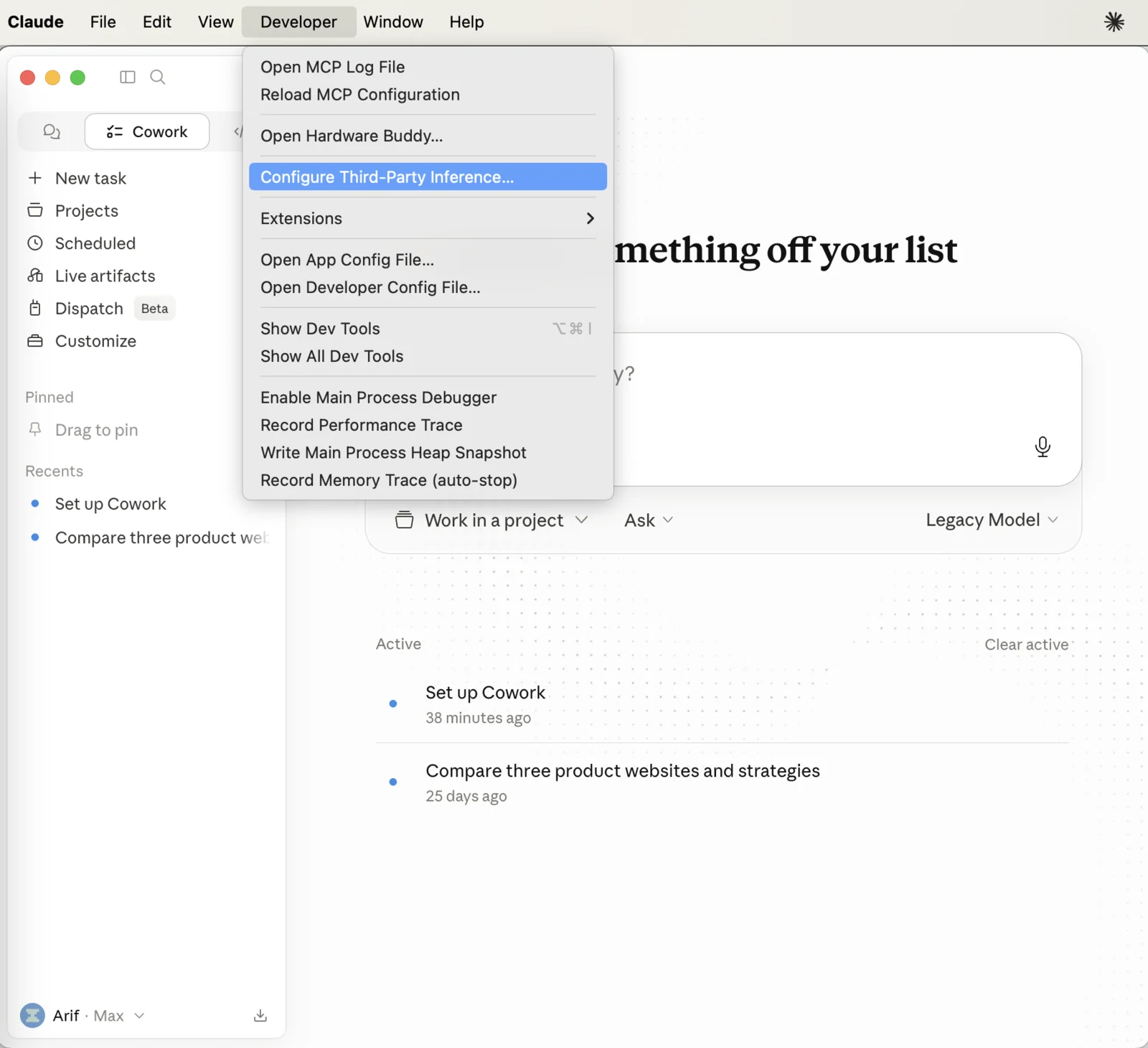
Go to Developer, then Configure Third-Party Inference. Choose Gateway as the inference provider.
Enter gateway settings
| Field | Value |
|---|---|
| Gateway base URL | GATEWAY URL from tare integrate dataplanes (scheme and host only, no /v1 suffix) |
| Credential kind | Static API key |
| Gateway API key | Inference key minted or reused by tare integrate claude-cowork on apply |
| Gateway auth scheme | bearer |
| Gateway extra headers | X-Title: Claude-Cowork, X-Provider: Tetrate AgentRouter |
| Models | A Claude model from the catalog (for example claude-sonnet-5), or leave empty for model discovery |
The Models field takes an explicit list, one model per line, and the first entry becomes the default in the Cowork picker. Left empty, Cowork discovers models from the gateway instead. An explicit list is the more predictable choice for a team, because the picker then offers exactly the approved models.
Discovery calls GET /v1/models, which returns what the inference key can actually call: a model enabled for the organization is listed only where it is also granted to the key's project. See Create a project and grant models.
Cowork always runs in gateway mode, with the Agent Router inference key sent as Authorization: Bearer, so discovery always has the credential it needs. Claude Code differs on both counts: its picker has no explicit model list, and gateway discovery there is off by default and unavailable in passthrough mode. See Connect Claude Code.
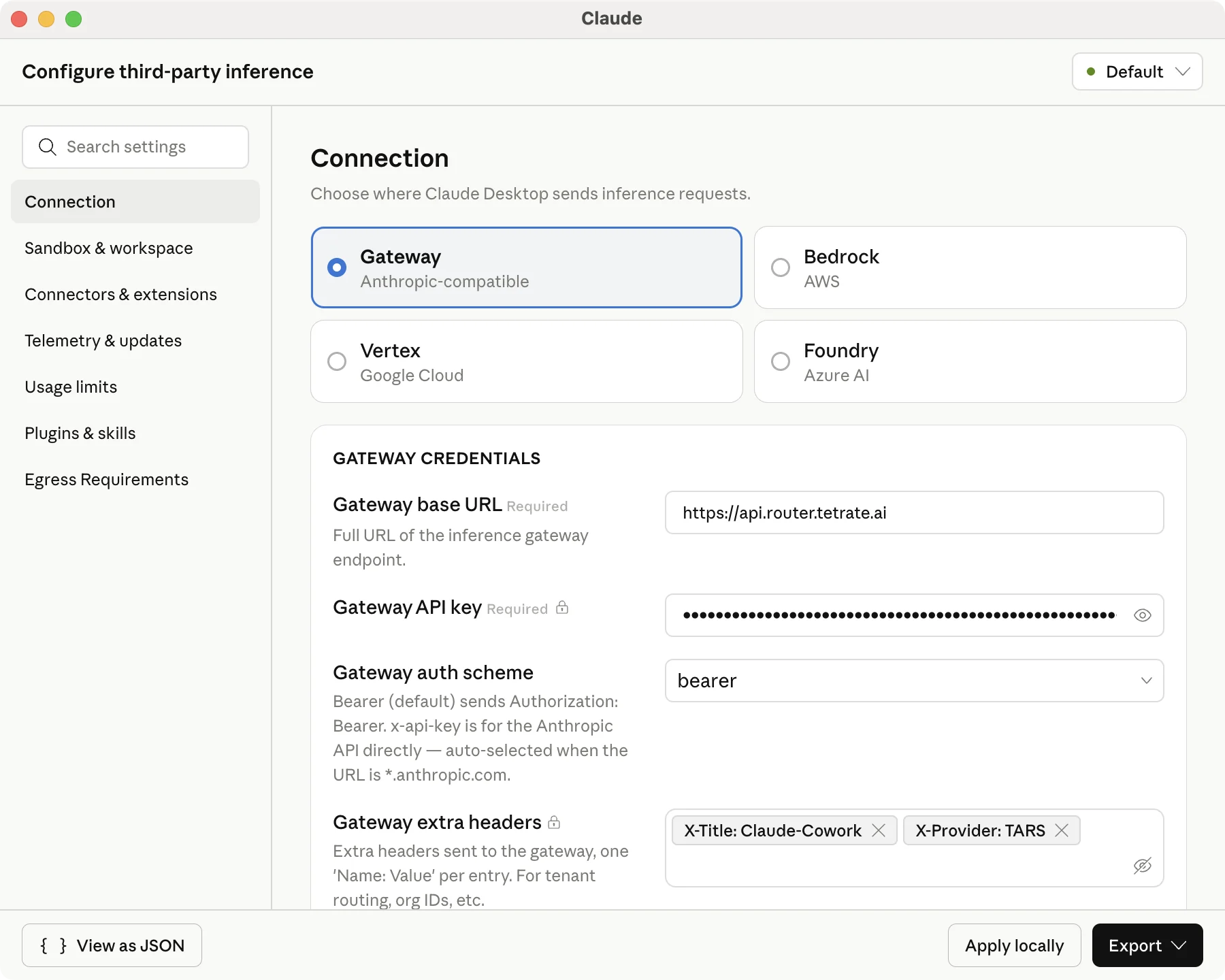
Click Apply locally, then relaunch when prompted.
Where auto-config cannot write files, or the write prompt was declined, tare integrate claude-cowork --dataplane <dataplane-id> --yes mints or reuses an inference key and prints paste-ready values. Keys can also be created in the Console under API Keys; see Make an API call.
Verify
Send a prompt in Cowork. With Developer Mode enabled, open Developer, Developer Console, Request Logs. Cowork requests appear as Anthropic Messages traffic with headers such as X-Title: Claude-Cowork and X-Provider: Tetrate AgentRouter.
Troubleshooting
| Symptom | Likely cause | Fix |
|---|---|---|
Auto-config unavailable; Claude-3p directory missing | Claude Desktop never launched on this machine | Launch Claude Desktop once, then re-run tare integrate claude-cowork |
| No Or sign in with Gateway link on the sign-in screen | Third-party inference config was not read | Confirm configLibrary/_meta.json has the expected appliedId; fully quit and relaunch |
| Welcome to Claude screen missing after apply | Claude Desktop was not fully quit before relaunch | Quit completely (Cmd+Q or File then Quit), reopen, select Or sign in with Gateway, then Continue |
| Cowork works but no traffic in Request Logs | Signed in with a Claude.ai account instead of the gateway path | Sign out, reopen, select Or sign in with Gateway, then Continue |
| Fewer models listed than the administrator enabled | Discovery returns what the key can call | A model enabled organization-wide also has to be granted to the key's project |
| Validation warning after apply | Wrong dataplane, revoked key, or unreachable gateway | Re-run with --dry-run, confirm --dataplane id and GATEWAY URL, then re-run with --yes to mint and write a fresh key |
| Manual steps not printed | Confirm prompt declined | Re-run with --yes to print paste-ready values including the API key |
Where to go next