Configure guardrail providers
A guardrail is a named policy: a collection of rules plus shared settings such as failure mode and a blocked-response message. Each rule names a check type (what to look for) and a provider (the engine that scores the content). Providers return a normalized score between 0.0 and 1.0; the gateway compares that score to the rule's threshold and applies the rule's action. The three providers every project arrives with, how they differ, which check types each one can run, and the Azure AI Content Safety setup are described below. Creating guardrails and rules is covered in Configure guardrails.
Persona: Platform operator working in the Admin Console.
Estimated time: 15 to 25 minutes to review the provider ladder and confirm which engines are enabled for the project.
When this guide applies
| Situation | What it covers |
|---|---|
| Choosing which engine should score a new rule | Comparing regexp, builtin, and tetrate on latency and capability |
| Understanding why a check type is missing from the rule form | The provider-scoped check-type list |
| Tuning a keyword or pattern-based detection | The choices that matter on the builtin provider |
| Wiring the ML provider for jailbreak, toxicity, or semantic topics | tetrate endpoint, timeout, and auxiliary endpoint requirements |
| Confirming a rule can use a given check type | Where the provider-by-check-type support matrix lives, and the cases that surprise |
| Setting up Azure AI Content Safety | The endpoint validation, the write-only credential call and its rotation, and the one-time gateway rollout on the 0.4.0 upgrade |
Outcomes
By the end of this guide:
- The three provider kinds every project owns and their place on the cost-and-capability ladder are clear.
- When to use subject-plus-term matching instead of a bare keyword list is clear.
- The required configuration for the
tetrateprovider is known. - A rule is only created with a check type its provider supports.
- An Azure AI Content Safety provider is configured with its endpoint and its write-only credential, and the one-time rollout on the 0.4.0 upgrade is expected rather than a surprise.
Prerequisites
- Administrator access to the Admin Console with permission to manage guardrails for a project.
- An active project selected in the Admin Console. Guardrail providers are project-scoped; Rules, Patterns, and Guardrail Providers all operate inside the currently selected project.
- Familiarity with how guardrails and rules are created, covered in Configure guardrails.
Step 1: open Guardrail Providers for the project
- Sign in to the Admin Console and select the project whose providers are to be managed.
- Open Guardrails → Guardrail Providers.
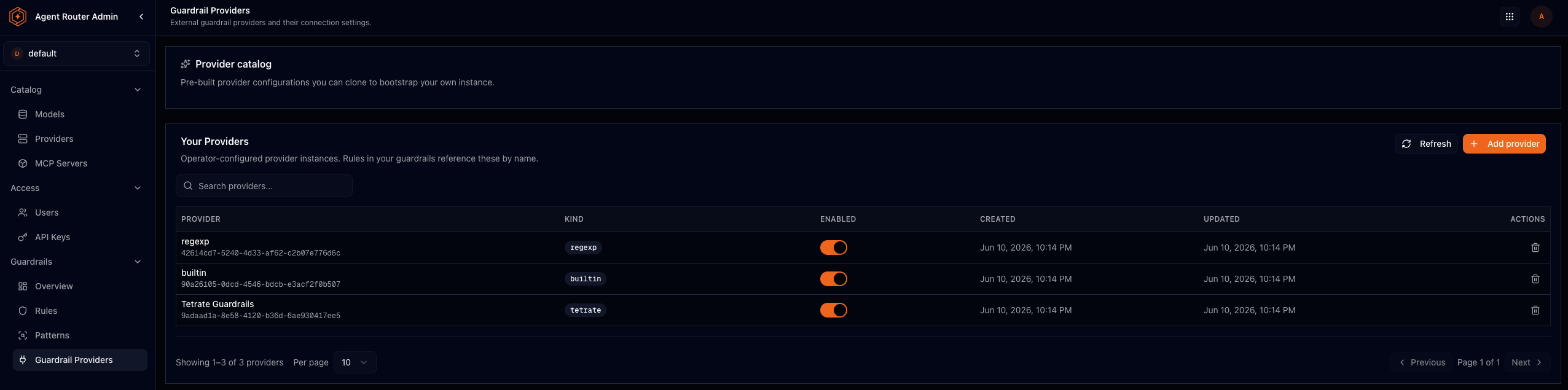
Providers are instances with UUIDs, and since 0.4.0 every instance is owned by a project. Rules reference a provider by its id, and only a provider of their own project. The page shows two lists: the Provider catalog, read-only templates to clone (regexp, builtin, Tetrate, and Azure AI Content Safety), and Your Providers, the project's own instances, the only ones its rules can use. A new project arrives with its own regexp, builtin, and tetrate (displayed as Tetrate Guardrails) instances already in place, so guardrails on those engines need no provider setup at all.
Where an Azure AI Content Safety or external guardrail service instance is configured in addition to these kinds, it appears as another provider under the same page. Steps 3 to 5 cover the three that arrive with the project; step 7 covers Azure AI Content Safety, which needs a credential.
Step 2: choose a provider on the cost-and-capability ladder
All three kinds implement the same contract: they score content and, for redaction, may return a sanitised copy of the text. They never choose to block or redact themselves, because that decision stays with the gateway. What differs is how they detect and which check types they can execute.
Provider (kind) | Tier | How it detects | Latency |
|---|---|---|---|
| regexp | Local | Pure pattern matching against the named-pattern catalog | Near zero; in-process |
| builtin | Local | A multi-layer keyword-and-regex detection pipeline | Near zero; in-process |
| tetrate | ML service | Embeddings, classifiers, and NLI entailment via Tetrate's semantic router | Network hop; remote inference |
Stack rules so cheaper providers evaluate first when the same content can be caught by a local check. A pattern match can short-circuit evaluation before a remote ML call runs. Operational ordering guidance is in Guardrails best practices and FAQ.
Step 3: configure a regexp provider
The regexp provider tests named patterns from the Patterns catalog against the content, scoring 1.0 on a match and 0.0 otherwise. Choose it when the content has a predictable shape (email addresses, national identifiers, API key formats) and in-process latency matters. The mechanism is described in About guardrails.
Because detection is only pattern matching, the check type is a label for what the operator intends to catch, and the referenced patterns define the real check.
Per-rule parameters: pattern names from the library, and an optional redaction format (for example {ssn}_REDACTED).
Step 4: configure a builtin provider
The builtin provider is the most configurable local engine. Each rule runs a fixed five-layer pipeline of blocked keywords, an allowlist gate, subject-and-term co-occurrence, detection patterns, and category keywords. Every layer runs, and a match anywhere scores 1.0. The layers, their evaluation order, and what each one matches are described in About guardrails.
Three choices matter most when configuring a rule on this provider:
- Reserve blocked keywords for zero-tolerance terms. That layer is checked first and the allowlist cannot suppress it.
- Prefer subject-plus-term matching to a bare keyword list where a word is only sensitive in context. Target subjects
[customer]with flagged terms[password]fire on "Please reset the customer's password before the demo" and ignore "I changed my password to something stronger", which a plain keyword list cannot do. - Set the minimum severity deliberately. It is the floor for the keyword and detection-pattern layers, so one keyword list can serve several rules at different sensitivities.
Step 5: configure a tetrate provider
The tetrate provider detects meaning rather than literal strings, routing each check to an embedding model, a security classifier, a PII model, or natural language inference (NLI) entailment behind a single endpoint. Which check reaches which model, and which checks cascade across layers, is described in About guardrails.
Step 6: confirm which provider supports which check type
A rule is valid only if its provider supports its check type. The Admin Console mirrors this by scoping the check-type dropdown to the selected provider, so the quickest confirmation is to select the provider in the rule form and look for the check type in the list.
The full matrix is in the guardrails reference. Three cases account for most surprises:
regexpaccepts every check type, because a regular expression is check-type-agnostic.gibberish,relevance, andsentimentare available ontetrateonly.compliance,ban_competitors,ban_code, andprotected_materialare available onbuiltin, and nominally onregexp, but not ontetrate.
Step 7: set up Azure AI Content Safety
Azure AI Content Safety is the one catalog template that cannot be used straight from a clone: it calls a Microsoft-hosted service, so it needs an endpoint and a credential, and content evaluated by it leaves the cluster for Azure. Setting one up, end to end:
- Create the Content Safety resource on the Azure side and note its endpoint URL and key.
- On Guardrails → Guardrail Providers, clone the Azure AI Content Safety template into the project, or create a provider of that kind directly.
- Set the endpoint to the resource's URL. The endpoint must be an absolute
http(s)URL; a provider whose configuration could never run is refused at save time rather than saved and silently skipped by the gateway. - Set the key through the provider's credential action, which calls the write-only SetGuardrailProviderSecret operation. This is the only way a credential enters: a create or update that carries an
api_keyinside the provider configuration is refused with an error naming the operation.
The credential is stored encrypted and is never displayed again, in the Console, in any API response, or in the data-plane configuration; the provider only reports whether one is stored. Setting the credential again rotates it in place, with the provider keeping its id, configuration, and every rule bound to it. Editing the provider preserves the stored credential rather than dropping it, and deleting the provider, or its project, destroys the credential with it.
On the data plane, the credential reaches the gateway as a mounted Kubernetes Secret rather than traveling inside the guardrail configuration, so it appears in no ConfigMap and no configuration dump. A rotation is picked up within a few minutes, with no gateway restart and no traffic interruption.
The upgrade that introduces this credential path restarts the egress gateway pods once, when the credential volume is added to the proxy. That rollout happens on the upgrade only; afterwards, adding, rotating, or removing a provider credential changes nothing about the running pods.
Where to go next