Configure guardrail providers
Guardrail providers score content for guardrail rules, each returning a normalized score between 0.0 and 1.0 that the gateway compares to the rule's threshold. Providers belong to a project: each project starts with its own regexp, builtin, and tetrate providers, and any further provider, such as Azure AI Content Safety, is created from the provider catalog.
Persona: Platform operator working in the Admin Console.
Estimated time: 15 to 25 minutes to review the provider ladder and confirm which providers the project owns. Add 10 minutes to stand up an Azure AI Content Safety provider, once the Azure resource and its key are in hand.
When this guide applies
| Situation | What it covers |
|---|---|
| Choosing which provider should score a new rule | Comparing regexp, builtin, tetrate, and azurecontentsafety on latency and capability |
| Understanding what a project already owns and what the catalog offers | The difference between a catalog template and the project's own providers |
| Adding a provider a project does not yet own | Creating one from a catalog template |
| Understanding why a check type is missing from the rule form | The provider-scoped check-type list |
| Tuning a keyword or pattern-based detection | The choices that matter on the builtin provider |
| Wiring the machine-learning (ML) provider for jailbreak, toxicity, or semantic topics | tetrate endpoint, timeout, and auxiliary endpoint requirements |
| Sending checks to Azure AI Content Safety | The endpoint settings and their validation, the write-only credential call and its rotation, and the one-time gateway rollout on the 0.4.0 upgrade |
| Confirming a rule can use a given check type | Where the provider-by-check-type support matrix lives, and the cases that surprise |
Outcomes
By the end of this guide:
- The four provider kinds and their place on the cost-and-capability ladder are clear.
- The difference between the catalog and a project's own providers is clear, and a provider can be created from a template.
- When to use subject-plus-term matching instead of a bare keyword list is clear.
- The required configuration for the
tetrateprovider is known. - An Azure AI Content Safety provider can be configured with its endpoint, its credential stored and rotated, and the one-time rollout on the 0.4.0 upgrade is expected rather than a surprise.
- A rule is only created with a check type its provider supports.
Prerequisites
- Administrator access to the Admin Console with permission to manage guardrails for a project.
- An active project selected in the Admin Console. Guardrail providers are project-scoped; Rules, Patterns, and Guardrail Providers all operate inside the currently selected project.
- Familiarity with how guardrails and rules are created, covered in Configure guardrails.
- For the Azure steps only: an Azure AI Content Safety resource, its endpoint, and one of its keys.
Step 1: open Guardrail Providers for the project
- Sign in to the Admin Console and select the project whose providers are to be managed.
- Open Guardrails → Guardrail Providers.
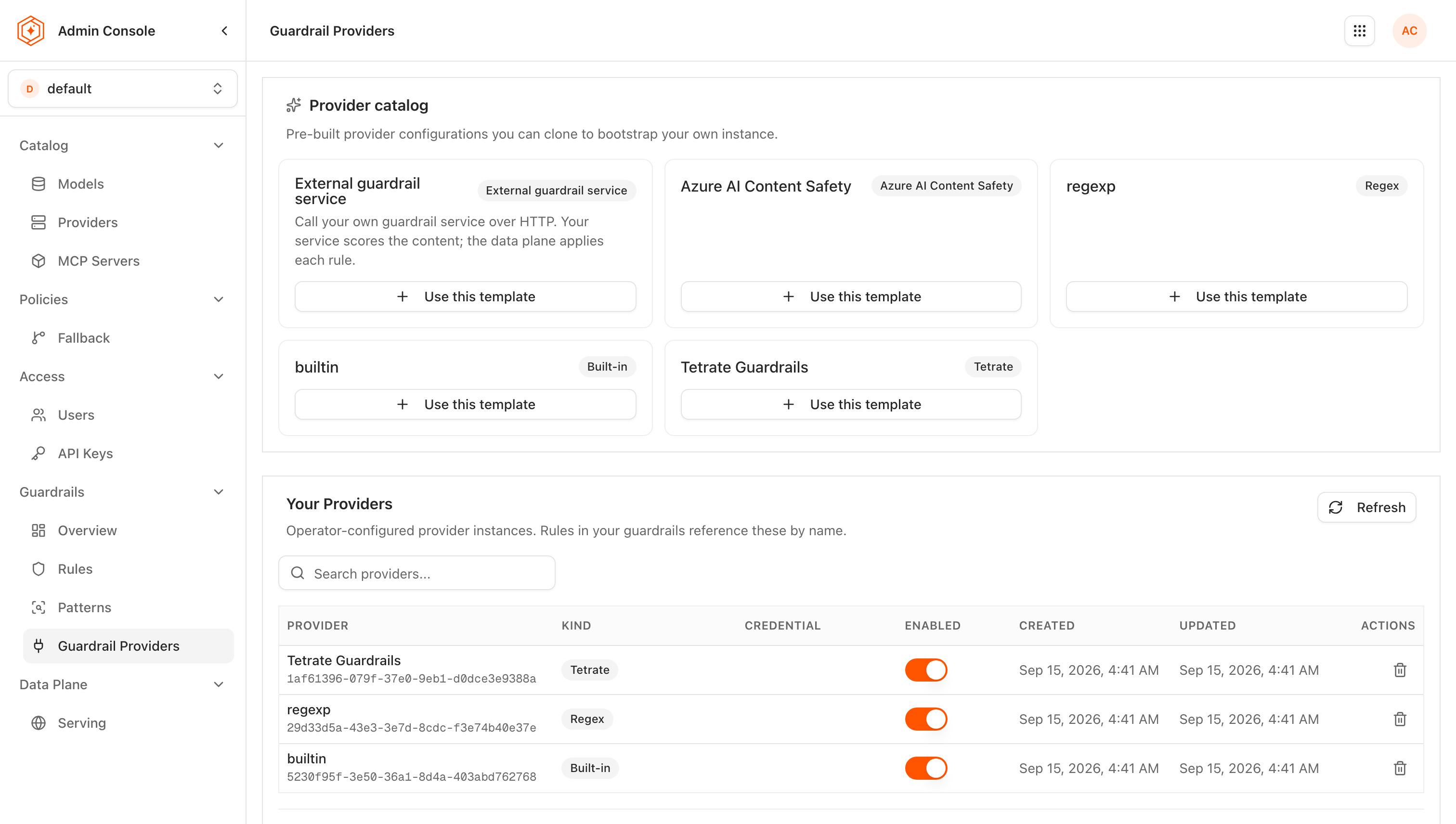
The page has two halves:
- Your Providers lists the concrete providers this project owns. Each is an instance with its own UUID, and a rule binds to that instance rather than to a kind, so several instances of the same kind can coexist in one project. These are the only providers a rule can use.
- Provider catalog lists the templates the product ships. A template is a starting configuration, shared across every project and read-only: it cannot be edited, deleted, given a credential, or referenced by a rule. It exists to be copied into a project.
A newly created project arrives owning a regexp, a builtin, and a tetrate provider (the last displayed as Tetrate Guardrails), copied from the catalog on its behalf, so a guardrail can be written and enforced in it without any provider setup. Azure AI Content Safety is deliberately not among them: it cannot evaluate anything without a credential, so it stays a catalog template until an operator configures one, as described in Step 7. A generic external guardrail service has no catalog template at all; it is registered with the tetrate CLI by following Connect an external guardrail service.
Before the provider catalog existed, regexp, builtin, and tetrate were three shared rows used by every project. They are now catalog templates, and each project owns its own copy. Existing rules were moved onto their own project's provider of the same kind during the upgrade, so what each guardrail enforces is unchanged. One consequence reaches automation: a script that creates rules against one of the three former shared provider identifiers is refused, and should read the project's own providers and use their identifiers instead.
Step 2: choose a provider on the cost-and-capability ladder
Every kind answers the same scoring interface (the external kinds implement it as the versioned Guardrail service contract; the in-process kinds answer it in process): each scores content and, for redaction, may return a sanitized copy of the text. They never choose to block or redact themselves, because that decision stays with the gateway. What differs is how they detect, which check types they can execute, and where the content goes.
Provider (kind) | Tier | How it detects | Latency | Content leaves the environment |
|---|---|---|---|---|
| regexp | Local | Pure pattern matching against the named-pattern catalog | Near zero; in-process | No |
| builtin | Local | A multi-layer keyword-and-regex detection pipeline | Near zero; in-process | No |
| tetrate | ML service | Embeddings, classifiers, and natural language inference (NLI) entailment via Tetrate's semantic router | Network hop; remote inference | No in the Self-Hosted Data Plane model, where the callout stays inside the customer network; in Tetrate-hosted deployments the data plane is Tetrate-operated |
| azurecontentsafety | Third-party SaaS | Azure AI Content Safety: severity analysis, Prompt Shields, protected-material detection, and groundedness | External round trip; metered per call | Yes; content is sent to Azure |
Stack rules so cheaper providers evaluate first when the same content can be caught by a local check. A pattern match can short-circuit evaluation before a remote ML call runs. Operational ordering guidance is in Guardrails best practices and FAQ.
Where a generic external guardrail service is configured instead, it is connected through a provider of kind externalservice, appears as another provider in Your Providers, and declares the checks it supports per instance. A vendor service without a native implementation of the contract is reached through an adapter that translates between the two. See the guardrails reference.
Step 3: create a provider from a catalog template
A provider is created by copying a catalog template into the project. There is no blank provider form: the template supplies the kind, which is required and cannot be changed afterwards.
- Open Guardrails → Guardrail Providers with the target project selected.
- Find the kind in Provider catalog and choose Use this template.
- Give the provider a name. Names are unique within the project, so a second instance of a kind needs a name of its own.
- Fill in the settings the template leaves blank. For
regexpandbuiltinthere are none; fortetrate,azurecontentsafety, andexternalservicethe connection settings are required. Theexternalservicesettings are covered in Connect an external guardrail service. - Save. The provider appears under Your Providers and rules can bind to it.
A provider is created enabled unless it is saved otherwise. Enabled is not a cosmetic flag. A new rule cannot be written against a disabled provider at all, and rules that already exist are skipped at evaluation time with no error and no trigger record, so a guardrail whose provider is disabled stops enforcing without saying so. Disable a provider only as a deliberate act, and re-check the guardrails that depend on it.
Two rules govern what a guardrail rule may bind to:
- A rule can only bind to an enabled provider its own project owns. A template, a provider in another project, and an identifier that names nothing are refused identically, with an error stating the provider is not available in this project. A disabled provider is refused separately, and the error says it is disabled, so the fix is to enable it rather than to look for a different provider.
- Creating a guardrail from a guardrail template binds each of its rules to the project's own provider of the same kind. Where the project owns no provider of the kind a template needs, the guardrail is refused with an error naming that kind, rather than created with rules that can never run. Creating or enabling a provider of that kind and repeating the operation resolves it.
The same work through the admin API is a POST to the project's guardrails/providers collection carrying kind, name, and config, and through the CLI it is tetrate agentrouter api guardrails providers create. Listing providers returns only the project's own rows; templates are returned only when they are asked for explicitly.
Step 4: configure a regexp provider
The regexp provider tests named patterns from the Patterns catalog against the content, scoring 1.0 on a match and 0.0 otherwise. Choose it when the content has a predictable shape (email addresses, national identifiers, API key formats) and in-process latency matters. The mechanism is described in About guardrails.
Because detection is only pattern matching, the check type is a label for what the operator intends to catch, and the referenced patterns define the real check.
Per-rule parameters: pattern names from the library, and an optional redaction format (for example {ssn}_REDACTED).
Step 5: configure a builtin provider
The builtin provider is the most configurable local provider. Each rule runs a fixed five-layer pipeline of blocked keywords, an allowlist gate, subject-and-term co-occurrence, detection patterns, and category keywords. Every layer runs, and a match anywhere scores 1.0. The layers, their evaluation order, and what each one matches are described in About guardrails.
Three choices matter most when configuring a rule on this provider:
- Reserve blocked keywords for zero-tolerance terms. That layer is checked first and the allowlist cannot suppress it.
- Prefer subject-plus-term matching to a bare keyword list where a word is only sensitive in context. Target subjects
[customer]with flagged terms[password]fire on "Please reset the customer's password before the demo" and ignore "I changed my password to something stronger", which a plain keyword list cannot do. - Set the minimum severity deliberately. It is the floor for the keyword and detection-pattern layers, so one keyword list can serve several rules at different sensitivities.
Step 6: configure a tetrate provider
The tetrate provider detects meaning rather than literal strings, routing each check to an embedding model, a security classifier, a personally identifiable information (PII) model, or NLI entailment behind a single endpoint. Which check reaches which model, and which checks cascade across layers, is described in About guardrails.
Step 7: configure an Azure AI Content Safety provider
The azurecontentsafety provider sends content to a Microsoft Azure AI Content Safety resource and returns its results as normalized scores. It is the only kind that covers factual_consistency (groundedness), and content evaluated by it leaves the customer environment, so binding a rule to it is an explicit decision per rule. The nine check types it supports, and the stage each runs on, are in the capability matrix.
Setup has two parts, and they are deliberately separate: the configuration, which is stored as written and delivered to the gateway, and the credential, which is never part of it.
Create the provider and its configuration
- Create the Content Safety resource on the Azure side, and note its endpoint URL and one of its keys.
- Open Guardrails → Guardrail Providers with the target project selected.
- In Provider catalog, choose Use this template on Azure AI Content Safety.
- Name the provider.
- Set the connection settings below. Only the endpoint is required.
- Save.
| Setting | Required | Default when left blank | Meaning |
|---|---|---|---|
endpoint | Yes | none | The Azure resource endpoint, as an absolute http or https URL, for example https://<resource>.cognitiveservices.azure.com |
api_version | No | 2024-09-01 | The Azure API version used for severity analysis, Prompt Shields, and protected-material detection |
groundedness_api_version | No | 2024-09-15-preview | The Azure API version used for groundedness detection, which Azure versions separately |
timeout | No | 10s | Per-request budget for the call to Azure, written as a duration such as 10s, 1500ms, or 1m30s |
Only the endpoint's shape is validated when the provider is saved, so the rest can save cleanly and fail later:
- The endpoint is a URL, not a hostname. A value without a scheme is rejected at save time with an error naming the expected shape. A bare
<resource>.cognitiveservices.azure.comis not accepted. - The endpoint carries no path. The gateway appends the Azure API path to it, so a value ending in
/contentsafetyproduces a doubled path that Azure rejects at call time rather than at save time. A trailing slash is harmless and is stripped. - The two API versions are passed to Azure as written. Neither is validated, so a version string Azure does not recognize fails on the call, not on the save. Leave both blank unless a specific Azure version is required.
- A malformed
timeoutdisables the provider silently. It is not validated at save time, and the gateway cannot build a provider whose timeout it cannot parse. A value such as10, which is a number rather than a duration, therefore leaves every rule bound to that provider evaluating nothing, with no error and no trigger record. Either write a unit (10s) or leave the field blank.
The guardrail's own evaluation timeout and failure mode still apply on top of the provider timeout. Because the default failure mode is fail-close, an Azure resource that is throttling or unreachable blocks the traffic the rule governs. Where availability matters more than the check, set that guardrail to fail-open deliberately; see Guardrails best practices and FAQ.
Store the credential
The Azure key is set through a dedicated write-only operation, and is the one setting that is never typed into the configuration.
- Open the provider under Your Providers.
- Enter the Azure key in the credential field.
- Save.
Through the admin API the same operation is SetGuardrailProviderSecret, a POST to the provider's secret sub-resource, and through the CLI it is tetrate agentrouter api guardrails providers set-secret.
Provider configuration is stored as written and delivered verbatim to the data plane, so a credential placed in it would be readable by everyone who can read the provider. A create or update carrying an api_key in the configuration of an azurecontentsafety provider therefore fails, with an error naming the credential operation to use instead. The same applies to an external guardrail service's auth_token. The whole write is refused: nothing is stored, and the key is neither silently consumed nor silently dropped. Resubmit the configuration without it, then set the credential through the credential operation.
What happens to the credential once it is stored:
- It is encrypted at rest, and the provider row keeps only a reference to it.
- No read returns it. Listing providers, reading one, and the configuration delivered to the gateway all omit it. A read reports that a credential is stored, never what it is.
- It reaches the gateway outside the configuration, as a mounted Kubernetes Secret, so it appears in no ConfigMap and in no proxy configuration dump.
- Editing the provider preserves it. Updating a provider's name or its configuration leaves the stored credential in place rather than dropping it.
- The operation is audit-logged, recording who set a credential on which provider, never the value.
- A template cannot hold one. The operation is refused on a catalog template, which is why the provider is created first and given its credential afterwards.
This kind cannot evaluate anything without a stored credential. Save the provider disabled, store the credential, then enable it, all in the same sitting. Enabling it is not optional: a rule cannot be bound to a disabled provider, and a guardrail created from a template is refused where the provider of the kind it needs is disabled.
Rotate or retire the credential
Rotation is the same operation again, with the new key:
- Open the provider under Your Providers.
- Enter the new Azure key.
- Save.
The credential is replaced in place. The provider keeps its identifier, its configuration, and every rule bound to it, so nothing else needs re-pointing and no gateway configuration changes. Because nothing in the configuration changes, the new key travels on the gateway's periodic reconcile rather than the normal propagation path: allow a few minutes, and keep the previous Azure key valid until traffic is observed succeeding on the new one. An Azure AI Content Safety resource issues two keys so that one can be rotated while the other serves.
There is no operation that clears a credential and leaves the provider behind. A stored credential is destroyed by deleting the provider, or by deleting the project that owns it, which retires the project's providers and destroys the credentials they hold.
The upgrade that introduces this credential path restarts the egress gateway pods once, when the credential volume is added to the proxy. That rollout happens on the upgrade only, whether or not any provider holds a credential; afterwards, adding, rotating, or removing a provider credential changes nothing about the running pods.
What an operator sees on the data plane when a credential is added, rotated, or removed is covered in Configuration propagation.
Step 8: confirm which provider supports which check type
A rule is valid only if its provider supports its check type. The Admin Console mirrors this by scoping the check-type dropdown to the selected provider, so the quickest confirmation is to select the provider in the rule form and look for the check type in the list.
The full matrix is in the guardrails reference. Four cases account for most surprises:
regexpaccepts every check type, because a regular expression is check-type-agnostic.gibberish,relevance, andsentimentare available ontetrateonly.compliance,ban_competitors,ban_code, andprotected_materialare available onbuiltin, and nominally onregexp, but not ontetrate.factual_consistencyis available onazurecontentsafetyonly, on the output stage only, and nominally onregexp.
Where to go next
Configure guardrails
Create policies and rules that reference these providers.
Guardrails best practices and FAQ
Roll out safely with monitor mode and deliberate failure modes.
Protect requests with guardrails
The developer-side view of how blocks and redactions appear.
Configuration propagation
How long a provider change takes to reach the gateway, and what a credential change does to it.