Where to Begin
Agent Router serves evaluators, developers, and operators across three products that differ in tier and in where the data plane runs. Pick a starting point by product or by role; the two meet in the matrix below, which names the exact page to open for each combination.
Start by product
Every product ends with a working gateway and a first routed request. They differ in tier, the capabilities an account has, and in where the data plane runs.
Agent Router Service
Multi-tenant and hosted by Tetrate. Nothing to install.
Best for routing a first request in minutes, with no infrastructure.
Agent Router Enterprise, fully managed
Team-scale governance on a dedicated instance, hosted end to end by Tetrate.
Best for admin controls without running infrastructure.
Agent Router Enterprise, self-hosted data plane
Same controls and dedicated management plane, with the data path on self-managed infrastructure.
Best for teams that must keep data on their own infrastructure.
Not sure which fits? The tier comparison on the welcome page sets Service against Enterprise, and the flowchart under Still deciding? below walks the choice.
Start by role
Deciding whether it fits
Running a proof-of-concept or trial to answer what an organisation asks before it commits: data residency, cost control, integration effort, and scale.
Evaluate Agent Router →Routing requests
Routing AI requests from an application or agent, managing API keys, setting fallbacks and traffic splits, aggregating MCP servers, and observing traffic through the Developer Console.
Guides for developers →Governing the gateway
Provisioning models and providers, governing access, auditing usage, configuring SSO, and managing budgets across environments through the Admin Dashboard.
Guides for platform operators →Your starting page
Find the role in the left column and the product across the top; the cell names the page to open first.
| Role | Developers Service | Teams Fully Managed | Teams Self-Hosted DP |
|---|---|---|---|
| Evaluator | Quickstart: Explore | Fast Track Eval | Prerequisites |
| Developer | Quickstart: Explore | Console quickstart | Console quickstart |
| Platform operator | Onboarding | Install data plane |
Installation is a phase, not a role: usually the platform operator during setup, sometimes with a platform engineer who owns the Kubernetes cluster. The Enterprise columns above cover it. The Service tier is self-serve and has no operator role.
Still deciding?
The flowchart picks a path from the deployment constraints; the questions below are the ones that tend to decide it.
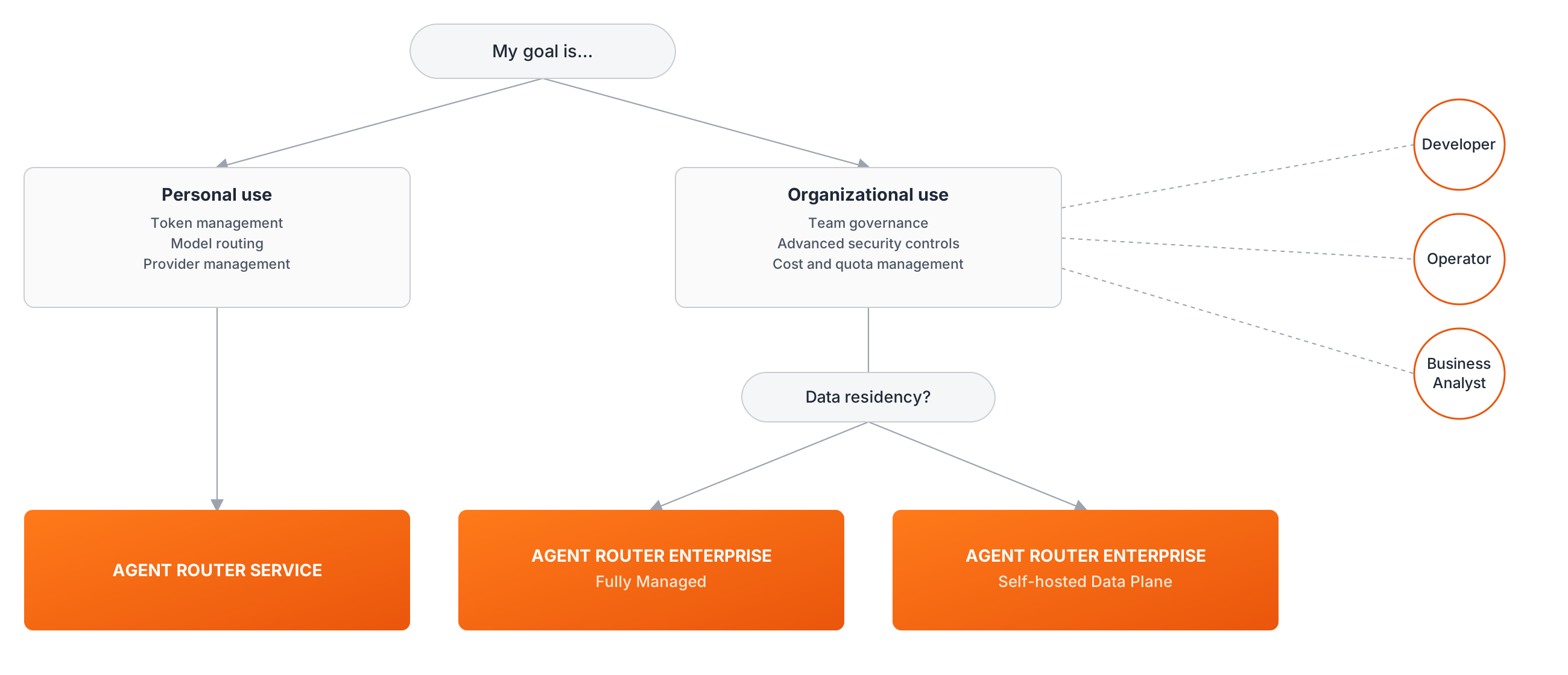
- Where does the data go? In Self-Hosted Data Plane deployments, AI traffic flows through a data plane in the customer's Kubernetes cluster: payloads, prompts, and credentials never leave the customer network. In fully hosted paths (Service or Fully Managed), Tetrate operates the data plane. See Deployment models for the split, the Architecture overview for the request path, and Compliance for residency and retention.
- Can cost be controlled and predicted? Spend is tracked per team and per key, with budgets and rate limits enforced inline rather than reconciled after the fact. The Product overview frames the cost story, and the operator guides show it in practice.
- How hard is integration, and is there lock-in? Applications target one endpoint using API shapes they already use, and providers can be added or swapped as a configuration change. Gateway APIs lists exactly what the gateway speaks.
- Will it scale to production traffic? Sizing and scale covers throughput, resource sizing, and the deployment footprint.
- What does running it actually require? Prerequisites lists what must be in place before installation on AWS, Azure, or GCP.
To run an evaluation end to end, see Evaluate Agent Router.
Where to go next
Deployment models
Where each part of Agent Router runs and who operates it, explained from first principles.
Tier comparison
Agent Router Service and Agent Router Enterprise capabilities side by side, on the welcome page.
Looking something up
For exact API surfaces, gateway edge cases, OpenTelemetry metric names, audit event schemas, or definitions of Agent Router-specific terms, head to the Reference section.