One control point for all AI traffic
Most organisations adopt AI faster than they can govern it. Tetrate Agent Router Enterprise is an AI gateway that puts every model request through a single governed path, so that cost, access, and reliability are managed centrally instead of application by application. Requests route to 200+ models, spend is attributed by team, guardrails are enforced inline, and traffic fails over when a provider goes down, without agents being rewritten.
What Agent Router can do for you
Routing every request through one shared path is what lets developers, finance, and security win at once. These goals usually pull against each other, because the controls that satisfy finance and security tend to slow developers down; on a shared path, the request a developer sends is the same request finance meters and security inspects.
An OpenAI-compatible endpoint fronts every model and provider, so existing code runs unchanged. Automatic failover reroutes traffic when a provider degrades, keeping applications available.
Per-key token budgets and usage logs cap consumption in real time. Cross-team attribution, showback, and chargeback show where spend goes.
Enterprise SSO attaches an authenticated identity to each call. Inline guardrails redact PII and enforce policy, on infrastructure run in the customer's own cloud, on-premises, or hybrid.
Product overview
Tetrate Agent Router Enterprise sits between the applications, teams, and AI agents that consume AI models and the providers that supply them (OpenAI, Anthropic, Google, Azure, Amazon, and others). Every AI request travels through one path that can be governed, observed, and secured, regardless of which provider ultimately serves it.
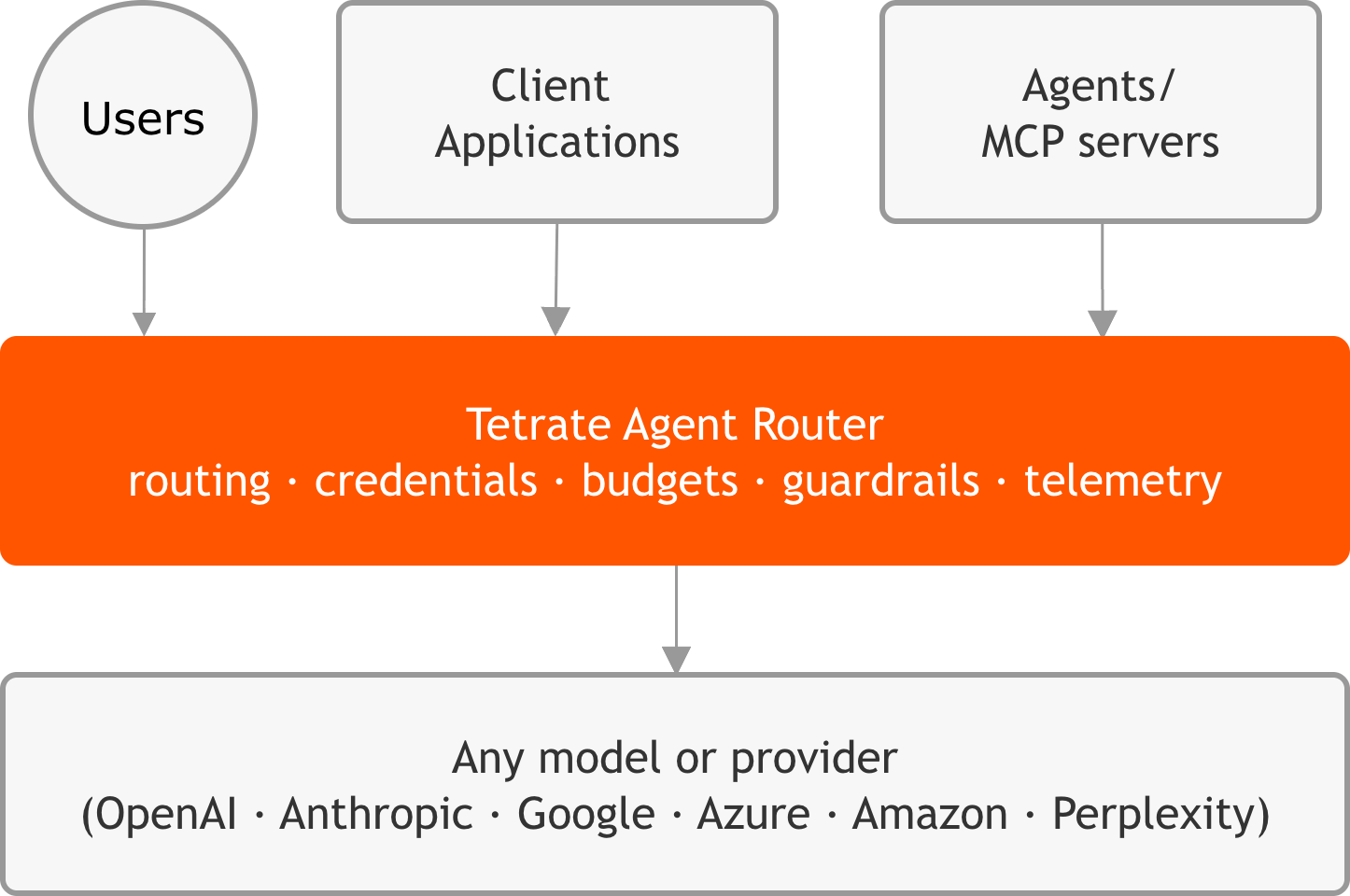
Agent Router is not a model, and it does not replace the providers. It is the layer that makes all of them usable on consistent terms: one interface for the people building with AI, one set of controls for the people accountable for cost, security, and compliance, and one record of what is actually used. Because requests are expressed against a single OpenAI-compatible interface, existing application code reaches any configured provider without per-provider integration work.
In Self-Hosted Data Plane deployments, all AI traffic runs inside the customer's own environment: prompts, responses, and provider credentials never leave the customer network. Tetrate hosts only the configuration and analytics that keep Agent Router manageable, and no request content crosses that boundary. In the fully hosted paths (Service and Enterprise Fully Managed), Tetrate operates the data plane as well. This division is the split-plane model described under How it fits together.
What Agent Router changes
Most organisations reach Agent Router Enterprise after AI is already in production, once an improvised, per-application approach has begun to cost them in spend, risk, and operational effort. The six areas below are where a governed path replaces that improvisation.
Six areas that change
Provider independence
Each provider is integrated, priced, and maintained differently, and when one retires a model, every application that used it has to be updated. Agent Router hides those differences behind a single OpenAI-compatible endpoint. Providers are added, swapped, or combined through configuration rather than application changes, and a routing chain can span several providers at once. The choice of provider becomes a configuration decision rather than an engineering constraint.
Visibility into cost and usage
Without a gateway, AI usage is scattered across provider dashboards, application logs, and spreadsheets, so basic questions (which team spent the most this month, which model returns the most errors) become investigations. Agent Router records every request in one place and reports cost and usage as it happens, broken down by team, by key, and by model. The same per-request data is exported over OpenTelemetry (OTEL) into the monitoring tools already in use.
Policy-based governance
Left unmanaged, AI access sprawls: developers hold raw provider keys, no one decides which models are approved for which work, and budgets surface only after the spend has happened. Agent Router centralises the controls. Models, providers, and credentials are managed in one place; each team, application, or project is granted its own access and limits; budgets and rate limits are enforced inline at the gateway; and every administrative action is captured in an audit log. Governance becomes configuration rather than convention.
Resilience to provider failure
Production AI cannot depend on a single provider staying healthy. When one slows down or begins returning errors, applications without a fallback fail or behave unpredictably. Agent Router reroutes automatically: each API key carries an ordered list of backends, and the gateway advances to the next one the moment a provider fails, within the same request. The application receives a clean response, and the failure is recorded for the operations team.
Agent-ready infrastructure
AI agents increasingly reach tools and data through Model Context Protocol (MCP) servers, one per file store, ticketing system, or documentation source. Wiring each agent to each server by hand produces unmanageable configuration and no control over what is reachable. Agent Router aggregates MCP servers behind a single endpoint and governs them with the same identity, audit, and access controls as model traffic, so agents are adopted without a loss of oversight.
Central and team-owned credentials
Most organisations run on a mix of central and team-owned AI accounts: a central team funds the bulk of usage, while a business unit keeps its own provider account for compliance or billing. Agent Router supports Bring Your Own Key (BYOK), where a team's own credentials sit alongside centrally managed ones. Policy, rather than application code, decides which credentials a given request uses, and both kinds can appear in the same routing chain.
How it fits together
Two structural ideas shape how Agent Router is run, and both matter to whoever is accountable for it. The first is the split between the plane that carries traffic and the plane that stores configuration.
Data plane
Runs in the customer environment
A deployment in the customer's own Kubernetes cluster that handles all live AI traffic. Every prompt and response passes through it, so sensitive data and credentials stay inside the customer's infrastructure.
Management plane
Hosted by Tetrate
Holds configuration, policies, audit history, and analytics. It publishes configuration to the data plane and receives telemetry back, but no request content passes between the two.
The two planes are joined by a single connection that the data plane opens outward to the management plane, so no inbound access to the customer environment is required. The mechanics of that connection, and the components inside the data plane, are covered in Planes and core components.
The second idea is the split between Agent Router's two applications, the Developer Console and the Admin Dashboard, covered next. The Architecture overview traces the data plane, the management plane, and the path an AI request takes between them.
The two applications
Agent Router is used through two web applications, each aimed at a different audience but built on the same foundation. Developers work in the Developer Console to build against the gateway: issuing API keys, shaping routing, and watching their own traffic. Platform operators work in the Admin Dashboard to govern Agent Router: provisioning the models and providers, users, and policies that everyone else works within. The two are not separate products but two views of one system, so a model an operator enables in the Admin Dashboard becomes available to a developer in the Console without any handoff.
Both applications sit above the same shared backend, which stores configuration and serves it to each application, and both ultimately shape how the AI Gateway behaves. That layering is the key to reading the diagram below: the operator configures a resource, the developer consumes it, and the gateway enforces the result on every request. Nothing a developer sees in the Console exists independently of what an operator has set up behind it.
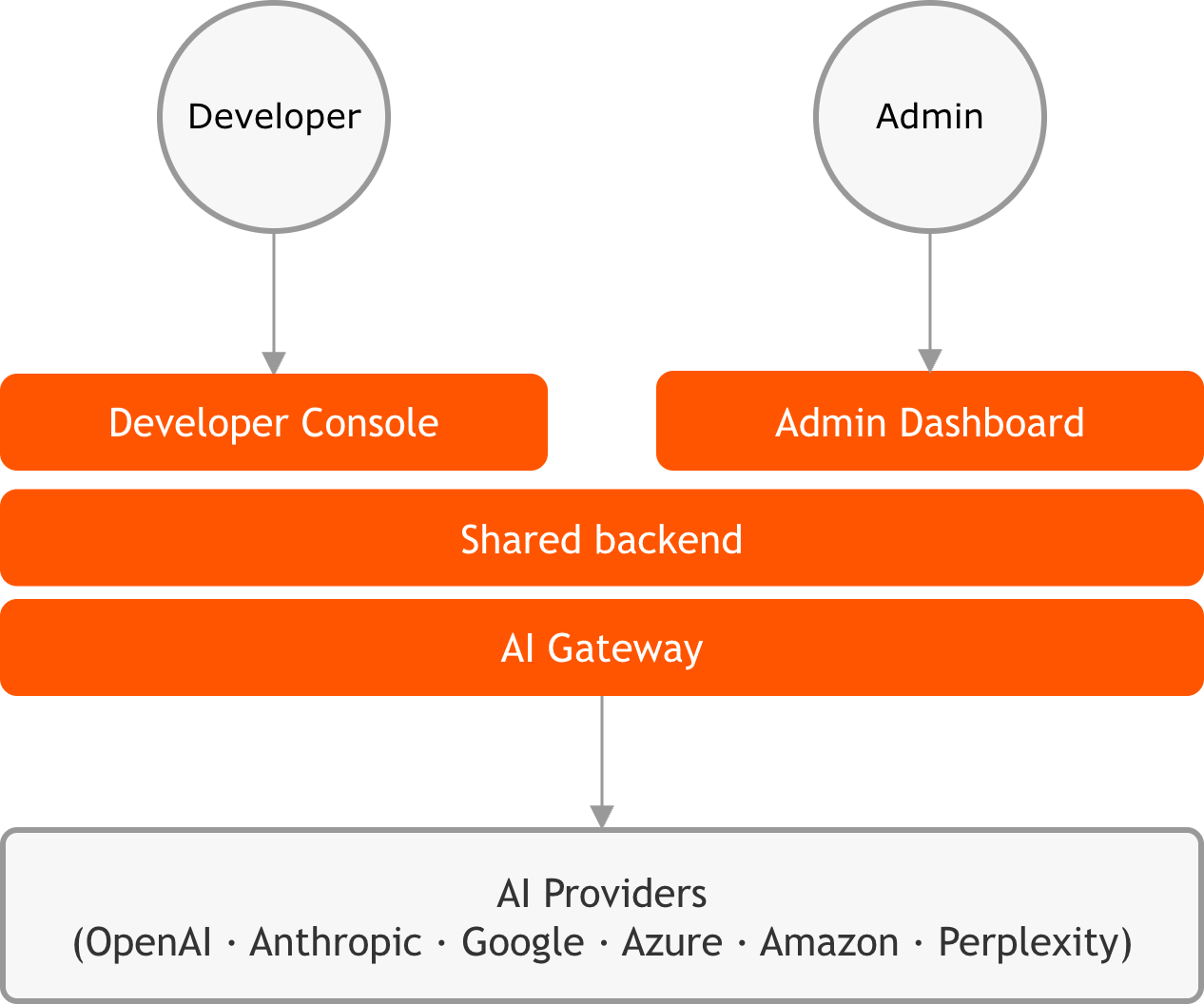
Application roles
The two applications exist because developers and platform operators come to Agent Router with different questions. A developer asks how to route a request, hold a key, or test a prompt; an operator asks which models are allowed, who may use them, and what it all costs. Splitting those concerns into two applications means each audience sees only the surface relevant to its work, rather than one crowded interface that tries to serve both.
The division follows a single rule: the operator provisions and governs a resource in the Admin Dashboard, and the developer consumes it in the Console. Models, providers, credentials, and policies are set up on the operator side and become the options a developer works within on the developer side. The two cards below list what each application provides, and the same pairing runs through every row: what the Admin Dashboard manages, the Console uses.
Developer Console
The Console is the developer-facing application. It provides:
- API key management: Create and configure keys that authenticate requests to the AI gateway
- Model catalog: Browse 200+ models across all supported providers
- Playground: Test model routing interactively before integrating
- MCP Profiles: Combine multiple MCP servers into unified endpoints
- Integrations: Setup guides for Claude Code, Cursor, LangChain, CrewAI, and more
- Usage monitoring: Track request volumes, costs, and latency in real time
- Routing configuration: Define fallback policies and traffic splitting rules per API key
Admin Dashboard
The Admin Dashboard is the operator-facing application. It provides:
- Model management: Enable, disable, and configure which AI models are available
- Provider management: Manage AI provider credentials and connection settings
- User management: Create accounts, assign roles, and manage access
- MCP servers: Manage the catalog of MCP servers available to Console users
- SSO configuration: Set up OIDC single sign-on
- Audit logs: View a tamper-resistant history of administrative actions
- Announcements: Publish organization-wide notifications to Console users
How the applications connect
The two applications are not separate systems that hand data back and forth; they are two front ends on the same shared backend. That backend is the single source of truth for identity, models, keys, audit records, and usage, so there is nothing to export from one application and import into the other. A model enabled, a user assigned a role, or a key revoked in one place is immediately reflected wherever that resource appears.
What connects the applications, then, is the set of resources they both draw on, each from its own side. The table below reads each shared resource across the two applications: the same underlying object, with the Admin Dashboard managing it and the Console consuming it.
Both applications share a common authentication system. Users sign in once and can switch between applications using the app switcher in the navigation bar.
| Shared Resource | Console | Admin Dashboard |
|---|---|---|
| User identity and SSO | Uses | Configures |
| Model registry | Browses, routes to | Manages |
| API keys | Creates, uses | Manages |
| Audit logs | Generates | Generates, views |
| Usage metrics | Views own | Views all |
The division is consistent: the Admin Dashboard configures and manages a resource, and the Console consumes it. Single sign-on is configured in Configure single sign-on, and the developer and operator entry points are covered in the Console quickstart and the Admin quickstart.
How access is organised
Access in Agent Router is organised into projects. A project is the boundary that owns a set of models, API keys, MCP servers and profiles, routing and policy, budgets, and members, and it is the unit that usage and audit are attributed to. It is the way a shared deployment is divided cleanly among the teams and applications that use it.
Each project is served by its own gateway, a single inference URL, so one team's or one application's configuration stays isolated from the next. That isolation is enforced at request time: a key issued for one project cannot call another project's models, and a model a project has not been granted cannot be reached through it. A gateway runs on a data plane, and projects can share one data plane or be spread across several by region or cloud. The full model, and how the three objects relate, is defined under Projects.
The path of a request
Every request follows the same governed path through the data plane, whichever provider ultimately serves it:
- An application sends a request to its project's gateway endpoint, using the OpenAI-compatible API and a project-scoped API key.
- The gateway authenticates the key and identifies the project and team the request belongs to.
- The routing chain on the key selects a backend (a model on a provider, together with the credentials to reach it), applying fallback, traffic-splitting, or attribute-based rules as configured.
- Policy is enforced inline: guardrails inspect the prompt, and budgets and rate limits are checked before the request is forwarded.
- The request is sent to the selected provider. If that provider fails, the gateway advances to the next backend in the chain within the same request, so the application still receives a single clean response.
- The response returns through the gateway, where guardrails can inspect it, and the cost and usage of the exchange are recorded before the response reaches the application.
Every step runs inside the customer's data plane. The management plane supplies the rules beforehand and receives telemetry afterwards, but never sees request content. The gateway's request-handling behaviour, including error normalisation and correlation IDs, is detailed in Gateway behavior.
What Agent Router provides
Agent Router's capabilities fall into four areas.
| Area | What it includes |
|---|---|
| Routing | One endpoint to 200+ models across OpenAI, Anthropic, Google, Azure, Mistral, and more; automatic fallback between providers; weighted traffic splitting; and routing rules based on request attributes. |
| Identity and access | Per-team and per-application access, each with its own limits; enterprise single sign-on (SSO); role-based access in both the Console and the Admin Dashboard; and Bring Your Own Key (BYOK) alongside centrally managed credentials. |
| Observability | Request logs, usage analytics, and cost reporting in the Admin Dashboard; export to existing monitoring tools over OpenTelemetry; and audit logging for every administrative action. |
| Agent infrastructure | MCP aggregation behind a single endpoint; tool catalogues usable by AI clients such as Claude Code, Cursor, and VS Code; and a Playground for testing prompts against any configured provider. |
Each area is expanded, with the specifics that matter when evaluating the product or planning a rollout, in Solution capabilities. The vocabulary used throughout is defined in Key concepts.
Ways to run it
Agent Router is delivered in three get-started paths: Agent Router Service, Agent Router Enterprise Fully Managed, and Agent Router Enterprise Self-Hosted Data Plane. The management plane is always Tetrate-hosted; the paths differ in where the data plane runs and who operates it. The trade-offs between them, and the networking, residency, and operational implications of each, are covered in Deployment models.
Where to go next
Continue reading
Who this documentation is for
The readers the documentation serves (evaluators, developers, and operators) and where each should start.
Key concepts
Defines the vocabulary used across the documentation, including data plane, project, fallback policy, BYOK, and MCP profile.
Solution capabilities
How Agent Router passes structured outputs, multimodal inputs, and function calling through to any provider, translating across providers where mappings exist.
Architecture overview
Walks through the data plane, the management plane, and the path a request takes between them.
Planes and core components
Where the two applications sit relative to the customer-managed data plane.
Deployment models
How the applications are delivered in the fully hosted and self-hosted paths.
Get started
Covers prerequisites and installation on AWS, Azure, and GCP.
Guides for developers
The developer workflows, for readers whose role is already clear.
Guides for platform operators
The operator workflows, for readers whose role is already clear.