Configure guardrails
A guardrail is a named policy for a project: a collection of rules plus shared settings such as failure mode, evaluation timeout, and a blocked-response message. Each rule names a check type (what to look for), a provider (the guardrail provider that scores the content), an action (block or redact), and a mode (enforce or monitor).
Persona: Platform operator working in the Admin Console, often alongside security and compliance stakeholders who own the underlying policy.
Estimated time: 20 to 40 minutes for a first guardrail, including time spent validating in monitor mode; less thereafter once the pattern is familiar.
When this guide applies
| Situation | What it covers |
|---|---|
| Creating a project baseline safety policy | Add guardrail, or clone from the template catalog |
| Redacting personally identifiable information (PII) or secrets before traffic reaches a model | A redact rule with the regexp, builtin, or tetrate provider |
| Blocking jailbreaks or prompt injection | A block rule with jailbreak or prompt_injection |
| Piloting a new rule without disrupting live traffic | Monitor mode before promote to enforce |
| Reusing a canonical regex across many rules | The Patterns library |
For how the guardrail providers differ and which check types each supports, see Configure guardrail providers. For the developer-side view of blocked and redacted traffic, see Protect requests with guardrails.
Outcomes
By the end of this guide:
- At least one guardrail exists in the selected project with type, category, severity, failure mode, and timeout set.
- At least one rule is attached with a supported check type, provider, action, and mode.
- The guardrail has been validated in monitor mode against live traffic before enforcement.
- Project scope, patterns, and the template catalog are understood.
Prerequisites
- Administrator access to the Admin Console with permission to manage guardrails for a project.
- An active project selected. Guardrails are bound to a project, not the organization.
- A written statement of the policy the guardrail is meant to enforce.
- For pattern-based rules: the specific terms or catalog pattern names to match, ideally reviewed with the policy owner.
Enabling guardrails
A guardrail is created disabled. It must be enabled before it takes effect.
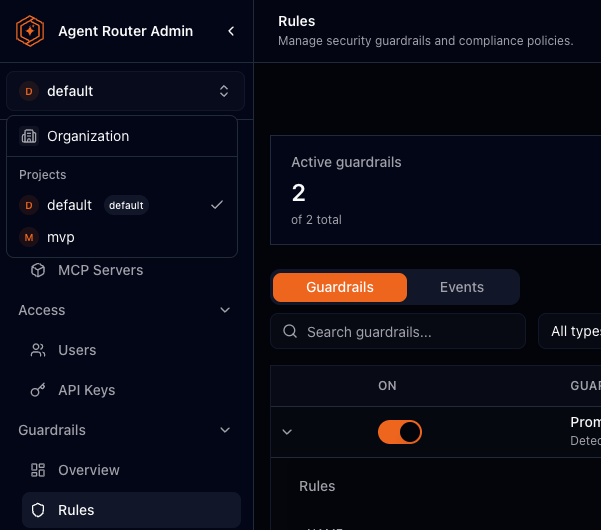
Step 1: select the project
Guardrails, patterns, and guardrail providers all operate inside the currently selected project. A guardrail authored under one project does not apply to another.
- Sign in to the Admin Console.
- Use the top-left selector to choose the project (not Organization scope).
Step 2: open Rules and choose how to create the guardrail
- Open Guardrails → Rules.
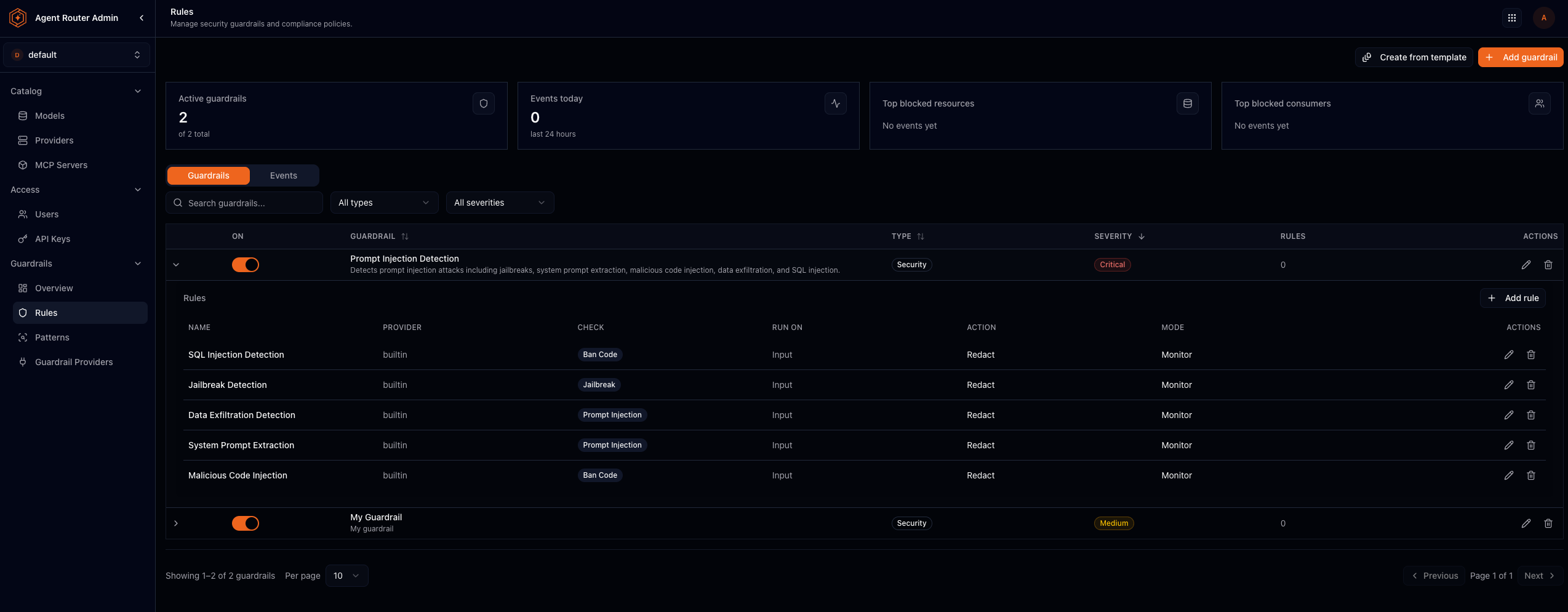
Two entry points create a guardrail in the current project:
- Add guardrail: start empty. Name the policy, set type, category, severity, failure mode, evaluation timeout, and blocked-response message, then add rules one at a time.
- Create from template: clone a curated guardrail from the catalog (rules already wired) and tailor it.
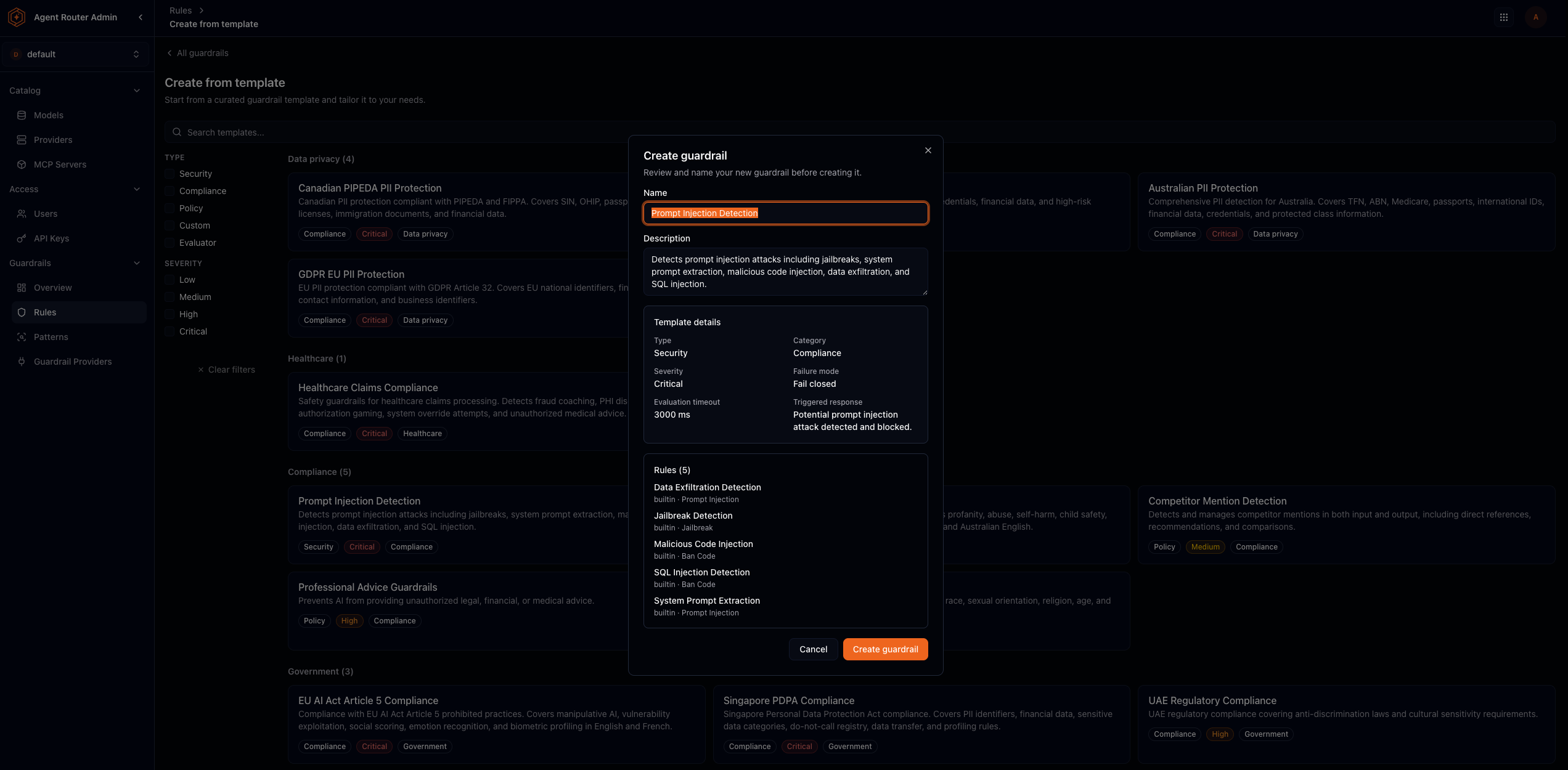
Templates are grouped by domain (for example data privacy, healthcare, and compliance) and filterable by type and severity. Cloning copies a fully formed guardrail into the project; edit it afterward like any other policy. Since 0.4.0 the clone binds each rule to the project's own provider of the matching kind, so the guardrail enforces as soon as it is enabled; in a project that owns no provider of a kind the template needs, the clone is refused with an error naming that kind, rather than created with rules that can never run.
Step 3: set guardrail-level settings
When adding a guardrail from scratch, supply:
| Setting | Meaning |
|---|---|
| Name | Display name; use a phrase that states the policy |
| Type | Broad purpose (for example Security, Compliance, Policy, Custom) |
| Category | Domain context (for example data privacy, healthcare, government, custom) |
| Severity | Risk level of violations this policy catches |
| Failure mode | If a provider cannot evaluate a rule: fail-close (default) treats it as blocked; fail-open lets traffic pass |
| Evaluation timeout (ms) | Maximum time to wait for evaluation before the failure mode applies |
| Triggered response | Optional message returned when a block fires |
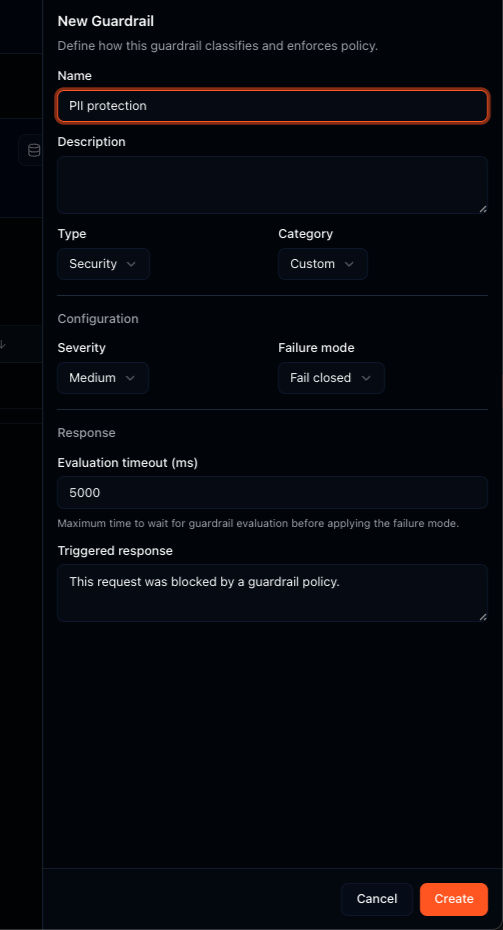
Creating the guardrail does not by itself change live traffic until rules are active and set to enforce mode.
Step 4: add a rule
A rule is the unit of enforcement. It answers what to look for, where to look, who evaluates it, and what to do on a hit.
| Field | Meaning |
|---|---|
| Name / description | Optional labels for the rule |
| Active | Whether the rule is evaluated |
| Provider | The guardrail provider that scores the check (regexp, builtin, or tetrate, or another configured provider) |
| Check type | Canonical safety check (for example pii, toxicity, jailbreak, banned_topics) |
| Run on | Input, output, or both. Leaving it unset means both, so a check the provider supports on only one stage needs the stage set explicitly |
| Action | block or redact: what enforcement would do |
| Mode | enforce applies the action; monitor records the would-be action without applying it |
| Configuration | Structured fields for the selected provider and check-type pair, with an Edit as JSON (advanced) panel underneath for the stored form |
| Triggered response | Optional message shown when this rule fires |
Provider and check type are chosen first because they determine everything below them. The check-type list is scoped to the selected provider, so an unsupported pair cannot be created; the full matrix of provider, check type, and stage is in the guardrails reference, and an unsupported combination submitted directly to the API is rejected at save time with an error naming the supported set. Changing either dropdown replaces the Configuration section with the fields that pair needs, and switching provider re-seeds it: regexp starts as {"regex":{"patternNames":[]}}, tetrate as {}, and builtin opens its structured form.
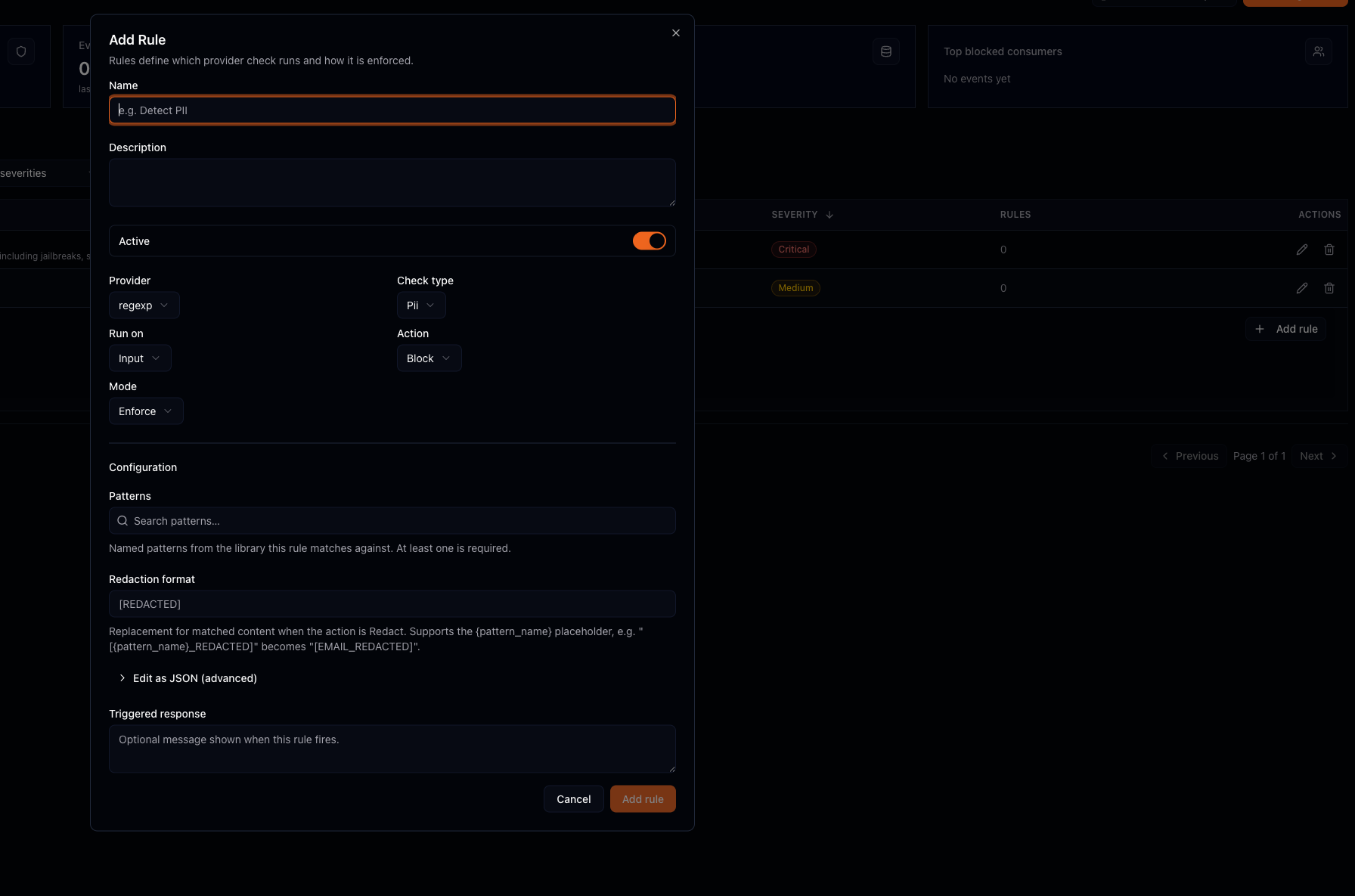
regexp with pii: the configuration is a pattern picker plus a redaction format, which accepts the {pattern_name} placeholder.
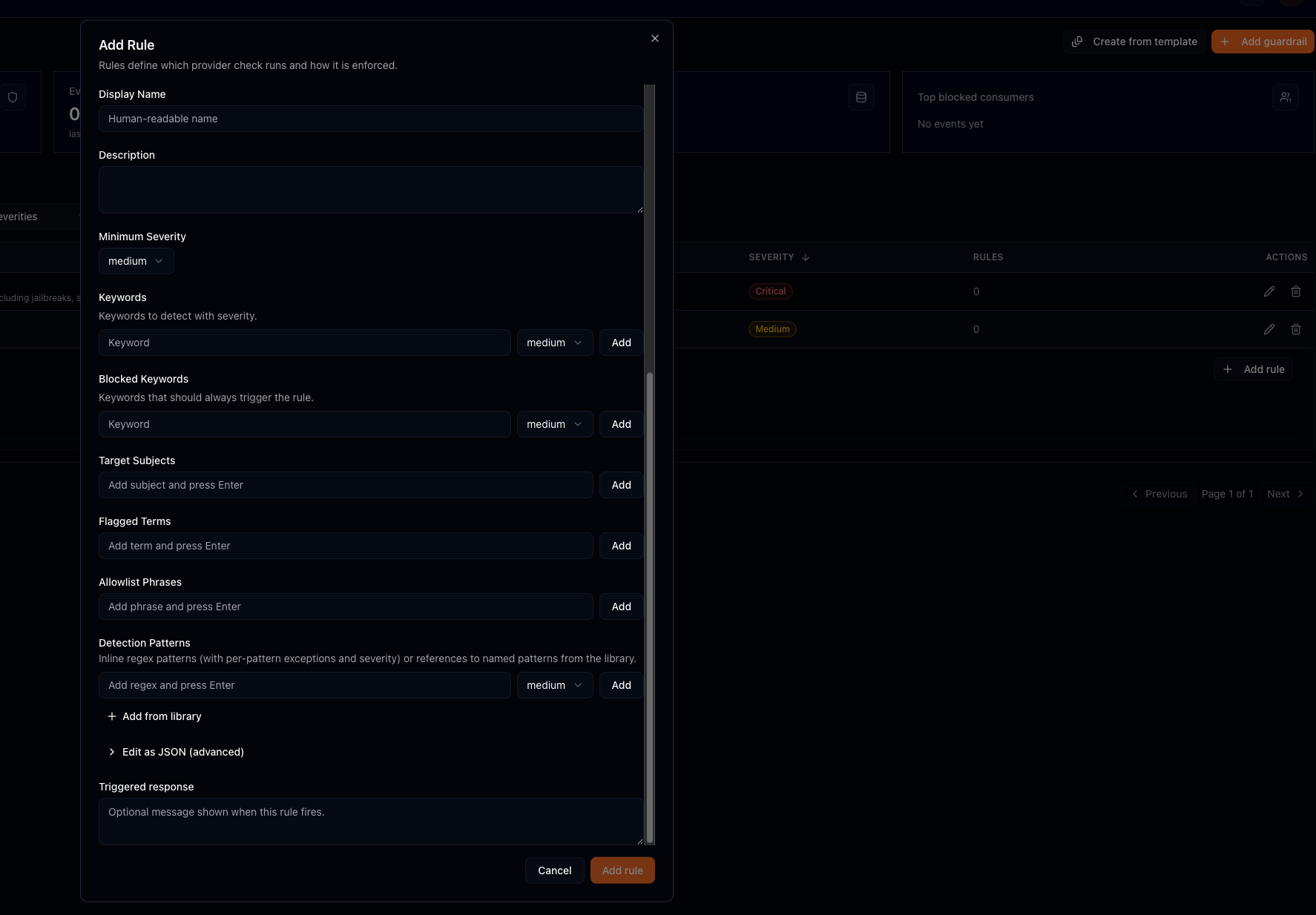
builtin: the same rule shell with a multi-field configuration covering each layer of its detection pipeline.
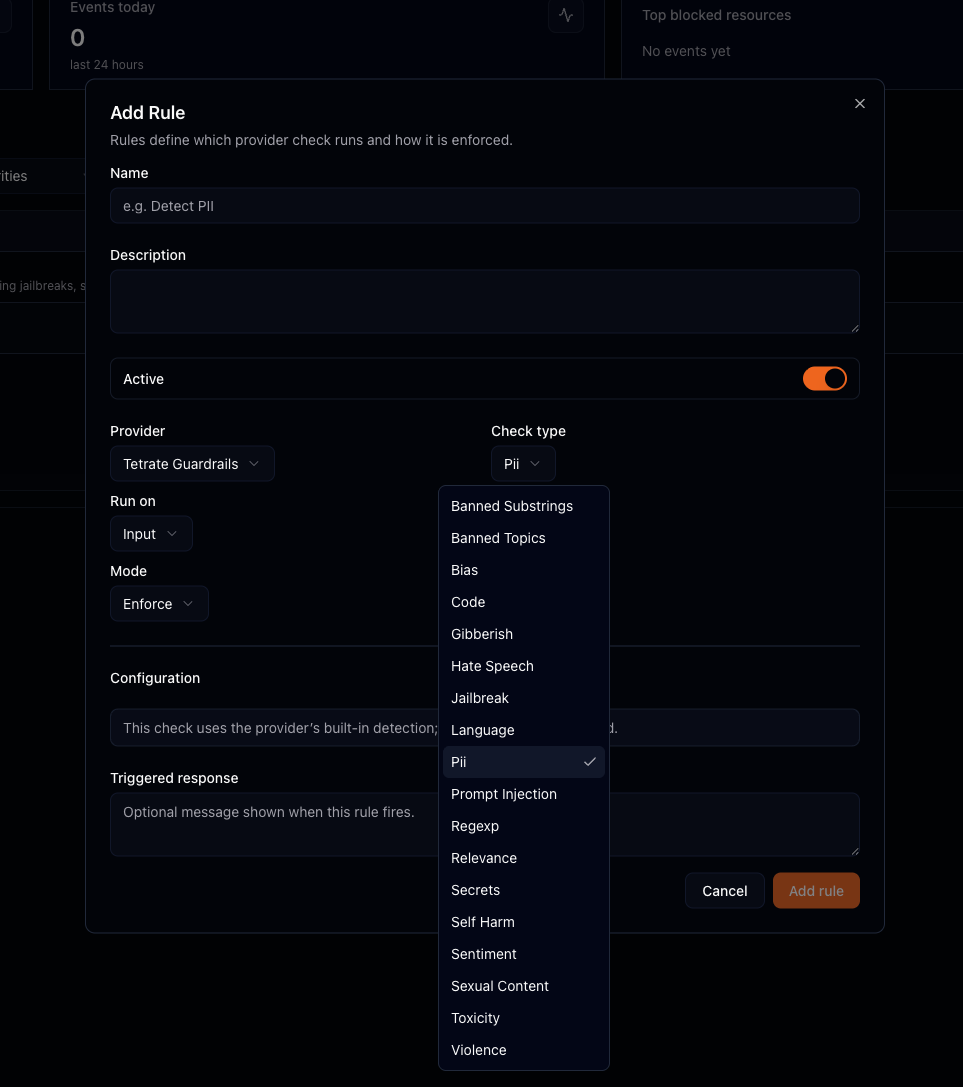
tetrate: the check-type dropdown is scoped to the ML checks this provider can run.
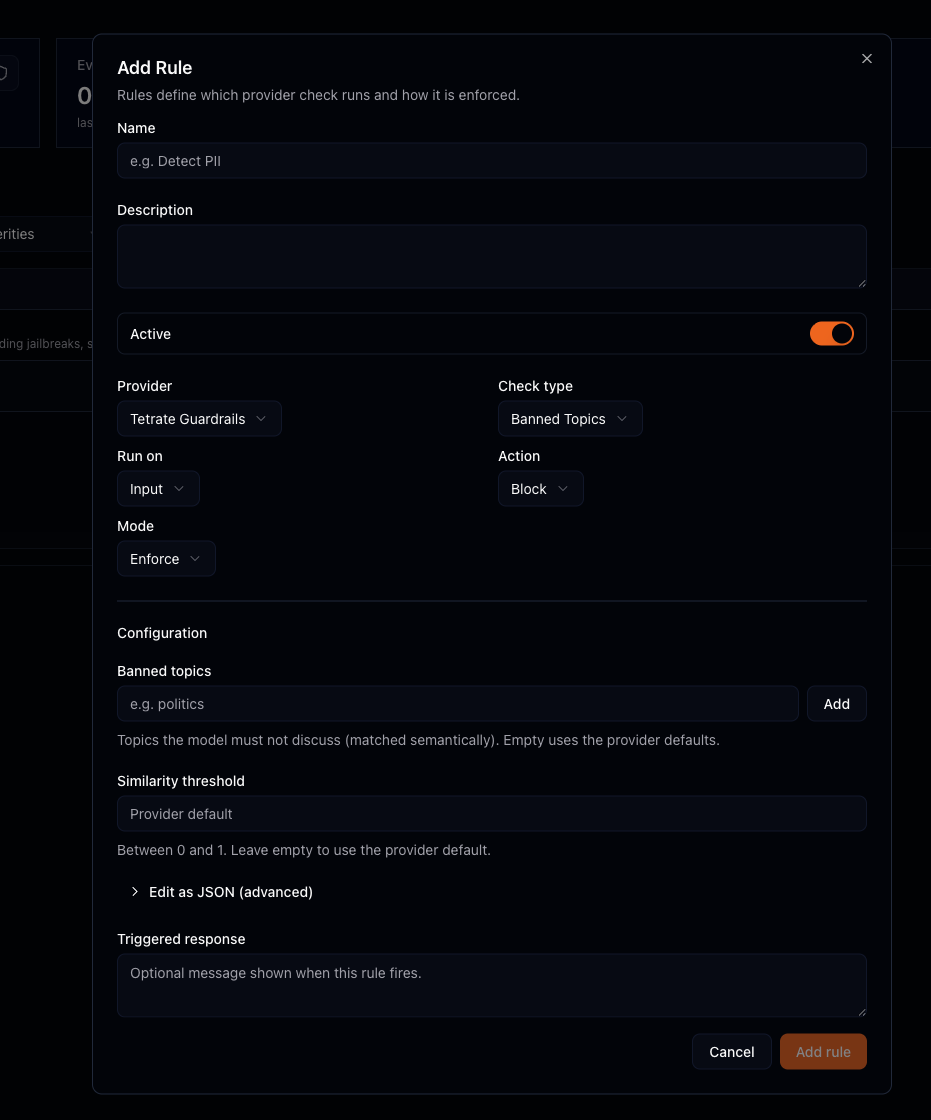
tetrate with banned_topics: a list of topics matched semantically rather than literally, plus a similarity threshold.
Whatever the form shows is stored as the rule's configuration and forwarded to the provider as that check's parameters. The Edit as JSON (advanced) panel exposes that stored object for cases the fields do not cover.
Providers score; the gateway decides. A provider never chooses to block or redact on its own: it returns a normalized score, and for redaction a sanitized copy of the text. A block returns an error code. A redact swaps in the sanitized text and may re-run providers with rules still pending against the new content. The full sequence is under How evaluation works for one rule.
Step 5: use the Patterns library
A pattern is a named regular expression (for example a national identifier format) stored in a shared catalog. Rules can reference patterns by name instead of embedding regexes, so one canonical definition is reused across many rules.
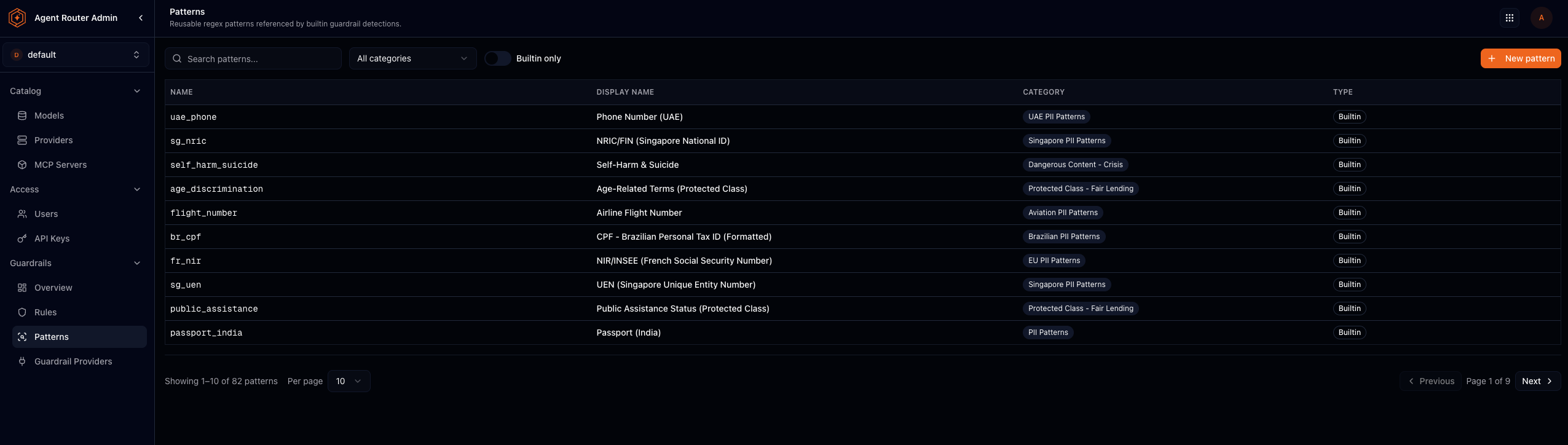
The library ships many built-in entries grouped by category (82 in a typical deployment). Filter to built-in only, search by name, or add a custom pattern. A rule on the regexp provider selects patterns from this library in its Patterns field; the builtin provider's detection patterns can each name a catalog entry instead of carrying an inline regex.
Step 6: validate in monitor mode before enforcing
There is no separate test-content surface that dry-runs a rule against pasted samples. Validation is monitor mode against live traffic:
- Create or edit the rule with the intended action (
blockorredact) and set mode to monitor. - Allow representative traffic through the project.
- Review whether the rule would have fired at an acceptable rate (false positives and misses).
- Only then switch mode to enforce.
Fail-close remains the default when a provider errors; set fail-open deliberately on paths where availability must dominate safety. See Guardrails best practices and FAQ.
How evaluation works for one rule
- The gateway groups active rules by provider and hands each provider its checks.
- The provider scores the content and may return a sanitized copy if it transformed anything.
- The gateway compares the score to the threshold.
- On a violation: enforce applies block or redact; monitor records the would-be action and continues.
If a provider errors, the guardrail's failure mode decides: fail-close treats the rule as blocked; fail-open skips it.
Where to go next
Configure guardrail providers
Choose regexp, builtin, or tetrate for each rule.
Protect requests with guardrails
How developers see blocks and redactions.
Detect and redact sensitive data
PII and secrets workflows built on these rules.
Detect and block prompt injection
Jailbreak and injection checks.
Guardrails best practices and FAQ
Rollout and investigation.