Where to begin
Ordered setup paths, a task index by goal, and a map of how the rest of the documentation is arranged.
Set it up
Requirements, installation, and first request, in the order they are done.
Already runningFind a task
Configuring SSO, provisioning models, setting a budget, and the rest, by goal.
Checking a detailLook something up
API surfaces, CLI flags, metric names, provider lists, and definitions.
Which product
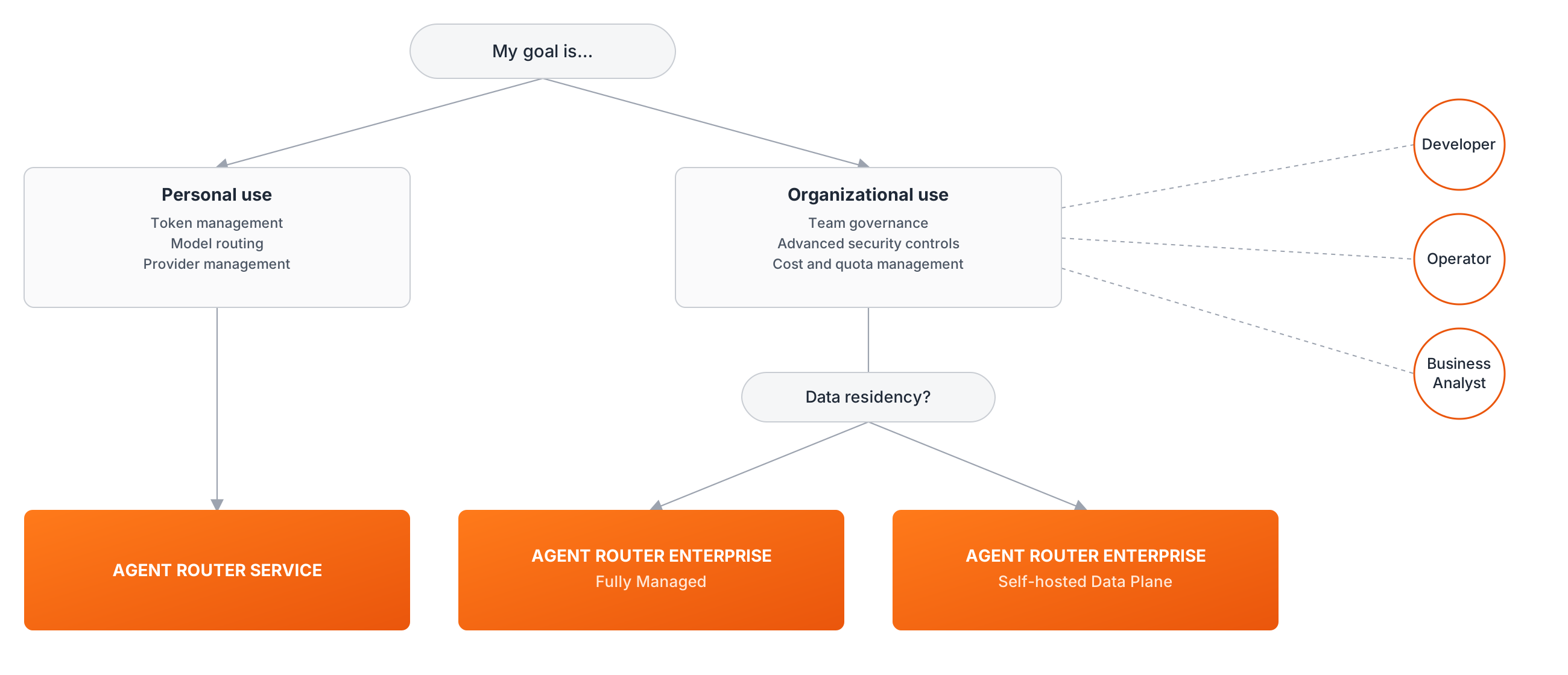
Three get-started paths end at the same place, a working gateway serving a routed request. Two tiers are available, Agent Router Service and Agent Router Enterprise, and Enterprise has two deployment models that differ in where the data plane runs.
Agent Router Service
Multi-tenant and hosted by Tetrate. Nothing to install.
10-minute quickstart →Enterprise, Fully Managed
A dedicated instance with operator controls, hosted end to end by Tetrate.
Fully Managed →Enterprise, Self-Hosted Data Plane
The same controls, with AI traffic kept on customer-managed infrastructure.
Self-Hosted Data Plane →Where the choice is still open, the feature comparison on the welcome page sets Service against Enterprise, and the flowchart under Still choosing a product walks the deployment constraints.
First time here
Each path runs from requirements through installation to a first routed request. Working down a column is the shortest route to a working deployment.
Agent Router Service
Nothing to install. Sign in and route a request.
Enterprise, Fully Managed
Tetrate provisions and hosts everything. Onboarding configures it.
Enterprise, Self-Hosted Data Plane
Read the requirements first. The install runs in a customer-managed cluster.
For a self-hosted install, Prerequisites is the page to read before anything else. It covers the Kubernetes version, the connections a cluster needs, what a security review asks for, and which version to install.
Find a task
Nine areas cover the operational surface.
Access and identity
Single sign-on, role mapping, roles and permissions, developer onboarding.
Models and providers
Provider connections, enabling models, Bedrock, self-hosted models, and Bring Your Own Key (BYOK).
Routing and resilience
Routing across providers, fallback chains, traffic splitting, integration.
Cost and quotas
Budgets, ceilings, rate limits, attribution, chargeback, spike alerts.
Safety and guardrails
PII redaction, prompt injection, vendor and custom guardrails.
MCP and agents
Model Context Protocol (MCP) profiles, server governance, OAuth clients, secrets and identity.
Observability
Usage analytics, request logs, OpenTelemetry export, custom backends.
Projects and gateways
Projects, project Users, project keys, gateway provisioning, data planes.
Compliance and audit
Data residency, log retention, audit trails, SIEM export.
Most requested tasks
| Task | Guide |
|---|---|
| Set up single sign-on | Configure SSO |
| Map identity provider claims to roles | Configure SSO role mapping |
| Drive access from existing Entra ID groups | Map Entra groups to functions |
| Check what each role is allowed to do | Manage roles and permissions |
| Add developers and issue them keys | Onboard developers and issue keys |
| Add a provider and enable its models | Provision models and providers |
| Use AWS Bedrock models | Provision AWS Bedrock models |
| Add a self-hosted or custom model | Custom and self-hosted models |
| Let callers supply their own provider key | Use your own provider credentials |
| Send requests to several providers through one endpoint | Route requests across providers |
| Fail over automatically when a provider errors | Improve resilience with fallbacks |
| Split traffic between two models | Reduce cost with traffic splitting |
| Route on a logical model name | Apply advanced routing rules |
| Point an application or coding assistant at the gateway | Integrate the gateway with an app |
| Decide between budgets, rate limits, and tags | Choose the right cost control for each workload |
| Cap what a team can spend | Set a budget and track spend against it |
| Attribute cost to an app or project | Know what every app and project actually costs |
| Charge spend back to the teams that caused it | Split the AI bill across the teams that caused it |
| Stop a runaway workload | Stop runaway workloads before they burn the budget |
| Contain a leaked API key | Contain a leaked key before it drains the budget |
| Get alerted when spend spikes | Get alerted to cost spikes as they happen |
| Understand what guardrails do | About guardrails |
| Redact personal data from prompts | Detect and redact sensitive data |
| Block prompt injection | Detect and block prompt injection |
| Protect coding-assistant traffic | Protect coding-assistant traffic |
| Give agents a single MCP endpoint | Aggregate MCP servers into a profile |
| Control which MCP servers are reachable | Govern MCP server access |
| Create a project | Create and delete a project |
| Provision a gateway | Provision a gateway for a project |
| Issue a project-scoped API key | Issue a project-scoped API key |
| Add or remove project Users | Manage project Users and access |
| Install a data plane in a cluster | Data plane installation |
| Investigate one request | Monitor traffic and usage |
| Get the first readings out of analytics | See where AI spend is going |
| Send traces and metrics to Grafana or Datadog | Export telemetry to observability |
| Review who changed what | Audit Agent Router activity |
| Export audit records to a SIEM | Export audit decisions to SIEM |
| Keep data in a particular region | Configure data residency |
Anything not listed is usually fastest to reach through the search box in the top navigation, which indexes the full text of every page.
How these docs are organized
The sidebar has four sections below this page.
| Section | What it holds | Go here when |
|---|---|---|
| Agent Router Service | Quickstarts and developer guides for the multi-tenant hosted product | An application or agent is being pointed at the gateway |
| Agent Router Enterprise | Operator guides, the Fully Managed and Self-Hosted install paths, and the release notes | Agent Router is being run and governed for a team |
| Product & Architecture | Planes and components, data flows, network and security, key concepts, evaluation material | The design has to be understood or explained to someone else |
| References | Gateway and management APIs, the CLI, the SDK, providers, glossary, best practices | An exact name, value, or schema is needed |
Anything phrased as a goal ("keep team spend inside a ceiling") is a guide and lives under Service or Enterprise. Anything phrased as a thing ("audit log events", "OpenTelemetry traces and metrics") is reference material and lives under References.
Look something up
Glossary
Definitions for data plane, fallback policy, MCP profile, guardrail, and the rest.
Gateway APIs
The inference endpoints the gateway speaks, with request and response shapes.
Supported providers
The provider families the gateway routes to and how each is authenticated.
Management API reference
Generated reference for every management API service, from the OpenAPI specs.
tetrate CLI reference
Every tetrate command and flag, including install, upgrade, and diagnostics.
OpenTelemetry traces and metrics
Exact metric and span names for dashboards and alerting rules.
Release notes
What changed in each release, the support window, and what is deprecated.
Still choosing a product?
The flowchart picks a path from the deployment constraints, chiefly where the data is allowed to go.