Architecture overview
Tetrate Agent Router is an AI gateway platform that provides unified, policy-controlled access to large language models across multiple providers. All AI traffic flows through a customer-managed data plane, keeping prompt and response data inside the customer's own infrastructure.
Product overview
The diagram below shows how the main applications sit above a shared platform layer, which in turn connects to the AI gateway routing traffic to upstream providers.
System architecture
The platform uses a split-plane model: a management plane hosted by Tetrate holds configuration and exposes the web applications, while a data plane deployed in the customer's Kubernetes cluster handles all AI traffic. The two planes communicate over a single outbound HTTPS connection initiated by the data plane; no inbound connections from the internet to the customer environment are required.
Data flow
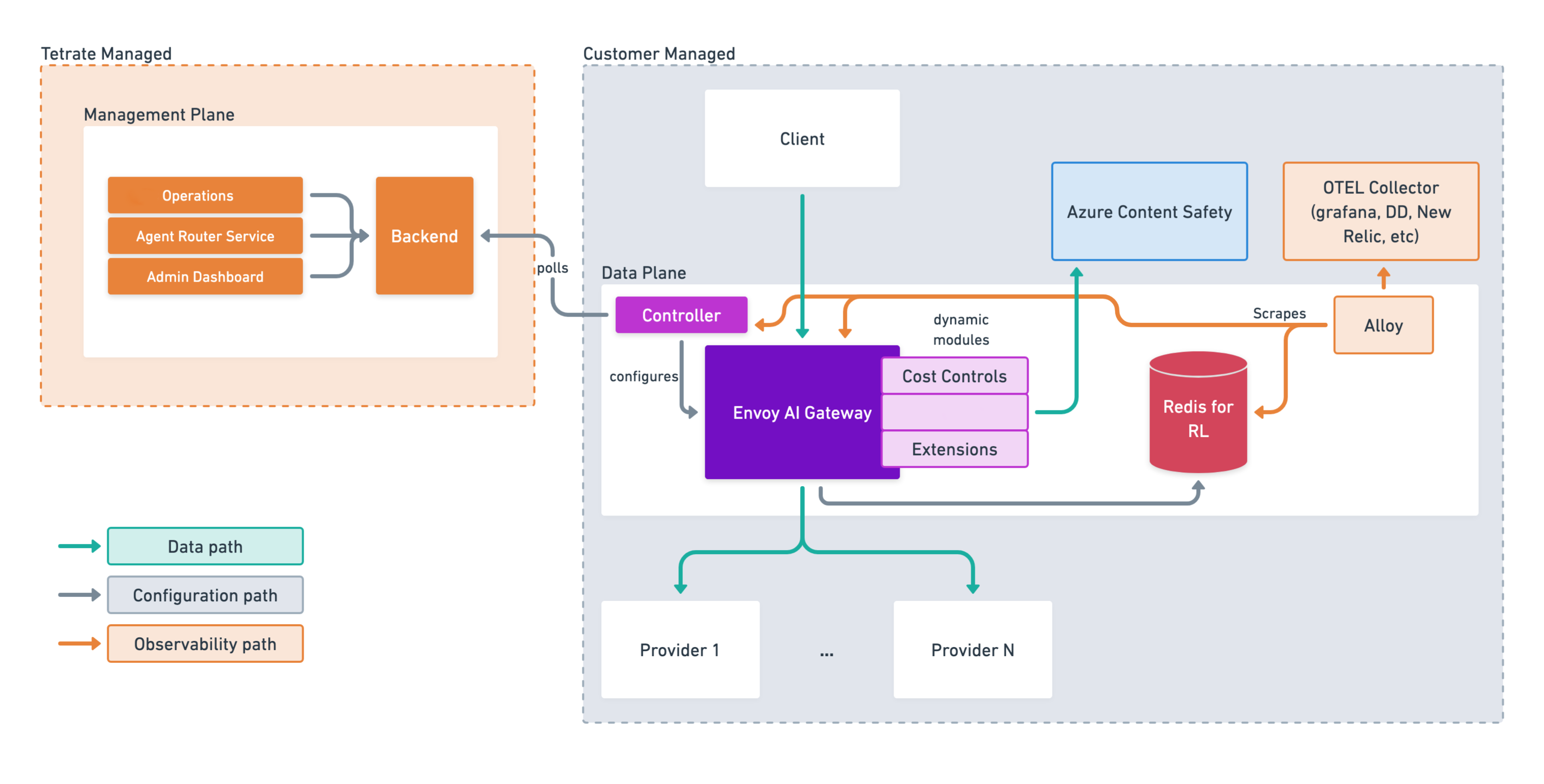
The platform has three distinct categories of data flow, each traveling over a separate path to keep operations isolated and secure. The diagram below shows all three flows spanning both the Data Plane and the Management Plane.
Traffic flow
-
Configuration flow (Grey Arrows): The Controller in the Data Plane securely polls the Backend in the Management Plane for policy updates on a regular schedule. It translates those updates into AI gateway configuration. This is a one-way, outbound-only connection: no inbound traffic from the Management Plane to the Data Plane is ever required, which simplifies firewall rules and reduces attack surface.
-
Data/Request flow (Green Arrows): The actual prompt and response traffic. Requests originate from client applications, pass through the AI gateway (where routing decisions, rate limiting, guardrail enforcement, and content safety checks are applied), and are forwarded to the selected downstream AI provider. Responses follow the same path in reverse.
-
Observability flow (Orange Arrows): Telemetry, metrics, and structured logs are collected across the Data Plane. A local Grafana Alloy agent scrapes observability data from the Gateway, Controller, and Redis instances. This data is forwarded to an OpenTelemetry (OTEL) Collector, which routes the telemetry to external monitoring platforms such as Grafana, Datadog, or New Relic.
Operating model
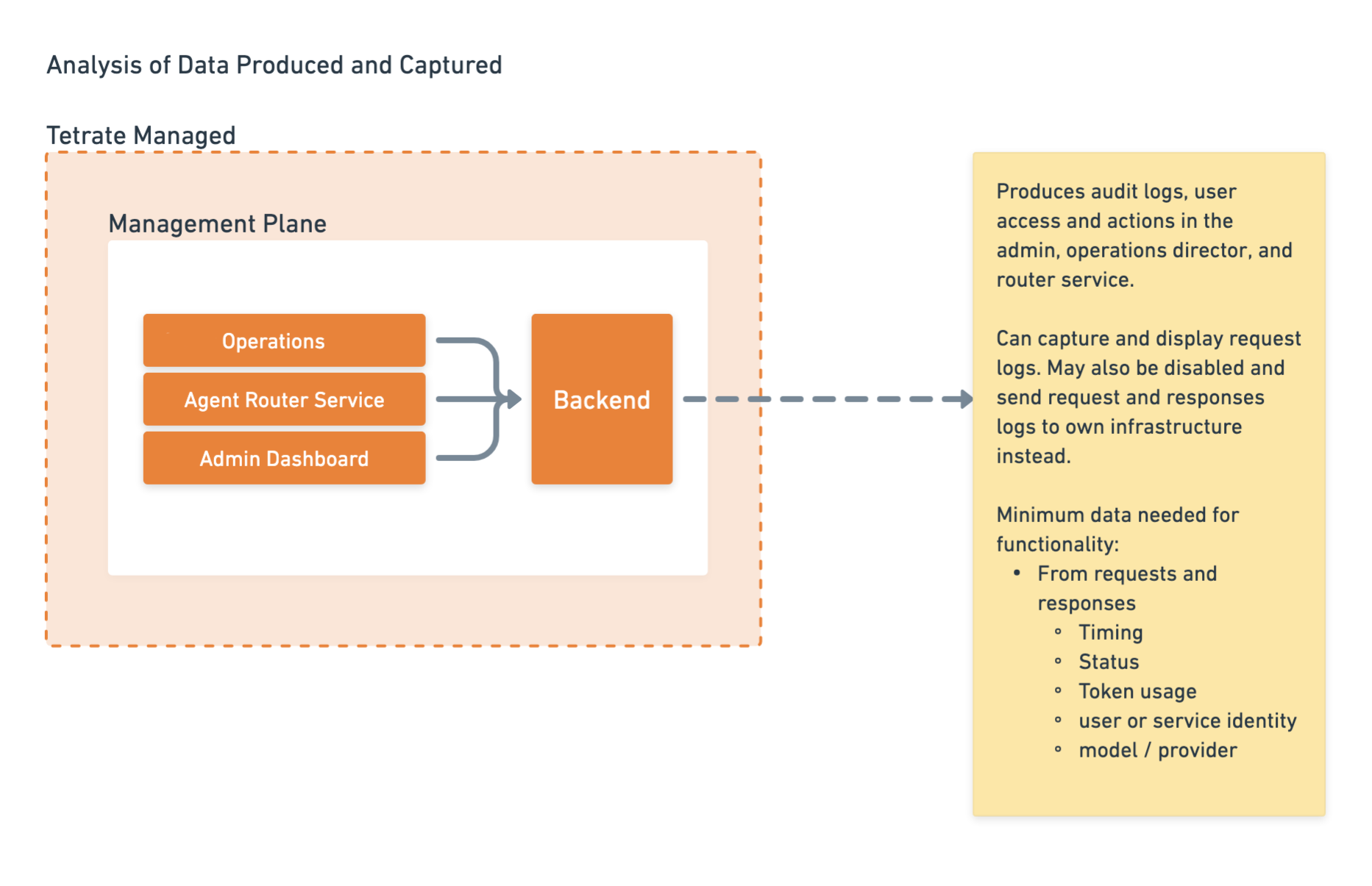
The platform is built on a split-plane model that divides responsibilities cleanly between a centralized management environment controlled by Tetrate and a customer-controlled data environment where all AI traffic flows.
-
Tetrate Managed (Management Plane): Hosted and operated by Tetrate. Contains the Console, Admin Dashboard, and the central backend that stores routing rules, policies, and configuration. Customers interact with these applications to configure the platform but do not manage the underlying infrastructure.
-
Customer Managed (Data Plane): Deployed within the customer's own Kubernetes cluster. All prompt and response traffic flows exclusively through this environment, so sensitive data never leaves the customer's infrastructure boundary. The data plane receives configuration from the management plane but operates independently; it continues routing requests normally even if connectivity to the management plane is temporarily interrupted.
Core components of the data plane
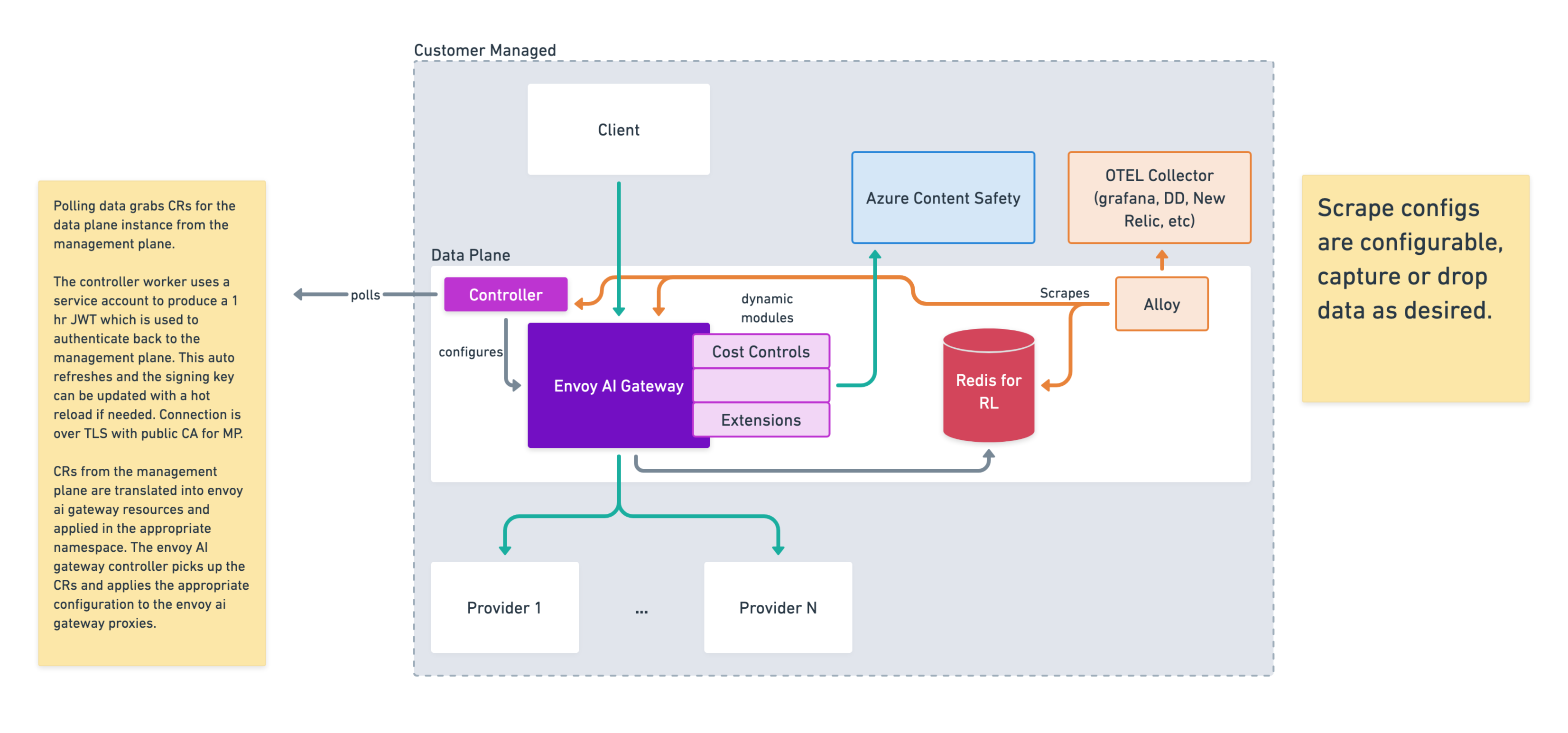
At the center of the customer-managed environment is the AI Gateway, which intercepts and manages all traffic between client applications and upstream AI providers.
Controller
Acts as the bridge between the data plane and the management plane. It polls the backend for configuration updates and translates them into a gateway configuration, keeping routing rules, policies, and provider credentials in sync without requiring inbound connections.
Dynamic Modules
The AI gateway is extended with high-performance native modules for Cost Controls, Guardrails, and custom extensions. These modules run inline in the proxy filter chain, adding processing logic without additional network hops.
Azure Content Safety
An optional external ML service connected to the gateway via the Guardrails module. Used for advanced content classification (toxicity detection, hate speech analysis, and sophisticated jailbreak attempt identification) that goes beyond what local pattern matching can provide.
Redis (Rate Limiting store)
A Redis datastore used by the gateway to track request counts and enforce rate limits across distributed gateway instances, so quotas are applied consistently under high throughput.
Guardrails
To understand how the "Guardrails" module works, it helps to look at how Agent Router processes traffic. The proxy component uses a pipeline of "filters." When a request comes in, it passes through this filter chain sequentially before being routed to its destination.
Historically, adding custom logic to this pipeline meant writing complex C++ code and recompiling the entire proxy, or using slower WebAssembly (Wasm) or Lua scripts. Dynamic Modules are a modern alternative. They allow developers to write high-performance extensions (often in Rust or Go) and load them into the proxy at runtime as shared libraries (e.g., .so files). This provides near-native execution speed without maintaining a custom proxy build.
Here is the step-by-step breakdown of how a Guardrails dynamic module functions within that flow:
-
Interception (The Prompt): When a user application sends a prompt to an AI model, the request hits the AI gateway first. The Guardrails dynamic module intercepts the HTTP payload (the actual text of the prompt) before it is forwarded to the downstream provider (like OpenAI or an internal model).
-
Evaluation: Once the module has the payload, it analyzes the content against predefined safety and security policies. This evaluation can happen in two ways:
- Locally: The module runs lightweight checks directly in memory: blocked keyword lists, regex patterns for Personally Identifiable Information (PII) such as Social Security numbers and credit card numbers, or basic prompt injection signatures. Local checks add minimal latency.
- Remotely (via callout): For more complex analysis, the module pauses the request and makes an asynchronous call to an external service. The Guardrails module can send the payload to Azure Content Safety to run advanced ML-based checks for toxicity, hate speech, or sophisticated jailbreak attempts before deciding whether to allow the request to proceed.
-
Enforcement (The Action): Based on the evaluation result, the dynamic module decides what to do with the request:
- Allow: The prompt is clean; the filter chain continues and the request is forwarded to the AI provider.
- Modify/Redact: The module alters the payload before forwarding it. For example, it replaces a detected credit card number with
[REDACTED], ensuring sensitive data never leaves the customer's environment. - Block: The prompt violates policy; the module terminates the request immediately, returns an HTTP 403 Forbidden to the client, and logs the violation. The AI provider never receives the request.
-
Egress Inspection (The Response): Guardrails are not limited to incoming prompts; they also apply on the return path. When the AI model generates a response, it flows back through the proxy. The Guardrail module can inspect the output to ensure the model has not hallucinated sensitive internal data or generated inappropriate content, applying the same Allow/Modify/Block logic before the response reaches the user.
Rationale
By running guardrails inside a dynamic module rather than hardcoding policy checks into each individual application, the platform provides centralized governance: every application using the gateway is protected automatically, with no per-application integration work required. Additionally, blocking non-compliant or malicious prompts at the network edge before they reach the LLM eliminates unnecessary provider costs; the AI provider is never invoked for requests that would fail policy validation.
Application roles
Agent Router Console
The Console is the developer-facing application. It provides:
- API key management: Create and configure keys that authenticate requests to the AI gateway
- Model catalog: Browse 200+ models across all supported providers
- Playground: Test model routing interactively before integrating
- MCP Profiles: Combine multiple MCP servers into unified endpoints
- Integrations: Setup guides for Claude Code, Cursor, LangChain, CrewAI, and more
- Usage monitoring: Track request volumes, costs, and latency in real time
- Routing configuration: Define fallback policies and traffic splitting rules per API key
Admin Dashboard
The Admin Dashboard is the operator-facing application. It provides:
- Model management: Enable, disable, and configure which AI models are available
- Provider management: Manage AI provider credentials and connection settings
- User management: Create accounts, assign roles, and manage access
- MCP servers: Manage the catalog of MCP servers available to Console users
- SSO configuration: Set up SAML/OIDC single sign-on
- Audit logs: View a tamper-resistant history of administrative actions
- Announcements: Publish platform-wide notifications to Console users
How the applications connect
Both applications share a common authentication system. Users sign in once and can switch between applications using the app switcher in the navigation bar.
| Shared Resource | Console | Admin Dashboard |
|---|---|---|
| User identity and SSO | Uses | Configures |
| Model registry | Browses, routes to | Manages |
| API keys | Creates, uses | Manages |
| Audit logs | Generates | Generates, views |
| Usage metrics | Views own | Views all |
Deployment models
Agent Router Enterprise supports two deployment models. Both share the same feature set; the difference is where the data plane runs and who manages the underlying infrastructure.
SaaS
The SaaS model is the fastest way to get started. Everything, the management plane and the data plane, is hosted and operated by Tetrate.
- Hosted by Tetrate at
router.tetrate.ai - No infrastructure provisioning required; operational from the moment your account is activated
- Automatic model catalog updates as new providers and models are added
- Suitable for teams that want immediate access to the gateway without managing Kubernetes infrastructure
Enterprise (dedicated)
The Enterprise model is designed for organizations with data residency requirements, private network topology, or the need for deep customization. The data plane runs in the customer's own infrastructure; the management plane remains hosted by Tetrate.
- Data plane deployed in the customer's Kubernetes cluster (any cloud or on-premises)
- Management plane hosted and operated by Tetrate, so there is no management plane infrastructure to maintain
- All AI traffic (prompts and responses) stays within the customer's environment and never transits through Tetrate systems
- No payment processing required; usage is tracked for internal audit and chargeback purposes only
- Full control over model availability, provider credentials, network policies, and data residency
- Enterprise-grade guardrails with configurable content safety policies, PII detection, and prompt injection protection
- Supports private provider connectivity (Azure Private Link, AWS PrivateLink, GCP Private Service Connect) to keep model traffic off the public internet
Network architecture
Intranet deployment
The data plane (Controller + Agent Router) runs entirely inside the customer's Kubernetes cluster. The only outbound connection it requires is to the management plane for configuration polling; there is no inbound traffic from the internet to the data plane.
If all client applications that call the gateway are internal (same VPC, same cluster, or reachable over a corporate network), no public ingress is needed. The gateway can operate fully within a private network and still receive configuration updates from the management plane over a single outbound HTTPS connection.
Private provider connectivity
When the data plane is deployed inside a cloud environment, you can configure each AI provider to be reached over private networking instead of the public internet. This keeps model traffic within the cloud provider's backbone and avoids public egress.
| Cloud | Private Connectivity Option | How to Configure |
|---|---|---|
| Azure | Azure Private Link | Set the provider endpoint URL to the private-link FQDN for your Azure OpenAI resource |
| AWS | AWS PrivateLink / VPC Endpoints | Set the provider endpoint URL to the VPC endpoint DNS name for the AI service |
| GCP | Private Service Connect | Set the provider endpoint URL to the Private Service Connect endpoint for the AI service |
To configure a provider with a private endpoint:
- Establish the private connectivity in your cloud environment (Private Link, VPC Endpoint, or Private Service Connect)
- In the Admin Dashboard, open Providers Management and add or edit the provider
- Set the endpoint URL to the private endpoint address instead of the provider's public URL
- Save and verify the connection is healthy
The gateway routes requests to whatever endpoint URL is configured for the provider, so private endpoints work transparently with all routing features (fallback policies, traffic splitting, BYOK).
Private-network enforcement
Network isolation is enforced through the fallback policy configured on each API key. The gateway only routes to the providers present in the fallback chain; if no public providers or models appear in the chain, the gateway will never fall back to them. This means teams that require all traffic to stay on private networks can guarantee that by configuring their fallback chains exclusively with private-endpoint providers.
Transport security
The gateway supports encrypted transport at every hop:
- Client to gateway: mTLS can be configured between client applications and the Agent Router, ensuring mutual authentication at the ingress boundary.
- Gateway to self-hosted upstreams: mTLS is supported for connections from the gateway to self-hosted or on-premises model endpoints, providing end-to-end mutual authentication.
- Gateway to public providers: Traffic to public AI providers (OpenAI, Anthropic, Google, etc.) is encrypted via TLS.
Waf policies
The data plane supports Web Application Firewall (WAF) protection through Envoy Gateway WASM extensibility combined with the Coraza WAF WASM filter. This allows standard OWASP Core Rule Set (CRS) policies to be applied directly at the gateway.
To enable WAF protection:
- Deploy the Coraza WASM filter alongside the data plane using the Envoy Gateway
EnvoyExtensionPolicyresource - Configure the desired rule sets (e.g., OWASP CRS for SQL injection, XSS, and other common attack vectors)
- The filter inspects requests inline before they reach the AI provider, blocking or logging matches based on the configured policy
Because the WAF runs as a WASM filter inside the proxy, it adds no additional network hops and can be customized per-route or applied globally across the data plane.
Operations & reliability
Control plane resilience
If the data plane loses connectivity to the management plane, the configuration controller continues to poll for new configuration on its normal schedule. All existing configuration already applied to the data plane remains in effect and the gateway continues to route requests as normal. When connectivity is restored, the controller picks up any configuration changes that were made in the meantime.
The management plane also uses the configuration polling from the data plane as a connectivity health check; if a data plane stops polling, operators can see that it is unreachable.
Multi-region deployment
The management plane can manage multiple data plane deployments simultaneously. Each data plane is an independent Kubernetes deployment that can be placed in any cloud, region, or availability zone. Data plane deployments can be arranged to meet your functional and architectural needs: for example, one data plane per region, one per business unit, or one per cloud provider.
Health checks
Data plane components expose Kubernetes liveness and readiness probes so that the orchestrator can detect and restart unhealthy workloads automatically. At the platform level, the management plane monitors data plane health through the configuration polling mechanism; if a data plane stops checking in, it is flagged as unreachable.
Scaling
Data plane components are configured with Kubernetes Horizontal Pod Autoscaler (HPA), which can be adjusted to match your traffic patterns and resource requirements. The management plane is scaled and managed by Tetrate.
Infrastructure as code
Tetrate Agent Router provides Helm charts for installing and managing data plane components on Kubernetes. Terraform modules are also available for provisioning the underlying cloud infrastructure (VPCs, subnets, IAM roles, etc.) when needed. Together, these allow fully reproducible, version-controlled deployments.
Resilience without full cutover
Each data plane runs independently in its own Kubernetes cluster and routes within its configured provider set. Developers configure fallback policies that define which backends to try when the primary fails for a given request; no cluster-wide or region-wide cutover is involved.
Under the hood, each backend in a fallback chain is assigned a priority level
in the AI gateway AIGatewayRoute resource. When a request to the
priority-0 backend fails (rate limit, server error, connection failure), the
gateway retries at priority 1, then priority 2, and so on, all within the same
HTTP request lifecycle. There is no provider-level health tracking; each request
independently discovers failures and walks the priority chain. This per-request
model means intermittent errors are absorbed transparently without
application-level retry logic.
What's next