Where to Begin
Tetrate Agent Router serves evaluators, developers, and operators, and is delivered in three get-started paths that differ in tier and in where the data plane runs. This page routes both decisions: first the role that matches the task at hand, then the path that matches the deployment.
Starting points at a glance
The table below crosses the two decisions this page routes: the role at hand, and whether the deployment already exists.
| Role | Starting a new deployment | Joining an existing deployment |
|---|---|---|
| Developer | Agent Router Service: sign up and route a first request solo. | The Console quickstart, then Guides for Developers. |
| Platform operator | Fully Managed or Self-Hosted Data Plane; the flowchart below walks the choice. | The Admin quickstart, then Guides for Platform Operators. |
| Evaluator | The evaluation guide below; evaluation does not depend on the deployment. | Same. |
Choose a path
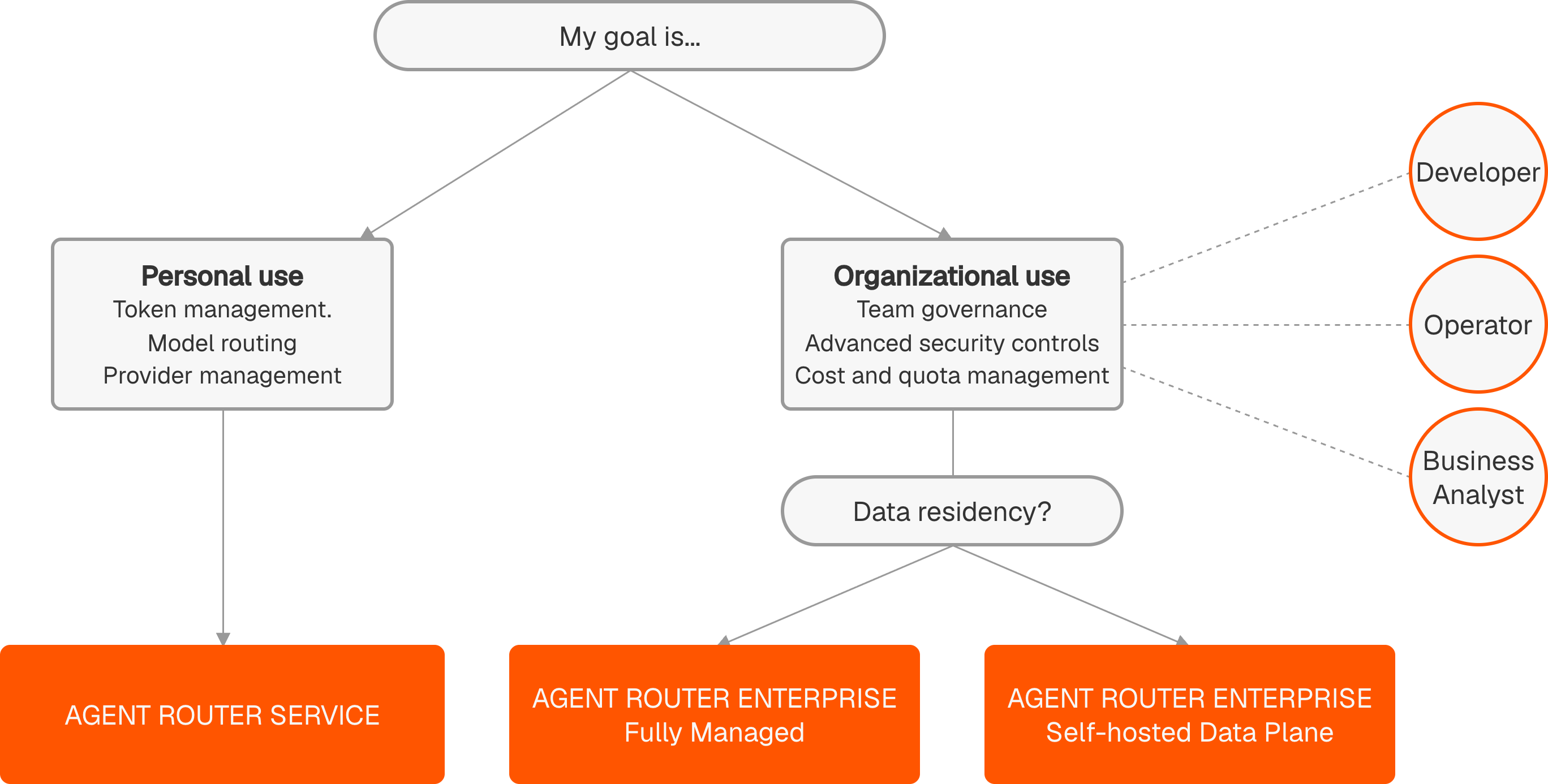
Tetrate Agent Router is delivered in three get-started paths, each with its own hub of onboarding steps, installation guides, and quickstarts. The paths differ in tier (which capabilities an account has) and in where the data plane runs; every path ends with a working gateway and a first routed request. The Agent Router tiers section on the welcome page defines the two tiers; the flowchart below picks the path.
Tier comparison
The table below sets the tiers side by side. The first four rows are the shared foundation: every Service capability carries into Enterprise unchanged. The remaining rows are the team-scale controls (attribution, access profiles, guardrails, SSO, and distributed deployment) that Enterprise adds on top.
Developers Agent Router Service | Operators & AI leaders Agent Router Enterprise | |
|---|---|---|
| AI Gateway with multi-model routing and auto-failover | ✓ | ✓ |
| Model Context Protocol (MCP) Gateway: connect agents to tools securely | ✓ | ✓ |
| Per-key token usage and cost logs | ✓ | ✓ |
| OpenAI-compatible API: works with existing code | ✓ | ✓ |
| Cross-team cost attribution, showback, and chargeback | ✓ | |
| Admin controls: model and MCP access profiles by team | ✓ | |
| Runtime AI Guardrails: PII redaction and policy enforcement | ✓ | |
| Enterprise SSO: every request carries authenticated identity | ✓ | |
| Distributed deployment: Fully managed Cloud, hybrid dataplane deploy at edge, per-region, or provider | ✓ |
Once a matching path is identified, open its hub below.
Agent Router Service
The solo path: sign up, create an API key, and send a first routed request in minutes.
Open the Service path →Enterprise Fully Managed
The onboarding wizard, the Admin Dashboard and Console quickstarts, and optional SSO role mapping. Nothing to install.
Open the Fully Managed path →Enterprise Self-Hosted Data Plane
Prerequisites, onboarding, data plane and gateway installation, and SSO configuration, closing with a Console quickstart.
Open the Self-Hosted path →Evaluating Agent Router
Evaluation means deciding whether Tetrate Agent Router belongs in the stack, usually during a proof-of-concept or trial. At that stage the question is less which button to click and more whether Agent Router answers what an organisation asks before it commits.
Those questions usually come down to these:
- Where does the data go? In Self-Hosted Data Plane deployments, AI traffic flows through a data plane in the customer's Kubernetes cluster: payloads, prompts, and credentials never leave the customer network. In fully hosted paths (Service or Fully Managed), Tetrate operates the data plane. See Deployment models for the split, the Architecture overview for the request path, and Compliance for residency and retention.
- Can cost be controlled and predicted? Spend is tracked per team and per key, with budgets and rate limits enforced inline rather than reconciled after the fact. The Product overview frames the cost story, and the operator guides show it in practice.
- How hard is integration, and is there lock-in? Applications target one endpoint using API shapes they already use, and providers can be added or swapped as a configuration change. Supported APIs lists exactly what the gateway speaks.
- Will it scale to production traffic? Sizing and scale covers throughput, resource sizing, and the deployment footprint.
- What does running it actually require? Prerequisites lists what must be in place before installation on AWS, Azure, or GCP.
A focused way to spend the first hour:
- Read the Product overview for what Agent Router is and the problems it solves.
- Skim the Architecture overview to see where it sits and where data lives.
- Scan Solution capabilities for the depth behind each feature.
- Check Compliance and Sizing and scale for the due-diligence answers.
- Run a Console quickstart to watch a real request route end to end.
Decision makers who will not work with Agent Router directly can stop after the first three items. The rest of the page serves the people who build with it or run it.
Roles at a glance
Agent Router serves two hands-on roles through two applications on a shared backend: developers consume the gateway through the Developer Console, and platform operators govern it through the Admin Dashboard. The two applications describes the two applications and the resources they share, with a diagram of how each role maps to its application.
The two roles are largely independent: a developer rarely needs the operator's tools, and an operator rarely touches a developer's routing configuration. They meet at the boundary an operator sets and a developer works within, such as the models, credentials, and budgets available to a key. The table below pairs each role with its primary application and the tasks the documentation covers for it; the role sections that follow expand on each in turn.
| Role | Primary application | Use the docs to learn how to... |
|---|---|---|
| Developer | Developer Console | Route requests across providers, manage API keys, integrate the gateway with applications, aggregate Model Context Protocol (MCP) servers, and observe AI traffic |
| Platform operator | Admin Dashboard | Provision models and providers, govern access, audit usage, configure SSO, manage budgets, and run Agent Router across environments |
There is a third role, the installer, but it is a phase rather than a separate person. The installer is usually the platform operator during initial setup, sometimes joined by a platform engineer who provisions the underlying Kubernetes cluster. That work (standing up the data plane, configuring SSO, onboarding the first administrators) is what the three get-started paths above cover, and is mostly done once per environment.
For developers
The developer role covers anyone building against Agent Router's request-routing surface. Typical work includes integrating Agent Router into an application or agent framework, deciding how requests fall back when a primary provider is unavailable, splitting traffic between models to manage cost or trial alternatives, and instrumenting an application to see what the gateway is doing under load.
Nearly all of this work happens in the Developer Console: issuing API keys, authoring routing policies, assembling MCP profiles, and testing prompts in the Playground. The Admin Dashboard is rarely needed, though credentials, model allowances, and budget caps set there by an operator may apply. On the Service tier, the Console quickstart is the whole onboarding; on Enterprise, an operator grants Console access, models, and budgets first.
Typical questions on arrival:
- How is a request routed when more than one provider can serve it?
- What happens when the primary provider returns an error or times out?
- How are a team's own provider credentials, Bring Your Own Key (BYOK), brought into a routing chain?
- How is observability data pushed to an existing OpenTelemetry collector?
- How are several MCP servers aggregated behind one endpoint for Claude Code, Cursor, or VS Code?
The goal-driven content for this role lives in the Guides for Developers section. Each guide opens with the goal and when it applies, then walks the end-to-end steps to reach it.
For platform operators
The platform operator role covers whoever owns Agent Router itself: deciding which models are available across the organisation, which upstream AI providers are wired in, who can use Agent Router, and how spending and access are controlled. The operator is also the one on call when something needs to be changed, audited, or explained to a stakeholder. The role applies to the Enterprise tier; admin controls are not part of the Service tier.
Most of this work happens in the Admin Dashboard, which exposes the model catalogue, provider configuration, user and group management, audit logs, announcements, instance settings, and the SSO configuration that drives login across Agent Router. The Console is visited occasionally, usually to check behaviour from a developer's point of view rather than as daily work.
Typical questions on arrival:
- How are new models or providers introduced, and existing ones retired?
- How are developers onboarded, and API keys issued or revoked?
- How are MCP servers governed, including the OAuth client lifecycle?
- How is Agent Router activity audited, and what events are recorded?
- How is SSO integrated with an existing corporate identity provider?
- How are multiple instances (for example, separate development and production environments) managed coherently?
The content for this role lives in the Guides for Platform Operators section, with the same goal-first structure as the developer guides.
Installer (a phase, not a role)
Installation is a one-off activity that usually falls to the platform operator, sometimes with help from a platform engineer who owns the target Kubernetes cluster. The work covers provisioning the data plane in the cloud of choice, installing the gateway, configuring SSO, and onboarding the first administrators. Once installation is done, the same operator typically moves on to Guides for Platform Operators to start governing the running system.
Where to go next
Deployment models
Where each part of Agent Router runs and who operates it, explained from first principles.
Tier comparison
Agent Router Service and Agent Router Enterprise capabilities side by side, on the welcome page.
Looking something up
For exact API surfaces, gateway edge cases, OpenTelemetry metric names, audit event schemas, or definitions of Agent Router-specific terms, head to the Reference section.