Communicate with platform users
A platform that changes silently is a platform that loses trust. A new model becomes available and nobody hears about it; a maintenance window is scheduled and three teams find out by getting paged; a deprecation date passes and an application breaks because the integration team had no idea anything was changing. Most of these incidents are not about the change itself, but about the absence of a clear, in-platform communication channel that reaches the people who need to know. The Admin Dashboard's Announcements surface is the platform's answer to that gap.
Sending an email is rarely enough; emails get filtered, lost, or simply read by the wrong audience. Announcements are notifications that operators publish from the Admin Dashboard and that appear directly inside the Console for every developer who signs in. They carry a severity level that controls visual prominence, support markdown for richer formatting where it helps, and can be scheduled in advance. This guide covers when to use which severity level, how to write announcements that developers actually read, how scheduling works, and how the lifecycle of an announcement (creation, edit, archival) interacts with the audit log.
Persona: Platform operator working in the Admin Dashboard.
Estimated time: 5--10 minutes per announcement; ongoing as the platform evolves.
When this guide applies
Announcements are the right tool whenever a change affects what developers can do or see on the platform, and a quick, in-context heads-up beats relying on out-of-band communication. Typical cases:
| Situation | Suggested severity |
|---|---|
| A new model has become available and developers can start using it | Info |
| A feature has been released or improved | Info |
| Scheduled maintenance is upcoming | Warning |
| A model or provider is being deprecated and will be removed by a known date | Warning |
| A partial outage is in progress and one provider is unavailable | Warning, or Critical if the impact is broad |
| A security incident is active and immediate action is required | Critical |
| The platform itself is unavailable or behaving unsafely | Critical |
For cases where the audience is narrower than the entire developer base (a single team, a specific product line, or a particular environment), announcements are still useful, but the body of the announcement should make the intended audience explicit. There is no built-in audience-filtering mechanism; every Console user sees every active announcement.
Outcomes
By the end of this guide:
- At least one announcement has been published and confirmed visible in the Console.
- The three severity levels are clear, including how each one is rendered and what dismissal behaviour applies.
- The mechanics of editing, scheduling, and archiving are exercised, so the announcement lifecycle is understood.
- The relationship between announcements and the audit log is clear: every announcement-related action is captured automatically.
Prerequisites
- Administrator access to the Admin Dashboard, typically the
super_adminrole. - A concrete change or message to communicate. Announcements that exist primarily to be dismissed do not improve trust.
Field reference
The Announcements list presents each entry as a row with the following columns:
| Column | Description |
|---|---|
| Title | The headline of the announcement |
| Severity | Info, Warning, or Critical |
| Status | Active (visible to Console users) or Archived |
| Created | Date the announcement was created |
| Published | Date the announcement became visible; may be a scheduled future date |
The severity levels map to distinct visual treatments in the Console:
| Severity | Visual treatment | Use cases |
|---|---|---|
| Info | Neutral or blue indicator | New model availability, feature updates, general notices |
| Warning | Yellow or amber indicator | Scheduled maintenance, upcoming deprecations, partial outages |
| Critical | Red indicator | Active outages, security incidents, urgent action required |
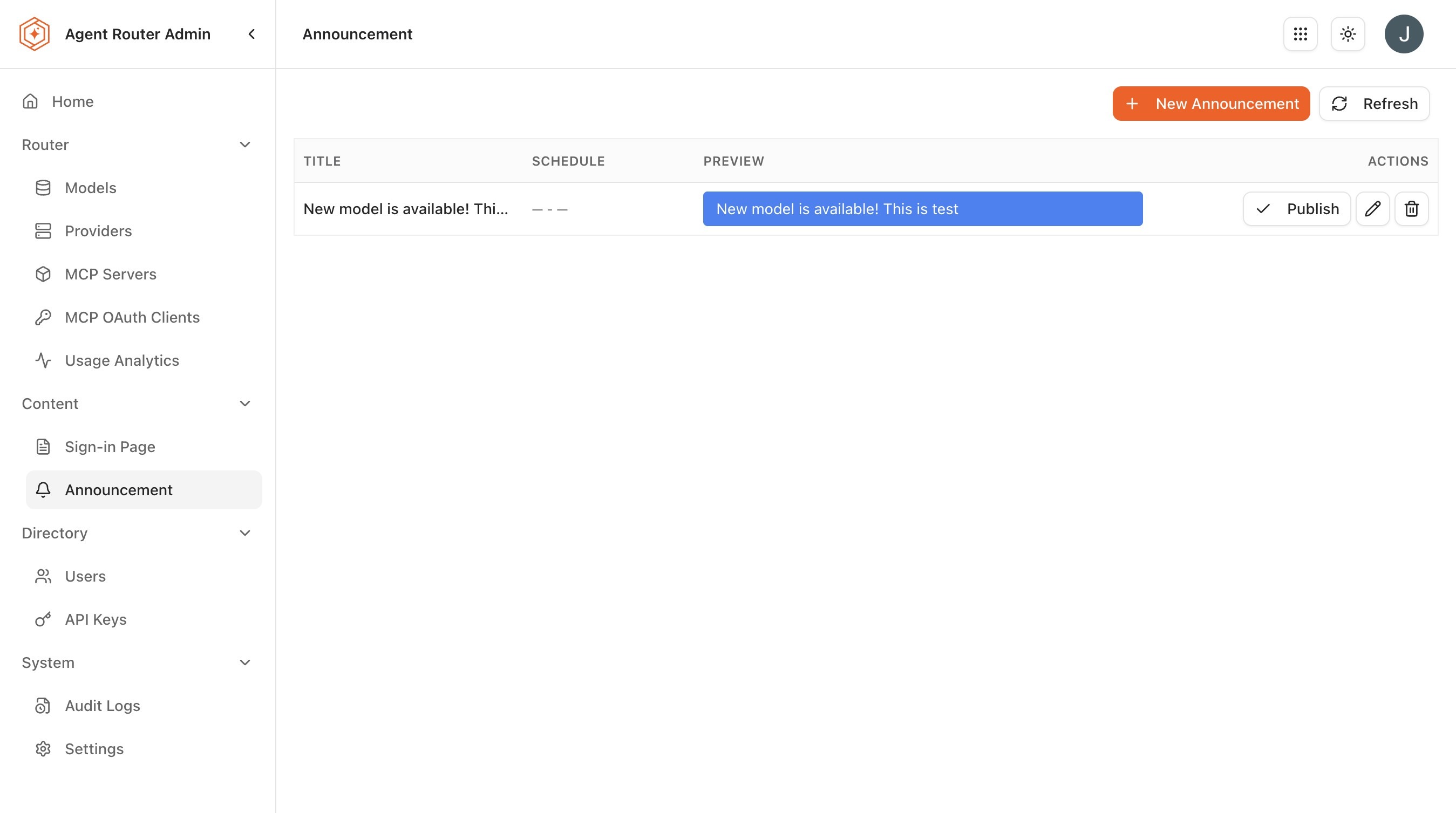
The core lifecycle tasks (create, edit, schedule, and archive) are detailed in the steps below.
Step 1: choose the right severity
The severity choice shapes how the announcement is rendered, how prominent it is, and whether developers can dismiss it for themselves. The three levels are not interchangeable.
| Severity | Visual treatment | Dismissal behaviour | Right use cases |
|---|---|---|---|
| Info | Neutral or blue banner | Dismissible per-user | New model availability, feature updates, general notices |
| Warning | Amber banner | Dismissible per-user, but reappears on new sessions | Scheduled maintenance, upcoming deprecations, partial outages |
| Critical | Red banner | Cannot be dismissed until archived by an operator | Active outages, security incidents, urgent action required |
A per-user dismissal applies only to the developer who triggered it; the announcement itself remains in effect platform-wide until an operator archives it.
The non-dismissibility of Critical announcements is deliberate. It is also the property that makes Critical announcements expensive to use: developers cannot make the banner go away while it is active, which is the entire point during an incident but is genuinely annoying once the underlying issue is resolved. A Critical announcement that is left active longer than it needs to be undermines the severity model for the next time it matters. Archive it promptly.
A useful internal rule of thumb: if an announcement does not need to interrupt a developer who is mid-task, it is not Critical. Warning covers the majority of operationally important communication.
Step 2: write the announcement
The Announcements surface uses a small set of fields that together carry the message and its lifecycle.
-
Sign in to the Admin Dashboard.
-
Open Announcements from the sidebar.
-
Review the existing announcement list. Each entry shows the title, severity, status (Active or Archived), and the creation and publication dates.
-
Click Create Announcement.
-
Fill in the fields:
- Title. A concise headline, ideally short enough to read in a banner without truncation. Examples:
Scheduled maintenance on 15 February,Claude Sonnet 4.6 now available,OpenAI degraded service in EU region. - Body. The full message. Markdown is supported, so bullet lists, links, and emphasis can be used where they help readability. Long bodies are rendered in a collapsible region.
- Severity. The choice from Step 1.
- Publish Date. Optional. Leave blank to publish immediately, or set a future date and time to schedule the announcement.
- Title. A concise headline, ideally short enough to read in a banner without truncation. Examples:
-
Click Publish for immediate publication, or Schedule if a future publish date has been set.
A few drafting conventions that consistently land well:
- Lead with the practical impact. "OpenAI requests will fail intermittently for the next two hours" tells the reader what they need to know before they finish the first sentence; "We are experiencing an issue" does not.
- Name the audience when it is not everyone. "If you use the
gpt-4o-minimodel in production, please note..." surfaces relevance immediately. - Include a what-to-do. When something requires action, name the action. When nothing is required, say that explicitly.
- Set an expectation. A maintenance announcement should name a start time, an end time, and a follow-up channel. An outage announcement should name a frequency for updates.
Step 3: verify the announcement in the Console
Active announcements appear as banners at the top of the Console interface. The most reliable way to confirm an announcement is doing what it should be doing is to look at it from a developer's perspective.
- Open the Console in a separate browser session or window.
- Sign in as a developer (the operator account works just as well for verification).
- Confirm the announcement appears as a banner with the expected severity styling.
- For Info and Warning announcements, confirm that the dismiss control is present and functional.
- For Critical announcements, confirm that the banner has no dismiss control, only the styling that distinguishes it from less urgent messages.
If the announcement does not appear, the most common causes are a future publish date that has not yet been reached, a typo in the body that broke the markdown rendering, or browser caching that is showing a stale Console state. A hard refresh resolves the caching case.
Step 4: edit, schedule, and archive
Announcements are not write-once. Each one can be revised, scheduled in advance, or archived when it has outlived its usefulness.
Edit an active announcement
- Click the announcement row to open its detail view.
- Update the fields that need to change. Edits to body text, severity, or publish date are all supported.
- Click Save.
Changes propagate to active announcements immediately; developers who already have the Console open will see the updated banner on their next page load. The edit itself is captured in the audit log, so a record exists of what changed and who changed it.
Schedule a future announcement
The publish date field is the lever for scheduled announcements. Pre-writing a maintenance announcement two weeks in advance, with a publish date set to the day of the maintenance window, is a useful pattern: the writing happens when the calendar is open and details are fresh, and the announcement appears at exactly the right moment without further effort.
Scheduled announcements show up in the Announcements list with a Published date in the future, distinguishing them clearly from Active announcements that are already visible.
Archive an old announcement
When an announcement is no longer relevant, it should be archived. Archiving removes the banner from the Console immediately but preserves the announcement in the Admin Dashboard list for historical reference.
- Open the active announcement.
- Click Archive.
Archived announcements remain visible to operators through the announcements list, filterable by status. They can be restored to Active if circumstances change, a maintenance that was rescheduled rather than completed, for example.
How announcements interact with the audit log
Every state-modifying action on the Announcements surface generates an entry in Audit Logs:
| Event | Captured fields |
|---|---|
announcement.created | Title, severity, body, publish date, actor |
announcement.updated | The changed fields, old and new values, actor |
announcement.archived | Actor and timestamp |
The audit trail means that the question "did anyone communicate this change?" is always answerable after the fact. For incident retrospectives and compliance reviews, the announcement lifecycle is part of the auditable record alongside everything else captured in the log.
What to do next
- Audit platform activity: announcements are part of the auditable activity surface and complement the per-event log. See Audit Platform Activity.
- Manage models and providers: announcements about new model availability typically follow a successful provisioning pass. See Managing Models and Providers.
- Run multiple platform instances: announcements are scoped per instance; coordinating cross-instance communication is its own discipline. See Run Multiple Platform Instances.
Where to go next