Planes and core components
Tetrate Agent Router is built on a split-plane model: a management plane hosted by Tetrate holds configuration and exposes the web applications, and a data plane handles all AI traffic. Where the data plane runs depends on the deployment model, with Tetrate operating it in Agent Router Service and Agent Router Enterprise Fully Managed, and the customer deploying it in their own Kubernetes cluster in Agent Router Enterprise Self-Hosted Data Plane. The two planes stay in sync over a connection the data plane opens, and live traffic never reaches the management plane.
For a first-principles walk-through of what an AI gateway is and how a request travels end to end, start with the Architecture overview.
System architecture
A plane is a group of software components that share a single job. Agent Router is organized into two planes, each with a distinct responsibility.
- The management plane is the part hosted and operated by Tetrate in every deployment model. It holds configuration (routing rules, policies, model and provider definitions, user records) and exposes the two web applications used to manage Agent Router. It is the control room: decisions are recorded here, but no live AI traffic passes through it.
- The data plane is the part that handles all AI traffic: every prompt sent to a model, and every response returned, passes through it and nowhere else. In Agent Router Service and Agent Router Enterprise Fully Managed, Tetrate operates it. In Agent Router Enterprise Self-Hosted Data Plane, it is deployed inside the customer's own Kubernetes cluster. Kubernetes is the industry-standard system for running containerized software across a group of machines; a cluster is one such group.
The two planes communicate over a single outbound Hypertext Transfer Protocol Secure (HTTPS) connection initiated by the data plane. Outbound means the connection is opened from the data plane toward Tetrate, never the other way around. In Agent Router Enterprise Self-Hosted Data Plane that means no inbound connections from the internet to the customer environment are required.
The diagram below shows the layout for Agent Router Enterprise Self-Hosted Data Plane (data plane in the customer domain). Fully hosted deployments keep the same components and flows, with the data plane in Tetrate's environment instead.
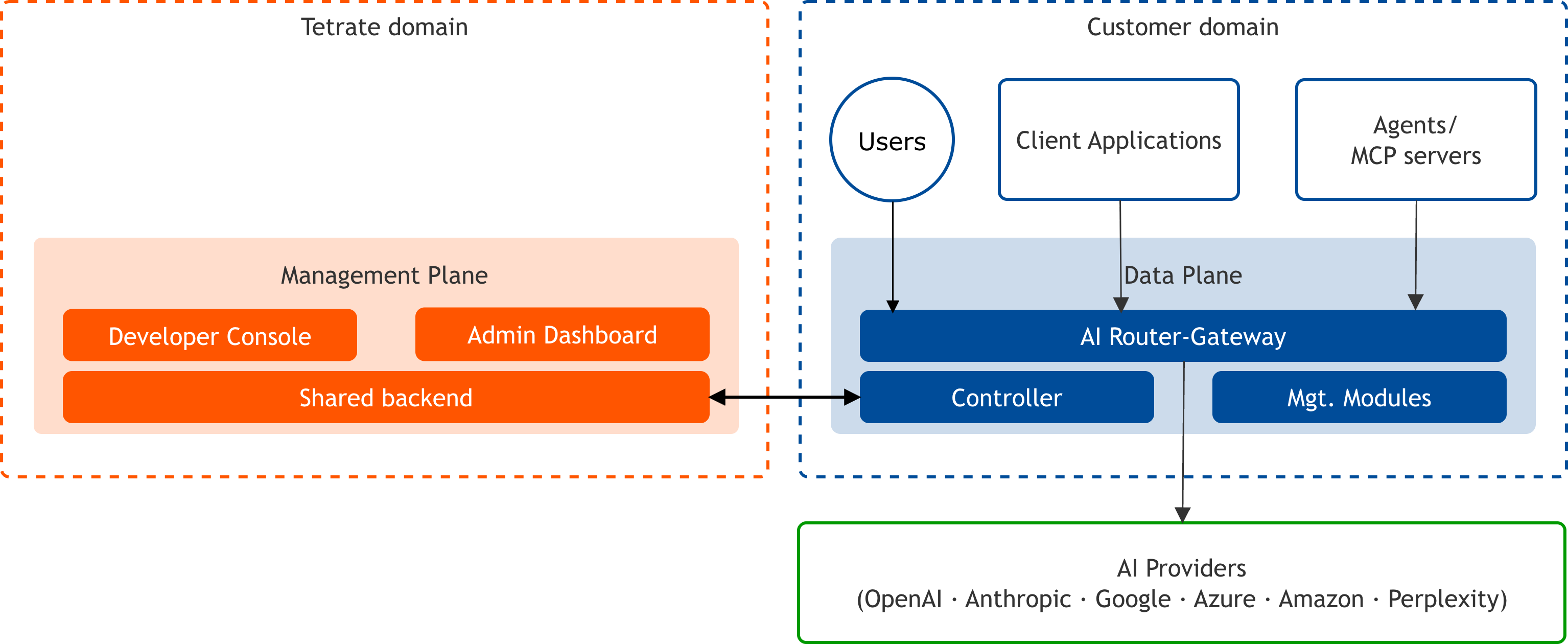
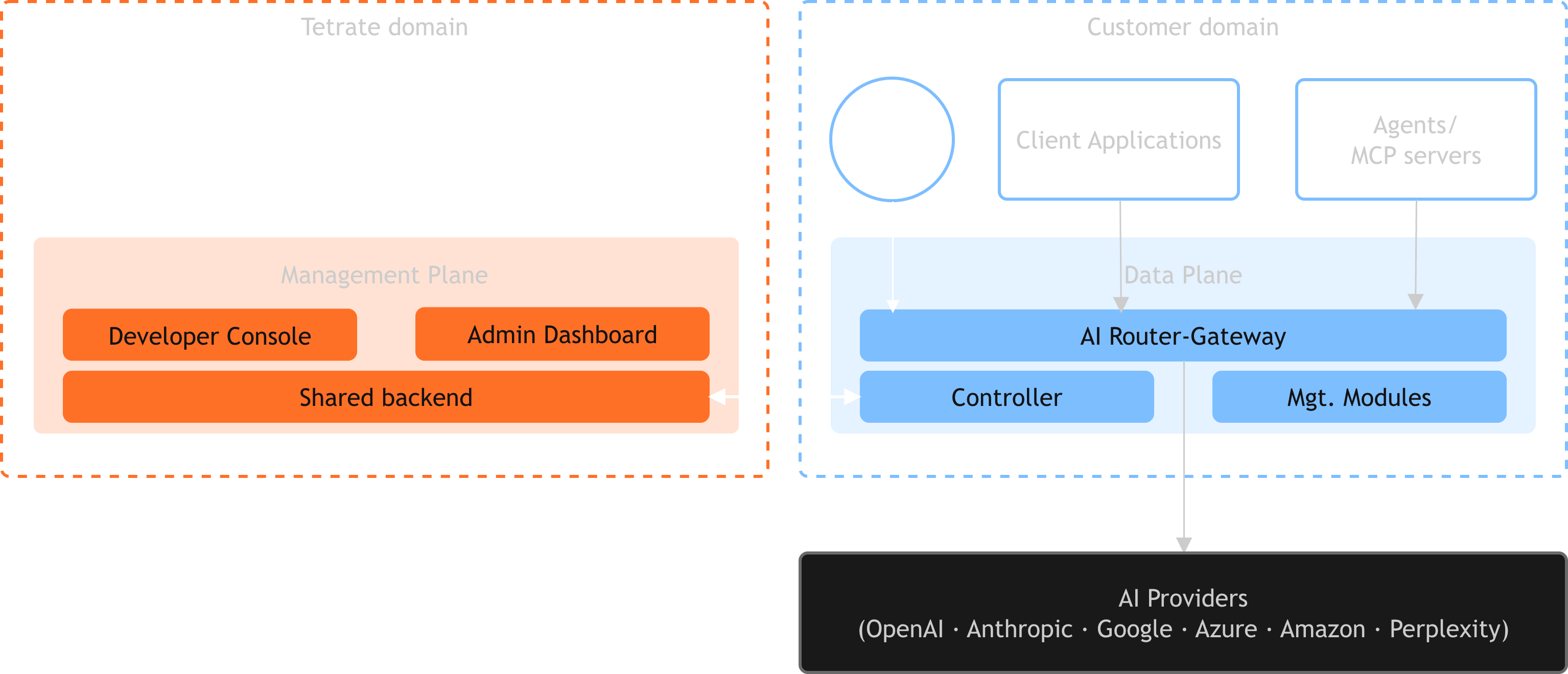
The diagram traces two independent journeys. Configuration travels down the left: the management plane hands updates to the Controller, which applies them to the Agent Router. Live traffic travels along the bottom: client applications send requests to the Agent Router, which forwards them to the upstream AI providers and returns the responses. The two journeys never mix, which is the point of the split.
Why the architecture is split this way
The separation exists for one main reason: live prompt and response content stays on the data plane and never reaches the management plane. The management plane only ever holds configuration and receives telemetry (operational data such as latency and token counts); it never sees the content of a request.
In Agent Router Enterprise Self-Hosted Data Plane, that also means prompt and response data never leaves the customer's environment on its way to the model provider, because the data plane runs in infrastructure the customer controls. One exception exists and is opt-in per rule: a guardrail rule bound to a third-party guardrail provider, such as Azure AI Content Safety, sends the content it evaluates to that provider (the trade-offs are on the guardrails reference; the in-cluster tetrate provider exists precisely so that machine-learning detection needs no such egress). The outbound-only link reinforces this: a firewall configured to allow a connection out is far easier for a security team to approve than one that must accept connections coming in, and refusing all inbound connections removes an entire class of attack. The result is data sovereignty (the customer keeps full control of its data) without the customer having to build and operate the management-plane software itself. In Agent Router Service and Agent Router Enterprise Fully Managed the same plane separation holds, but the data plane itself is operated by Tetrate.
Operating model
The split-plane model divides responsibilities between a centralized management environment controlled by Tetrate and a data plane that carries all AI traffic. Each side owns a different set of concerns, and each side can be changed, scaled, or recovered without disturbing the other.
Management plane
Hosted and operated by Tetrate in every deployment model. Contains the Developer Console, the Admin Console, and the central backend that stores routing rules, policies, and configuration. Customers interact with these applications to configure Agent Router but do not manage the underlying infrastructure, so there are no management-plane servers to patch, back up, or keep highly available on the customer side.
Data plane
All prompt and response traffic flows exclusively through this environment. Tetrate operates it in Agent Router Service and Agent Router Enterprise Fully Managed; the customer deploys it in their own Kubernetes cluster in Agent Router Enterprise Self-Hosted Data Plane. The data plane receives configuration from the management plane but operates independently: it holds the most recent configuration locally and continues routing requests normally even if connectivity to the management plane is temporarily interrupted. A brief loss of the link pauses configuration updates, not live traffic.
The two applications in the management plane are two views of the same system, each scoped to a different audience.
| Application | Audience | What it is used for |
|---|---|---|
| Developer Console | Developers | Issue API keys, author key policies, assemble Model Context Protocol (MCP) profiles, and monitor their own traffic. |
| Admin Console | Platform operators (platform / IT) | Provision models and providers, manage users, set budgets and rate limits, review audit logs, and configure single sign-on. |
The three journeys that cross these planes (configuration polling, the live request path, and telemetry export) are traced in detail on the Data flows page.
Operating multiple data planes
Tetrate Agent Router Enterprise supports running more than one data plane from a single management plane. Each data plane is an independent deployment (typically in its own Kubernetes cluster), and the data planes can sit in any combination of clouds, regions, or on-premises environments while the one management plane keeps their configuration in sync. This fleet model is most relevant to Agent Router Enterprise Self-Hosted Data Plane, where the customer chooses where each data plane runs.
The diagram below illustrates a multi-data-plane layout for Agent Router Enterprise Self-Hosted Data Plane.
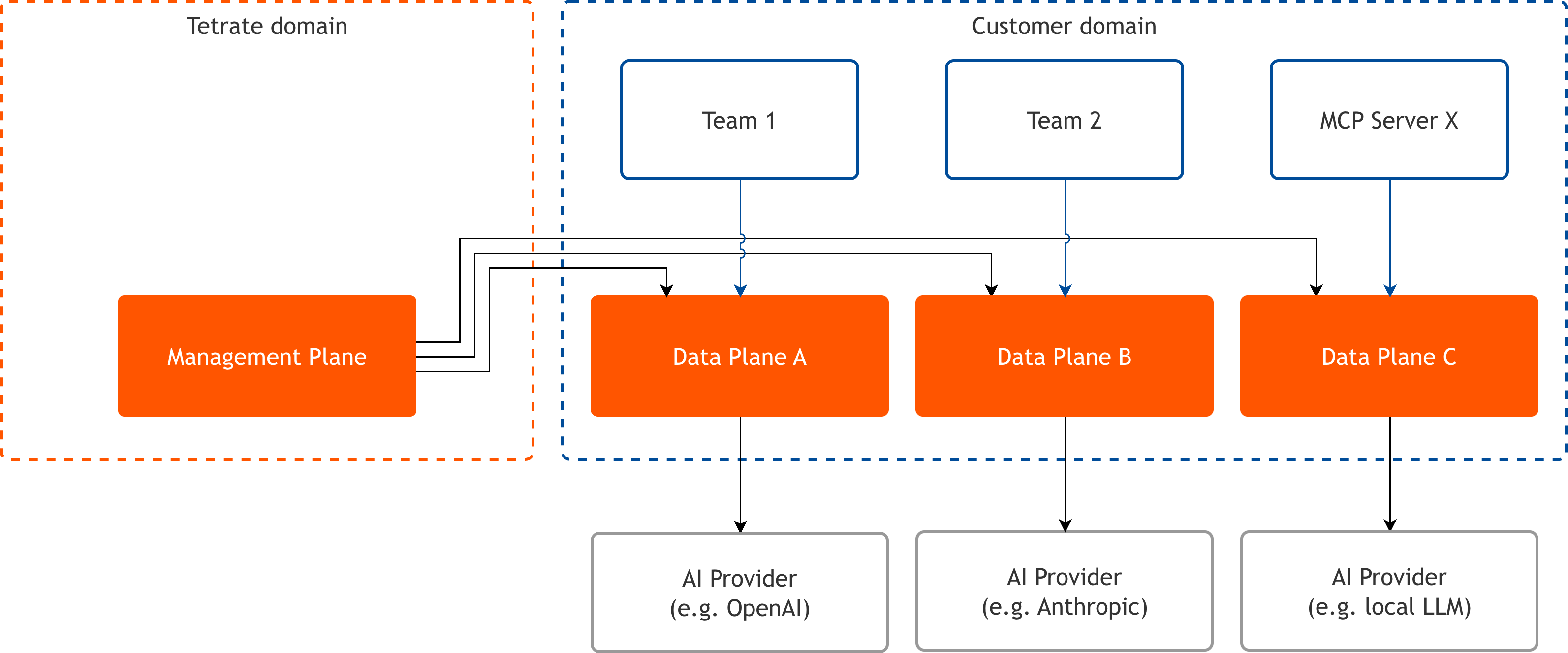
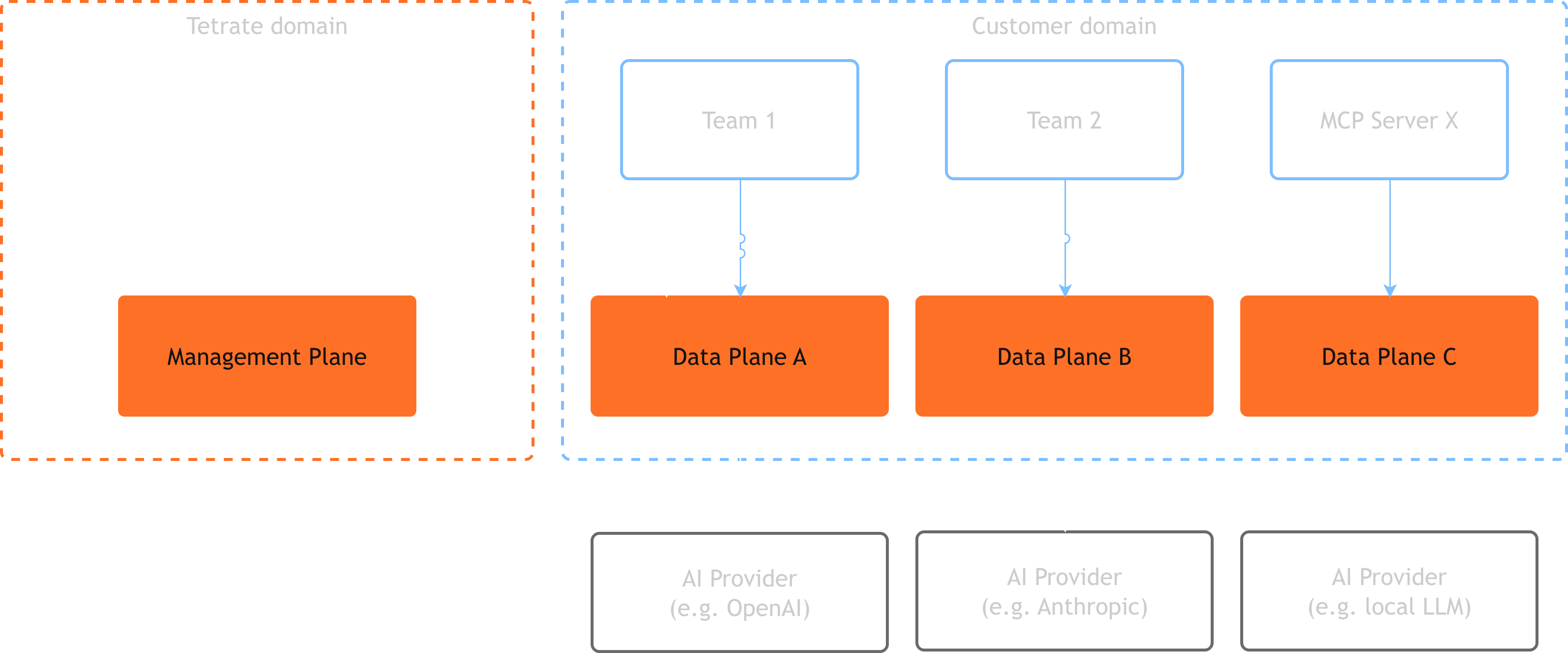
More than one data plane is useful whenever a single deployment cannot satisfy every requirement at once. A common pattern is one data plane per region, placing traffic handling close to the applications it serves to reduce latency and to keep requests within a required geography for data residency. Another is one data plane per cloud, so that models offered natively by a provider are reached over that provider's own network: an AWS data plane serving Amazon Bedrock models, for example, alongside an Azure data plane serving Azure OpenAI models. Data planes are also split per business unit or per environment (production, staging) when separate teams need to operate without affecting one another.
Within this model, a platform administrator labels each data plane with the projects it serves, and the data plane serves the configuration of every project labelled on it. A project is the logical boundary that owns a set of models, API keys, and MCP profiles, together with the members allowed to use them, and is defined in full under Projects. Each data plane lists the hostnames it answers on in its own Helm values. Several projects can share one data plane and one hostname, because every request resolves to its project from its API key, never from the hostname: a key issued for one project is refused on a hostname that does not serve its project, and a model a project has not been granted cannot be called with its key. One project can also be labelled on several data planes, as the region and cloud patterns above require.
Holding configuration centrally in the management plane while each data plane runs independently is what makes a fleet of data planes practical to operate. Data planes can be added as demand grows, and a project moves to a different data plane by labelling the new one with it, so its keys and configuration work there unchanged. Two data planes that declare the same hostname keep the customer-facing URL fixed across the move. The operator-facing procedures are covered in Run multiple platform instances and Load balance across regional deployments.
Core components of the data plane
The data plane is not a single program. It is a small set of components that run together wherever the data plane is hosted. At the center is the AI Gateway, which intercepts and manages all traffic between client applications and upstream AI providers. A gateway is a single entry point that requests pass through on their way somewhere else, and this one is built as a proxy: a server that receives a request, does something with it (here: choosing a provider, attaching credentials, applying policy), and forwards it on.
Controller
Acts as the bridge between the data plane and the management plane. It polls the backend for configuration updates and translates them into a gateway configuration, keeping routing rules, policies, and provider credentials in sync without requiring the management plane to open inbound connections. Polling means the Controller repeatedly asks for updates on a schedule, so it is always the side that reaches out.
Modules
The AI gateway is extended with high-performance native modules for cost controls, guardrails, and custom extensions. A dynamic module is add-on logic loaded into the proxy at runtime, so it runs inline in the proxy filter chain (the ordered sequence of steps each request passes through) and adds processing without an extra network hop.
Agent Router
The proxy that routes every request to a provider and enforces policy inline.
The Agent Router itself (the proxy every request passes through) is the gateway the other components extend and support. It is built on Envoy AI Gateway, the open-source project backed by the Cloud Native Computing Foundation (CNCF) and co-created and maintained by Tetrate and Bloomberg, which is why Agent Router can route to many providers reliably and with low overhead. The Controller keeps the gateway configured, the dynamic modules add cost controls and guardrails inline, and Redis lets several copies of the gateway share one view of rate-limit usage.
Why these pieces run inline rather than as separate services: every extra service a request must call adds a network hop, and every hop adds latency and a new thing that can fail. Running cost controls and guardrails as dynamic modules inside the proxy keeps that logic on the request path itself, so policy is enforced without leaving the gateway.
The components divide across the two planes as follows. The management plane components are operated by Tetrate; the data plane components run wherever the data plane is hosted.
| Component | Plane | Role |
|---|---|---|
| Developer Console, Admin Console, central backend | Management | Configuration storage and the web applications operators and developers use |
| Agent Router (AI Gateway) | Data | The proxy that routes every request to a provider and enforces policy inline |
| Controller | Data | Polls the backend and translates configuration into gateway configuration |
| Modules | Data | Inline gateway extensions for cost controls, guardrails, logs, telemetry, and more |
Terms introduced on this page
Terms below appear only on this page.
Also used here and defined in the Glossary, with the definition on hover: management plane, data plane, controller, gateway, dynamic module, rate limiting.
| Term | Meaning |
|---|---|
| Plane | A group of software components that share one responsibility. Agent Router has two: management and data. |
| Kubernetes | The industry-standard system for running containerized software across a group of machines (a cluster). |
| Proxy | A server that receives a request, acts on it, and forwards it on. The gateway is built as one, on Envoy. |
| Redis | A fast in-memory datastore the gateway uses as a shared counter for rate limiting across instances. |
| Outbound-only connection | A link opened from the data plane toward Tetrate, never the reverse. In Agent Router Enterprise Self-Hosted Data Plane, that means no inbound firewall openings into the customer environment are needed. |
Where to go next
Data flows
The configuration, request, and observability paths that cross the two planes.
Guardrails
How the Guardrails dynamic module inspects traffic inline at the gateway.
Deployment models
Agent Router Service, Agent Router Enterprise Fully Managed, and Agent Router Enterprise Self-Hosted Data Plane compared.