Reduce cost with traffic splitting
Frontier models are remarkable but expensive, and most applications do not actually need their full capability on every request. A traffic split is a routing configuration in which all backends sit at the same priority and share traffic by weight: where a fallback chain reaches its secondary backends only on failure, a traffic split sends a deliberate fraction of requests to each backend on every call, so a 70/30 split produces approximately a 70/30 distribution across a reasonable sample. This guide covers how to configure that split, what proportions to start with, how to combine splits with fallback chains, and how to verify the distribution in Request Logs and usage analytics.
Persona: Developer working in the Agent Router Console.
Estimated time: 10--20 minutes for the initial configuration, plus an evaluation period that depends on traffic volume.
When this guide applies
Traffic splitting is the right tool when traffic should be distributed across backends by design, not only on failure. The three common use cases are:
| Use case | What the split does |
|---|---|
| Cost reduction | Sends a portion of traffic to a cheaper backend while keeping the rest on a higher-capability model. The split can be widened over time as quality data is gathered. |
| A/B evaluation | Distributes traffic between two backends so their behaviour can be compared under real production conditions, rather than synthetic benchmarks. |
| Gradual migration | Rolls a new backend out behind an existing one, typically starting at a small weight (5--10 %) and increasing as confidence grows. |
For pure resilience (keeping requests successful when the primary backend fails) the right tool is a fallback chain, covered in Improve Resilience with Fallbacks. The two patterns are not mutually exclusive; combining them is covered later in this guide.
Outcomes
By the end of this guide:
- A traffic split with at least two weighted backends is attached to a working API key.
- Test traffic has been generated and the resulting distribution observed in Request Logs.
- The split has been adjusted at least once to confirm that weight changes take effect immediately.
- Where appropriate, the split is layered with a fallback chain to combine deliberate distribution with on-failure resilience.
Prerequisites
This guide assumes the foundational developer setup from Route Requests Across Providers is in place: a working API key in the Console with a routing configuration attached. The configuration created in that guide, and refined in Improve Resilience with Fallbacks, is replaced or layered here, depending on the chosen approach.
Other prerequisites:
- Two or more enabled models in the Admin Dashboard. The models do not need to come from different providers; a within-provider split between a frontier and a budget model is the most common cost-reduction shape.
- A terminal with
curl(or a Python environment with theopenaipackage) for the verification step.
Step 1: choose the weight distribution
A split is defined by which backends it includes and what weight each backend receives. The right starting weights depend on the goal of the rollout.
- Cost reduction. Start conservative: 80--90 % on the primary backend, 10--20 % on the cheaper alternative. The conservative weight makes the rollout safe to leave running while the application team gathers quality data on the cheaper option's outputs. As confidence grows, the split is widened.
- A/B evaluation. Use a balanced or near-balanced split (50/50, 60/40) so each backend serves a statistically usable sample within a reasonable evaluation window. Heavily skewed splits make the comparison slow.
- Gradual migration. Start with a small canary weight on the new backend, 5 %, sometimes less. Increase in stages (5 % → 20 % → 50 % → 100 %), pausing between stages long enough to see error rates and latency stabilise.
Weights are unitless and proportional. The Console accepts any non-negative integers; the gateway normalises them internally. A 70/30 split, a 7/3 split, and a 700/300 split all behave identically. Using values that sum to 100 is a common convention because the weights then read directly as percentages.
A typical first cost-reduction split:
| Position | Example backend | Weight | Share of traffic |
|---|---|---|---|
| 0 | gpt-4o | 80 | ~80 % |
| 0 | gpt-4o-mini | 20 | ~20 % |
Both entries sit at priority 0; the split is what determines which backend serves each request.
Step 2: configure the traffic split
The split replaces the existing routing configuration on the chosen API key, unless it is being layered with a fallback chain (see Combining splits and fallbacks below).
- From the API Keys page in the Console, open the detail page of the key the split should apply to.
- Scroll to the Routing Configuration section.
- Click Configure or Add Rule.
- Select Traffic Splitting.
- Add the first model and set its weight (for example,
gpt-4oat weight 80). - Click Add Model, add the second model, and set its weight (for example,
gpt-4o-miniat weight 20). - Repeat to add further backends if a three-way or higher split is required.
- Confirm the displayed traffic share matches the intended distribution. The Console renders each weight as a percentage of the total to make the resulting split obvious.
- Save the configuration and confirm the Active toggle is on.
Weight adjustments take effect immediately on save; no in-flight requests are affected, and the new distribution applies to every subsequent request. This makes incremental rollouts inexpensive to manage: a small weight change, observed for a few hours, then another small change, with no service restart anywhere.
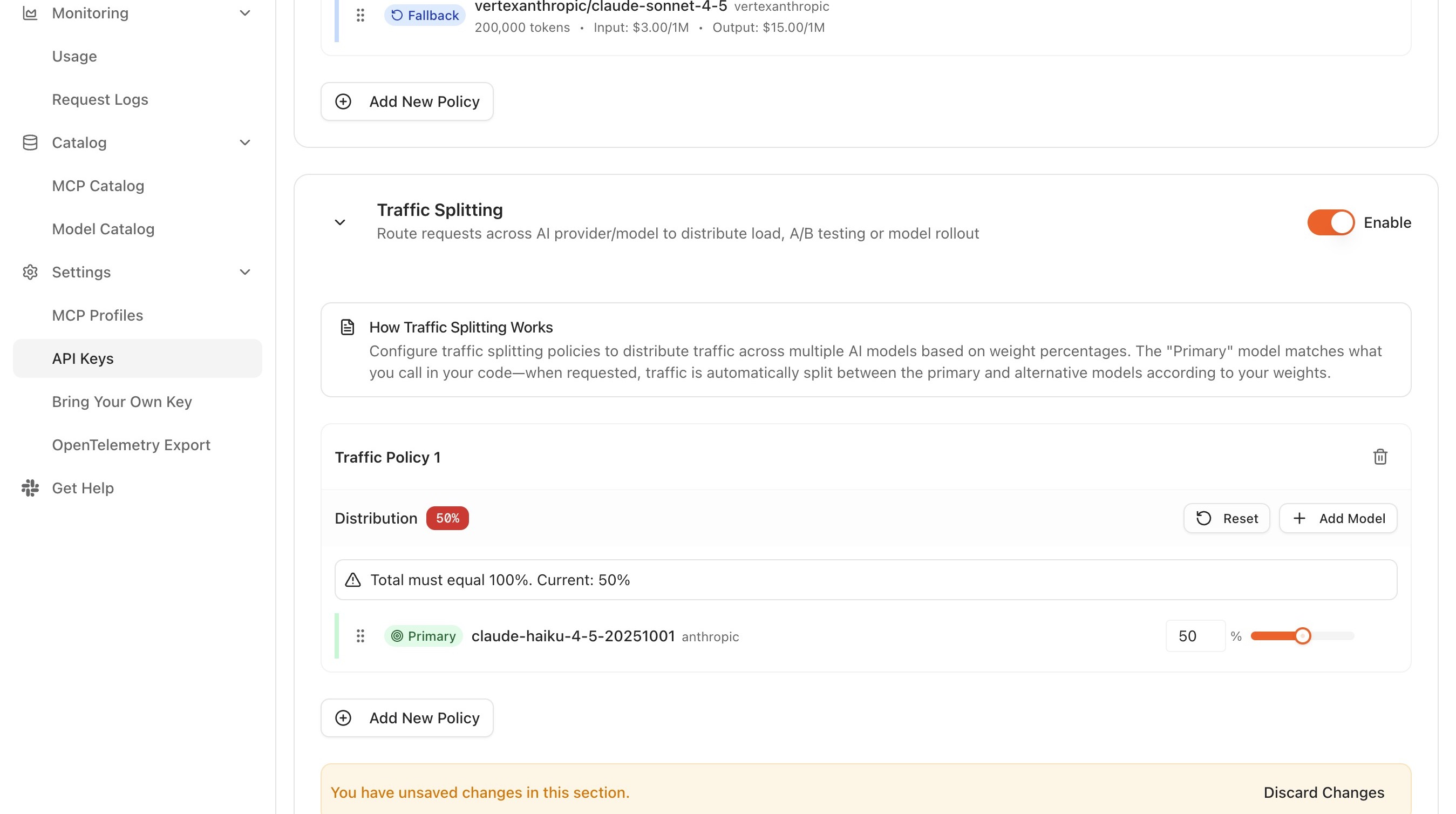
Traffic-split field reference
The traffic-split configuration UI exposes the following controls:
- Model. Selected from the model dropdown. Each entry sits at priority 0, so the weight, not the priority, determines the share of traffic the model receives.
- Weight. A non-negative integer per model. The Console renders each weight as a percentage of the running total so the resulting split is visible as it is edited.
- Add Model. Appends another backend to the split. After selection, a weight must be assigned to the new model.
- Remove. A control next to each model removes it from the split. Remaining weights are then adjusted as needed before saving.
Step 3: generate test traffic and observe the distribution
A configured split is most useful when its real distribution has been confirmed against expectations. The distribution is probabilistic, so individual requests do not follow the weights exactly; the law of large numbers takes over only across a reasonable sample.
A simple loop is sufficient for verification:
for i in {1..50}; do
  curl -s https://YOUR_GATEWAY_URL/v1/chat/completions \
    -H "Authorization: Bearer YOUR_API_KEY" \
    -H "Content-Type: application/json" \
    -d '{
      "model": "gpt-4o",
      "messages": [{"role": "user", "content": "Reply with a single word."}]
    }' > /dev/null
done
Then, in the Console:
- Open Monitoring → Request Logs.
- Filter by the API key the split is attached to.
- Filter by the time window covering the loop above.
- Group or sort by Resolved model, and confirm the proportions are in the neighbourhood of the configured weights. A 50-request sample of an 80/20 split typically lands somewhere between 75/25 and 85/15, which is the expected statistical spread; substantially wider deviations are worth investigating.
For longer-term observation, Usage Analytics is the better surface, because it aggregates across larger windows and presents the distribution as cost and token counts in addition to request counts.
Step 4: adjust and re-verify
The point of the split is to be tuneable. After observing the initial distribution and any quality signals from downstream evaluation, the weights are adjusted:
- Open the existing traffic-split configuration on the API key's detail page.
- Edit the weight values.
- Save.
- Confirm in Request Logs that the new distribution takes hold from the moment of save.
The same flow handles adding a third backend, removing a backend that has fallen out of favour, or rebalancing once a migration has progressed.
The split can also be disabled without being deleted. Setting the Active toggle off causes subsequent requests to bypass the split entirely, which is a quick way to confirm that the split, rather than some other configuration, is responsible for the observed distribution. Toggling it back on restores the configured weights immediately.
For migrations and canary rollouts, log the current weights in a tracking document along with the date and the rationale for each change. Distributions tend to drift over time as engineers iterate, and a short audit trail removes a lot of guesswork later about why a particular split looks the way it does.
Combining splits and fallbacks
A traffic split decides which backend handles a given request under normal conditions. A fallback chain decides what happens when the chosen backend fails. The two compose naturally: a split sits at priority 0, and one or more fallback backends sit at priorities 1 and beyond.
A common shape:
| Priority | Backend | Weight | Role |
|---|---|---|---|
| 0 | gpt-4o | 80 | Primary, normal-traffic share |
| 0 | gpt-4o-mini | 20 | Primary, cheaper share |
| 1 | claude-sonnet-4-20250514 | 1 | Fallback for both primaries |
Under normal conditions, the split distributes traffic across the two priority-0 backends at the configured ratio. If the chosen priority-0 backend fails on a given request, the gateway walks to priority 1 and serves the request from the secondary. This composition gives the cost or evaluation benefits of the split and the resilience benefits of a fallback chain without forcing a choice between them.
For the deeper fallback semantics, see Improve Resilience with Fallbacks.
What to do next
- Apply advanced routing rules: combine splits with attribute-based dispatch, so different request types are split differently. See Apply Advanced Routing Rules for the underlying capabilities.
- Use your own provider credentials: bring BYOK credentials into one or more positions in the split. See Use Your Own Provider Credentials.
- Monitor traffic and usage: extend the verification step into ongoing dashboards, including cost-per-thousand-requests across the backends in the split.
- Export telemetry to an observability stack: push the distribution and the per-backend cost into the organisation's existing observability platform.
The split configured above remains attached to the key for subsequent guides.
Where to go next