Export telemetry to an observability stack
Introduction
The Console's Request Logs and Usage Analytics surfaces are sufficient for almost any single-question investigation. They are not, however, sufficient for the questions an observability team is paid to answer at three o'clock in the morning. Those questions live in dashboards that already exist, alerting rules that already page the right people, long-term storage that already complies with the right retention policies, and correlation models that already join AI traffic to the rest of the application stack. Recreating any of that inside a vendor-specific console would be both wasteful and politically unviable. The platform's answer is to emit telemetry in open formats and let the organisation's existing observability stack absorb it. Two integration paths are supported, and they are complementary rather than competing. OpenTelemetry trace export sends per-request traces with rich attributes to any OTLP-compatible backend: Jaeger, Datadog, Grafana Tempo, Honeycomb, New Relic, or a self-hosted collector. Prometheus metrics are exposed on a scrape endpoint by each data plane component and can be pulled by any metrics agent, or transformed into OTLP metrics by a Grafana Alloy (or similar) collector. Most production deployments use both: traces for per-request investigation, metrics for dashboards and alert rules. This guide covers configuring trace export, what to expect from the scrape endpoint, and how the result composes with the alerting and storage that the observability team already runs.
Persona: Developer working in the Agent Router Console, in collaboration with whoever owns the organisation's observability stack.
Estimated time: 20--30 minutes for the trace-export configuration, plus whatever time is required to confirm the traces land in the destination platform.
When this guide applies
Telemetry export is the right next step in any of these situations:
| Situation | What export adds over the in-Console surfaces |
|---|---|
| Dashboards and alerts already exist in Datadog, Grafana, Honeycomb, New Relic, or similar | The same dashboards and alerts can include AI traffic alongside the rest of the application stack |
| AI traffic needs to be correlated with downstream service behaviour | Trace context flows through to the observability backend, where the join across services is trivial |
| Long-term retention beyond the in-Console window is required | Storage is whatever the observability platform already provides |
| Alerting on elevated error rates, latency spikes, or rate-limit saturation is required | Alerts are configured in the alerting platform the team already operates |
| Compliance or SIEM workflows depend on a specific log format | The OTLP and Prometheus formats integrate with the standard tooling these workflows already use |
For ad-hoc investigation by a single developer, the Console's Request Logs and Usage Analytics are still the right surfaces; export is the layer that scales beyond that. The two surfaces remain available regardless of whether export is configured.
Outcomes
By the end of this guide:
- Trace export to an OTLP-compatible backend is configured, enabled, and reporting a Connected status.
- At least one request issued through the gateway has produced a trace in the destination observability platform.
- The Prometheus scrape endpoint exposed by each data plane component is understood, even where it is not yet wired into the metrics collection stack.
- The boundary between platform-emitted telemetry and observability-platform-owned concerns (storage, alerting, retention) is clear.
Prerequisites
- A working API key with traffic flowing through it, as set up in Route Requests Across Providers.
- An OTLP-compatible observability backend. The endpoint URL, transport protocol (gRPC or HTTP), and authentication credentials must be obtained from whoever owns that backend.
- Confirmation that the backend's OTLP endpoint is reachable from the Agent Router data plane. This is a network reachability question, not a Console question; if there is doubt, the operator who installed the platform is the right person to ask.
Step 1: configure trace export
Trace export is configured once per platform instance, from inside the Console. The configuration applies to all traffic flowing through the data plane; individual API keys do not need any further setup.
- Sign in to the Agent Router Console.
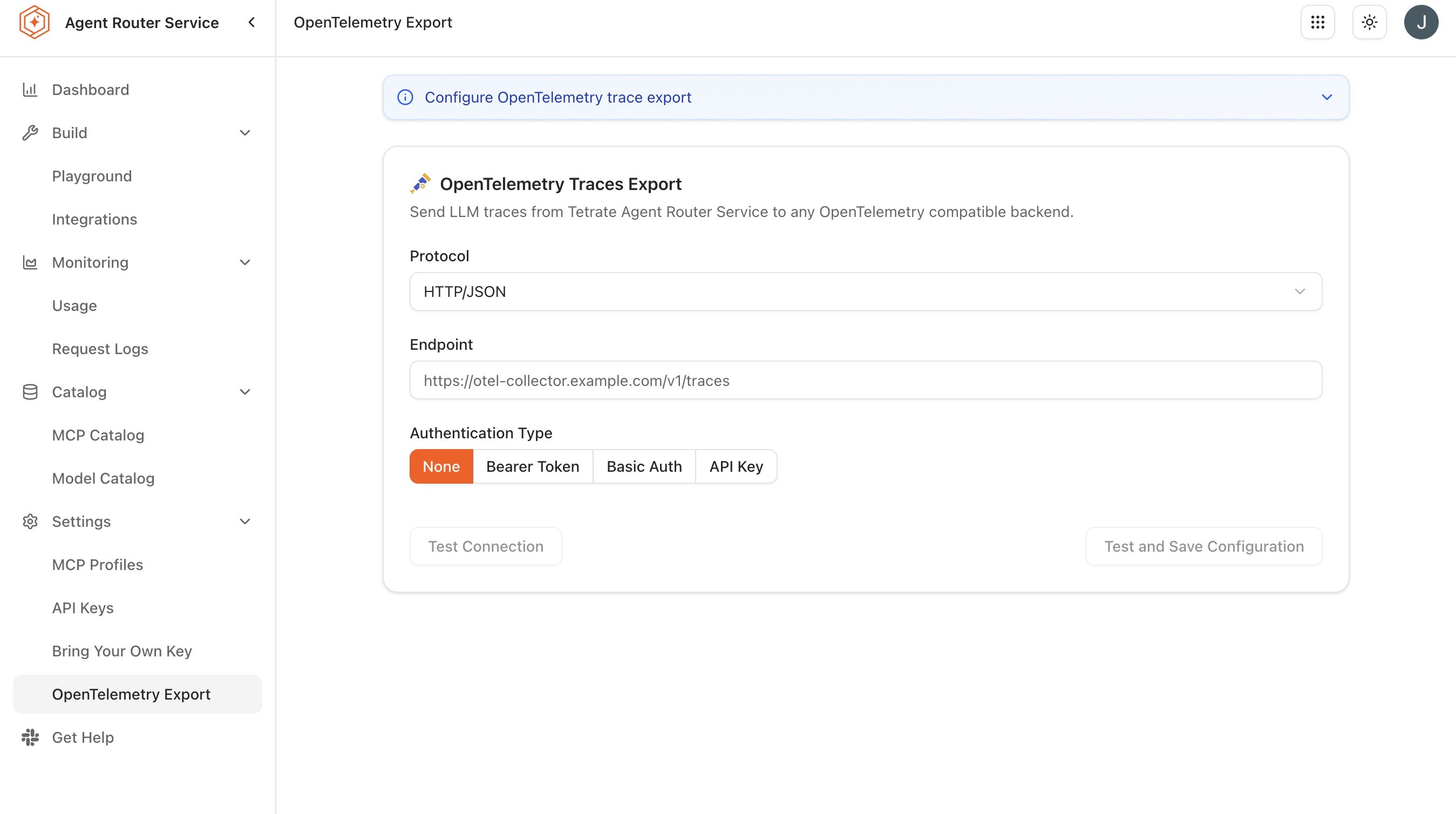
- Open Settings → OpenTelemetry Export from the sidebar. The same page is reachable at
/system-integrations. - Click Configure or Enable Export.
-
Enter the Endpoint URL of the OTLP collector. Examples by backend:
Backend Typical endpoint Default protocol Jaeger http://jaeger:4317gRPC Grafana Tempo http://tempo:4317gRPC Datadog https://trace.agent.datadoghq.comHTTP Honeycomb https://api.honeycomb.iogRPC with API key New Relic https://otlp.nr-data.net:4317gRPC with API key Self-hosted OTLP collector Collector address and port Backend-specific -
Select the transport Protocol:
- gRPC is the most common choice and is the default on port 4317.
- HTTP uses OTLP over HTTP on port 4318 and is the better choice when gRPC is blocked by intermediate infrastructure.
-
Configure Authentication. The right option depends on the backend:
Auth mode When to use it None Internal endpoints on a trusted network Bearer Token OTLP collectors that accept a static bearer token Basic Auth Backends that require username and password (rare for OTLP) API Key Hosted backends such as Honeycomb, New Relic, and Datadog. The header name is often vendor-specific and configurable here Custom Headers Backends that require one or more arbitrary headers, for example, DD-API-KEYfor Datadog -
Optionally set the Service name under which traces appear in the destination backend. The default is
agent-router. A more specific value is useful in tenants that run multiple platform instances (agent-router-prod,agent-router-staging) so the destination dashboards can distinguish them. -
Optionally set the Sampling rate. 100 % is appropriate for evaluation and low-volume environments; high-volume production typically samples lower.
-
Click Save.
-
Enable the export toggle.
-
Confirm the status indicator transitions to Connected.
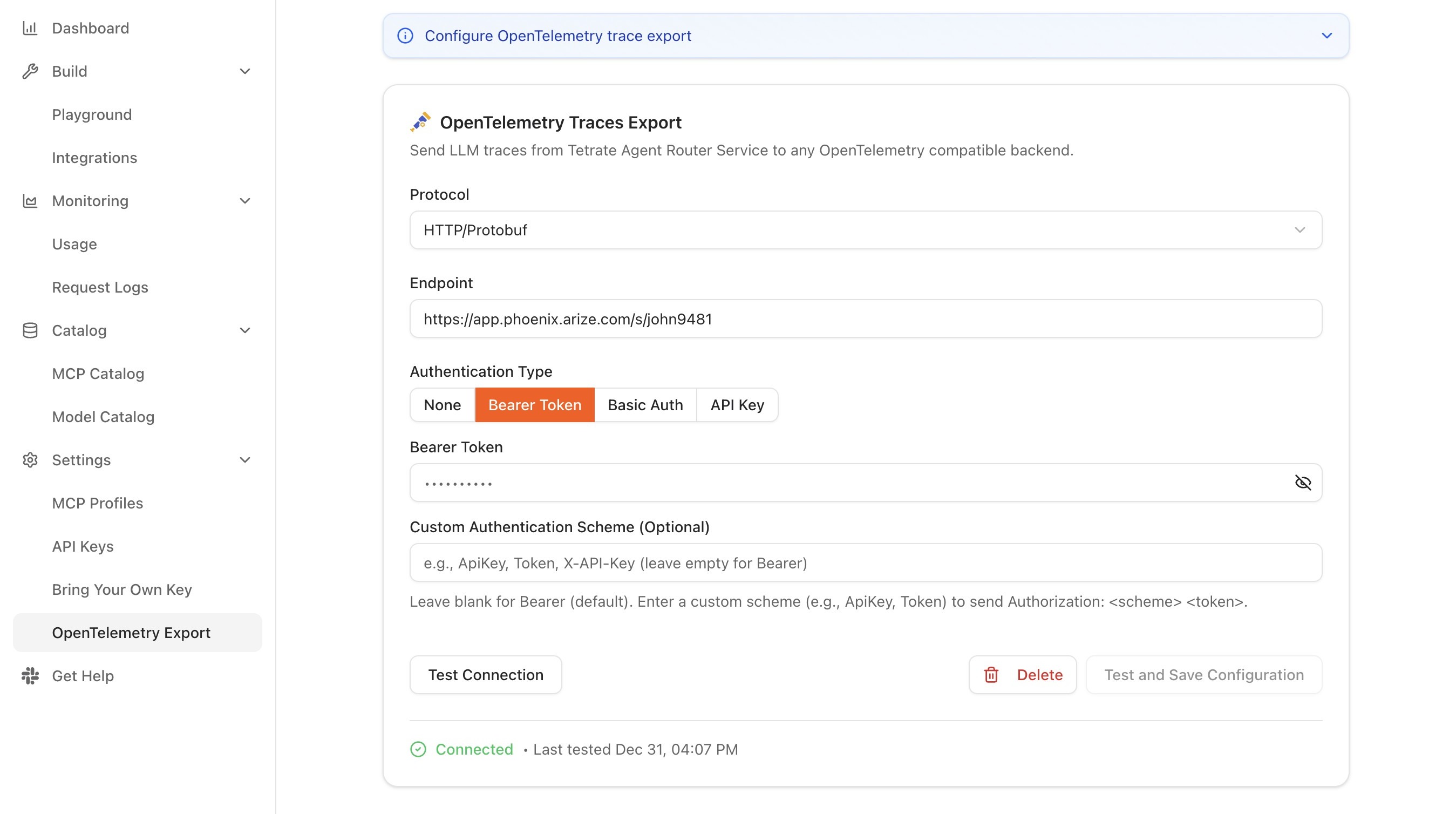
The status indicator is the most useful signal during initial setup. It reports one of three states:
| Status | Meaning |
|---|---|
| Connected | Traces are being exported successfully |
| Disconnected | Export is disabled or not yet configured |
| Error | Export is enabled but the endpoint is unreachable or returning errors |
A persistent Error state usually points to one of three issues: the endpoint is unreachable from the data plane (network or DNS), the protocol does not match the collector's expectation (gRPC vs HTTP), or the authentication credentials are wrong. Each of these is checkable independently.
The configuration can be revised at any time from the same page. Changing the endpoint URL, protocol, or authentication settings and clicking Save applies the new values immediately; no restart of the data plane is required. Toggling the export switch off stops trace export immediately while preserving the saved configuration, so export can be re-enabled later without re-entering the endpoint and credentials.
Step 2: generate traffic and inspect the destination
Once export is active, every gateway request produces a trace. A small burst of test traffic is enough to confirm the pipeline end-to-end.
for i in {1..5}; do
  curl -s https://YOUR_GATEWAY_URL/v1/chat/completions \
    -H "Authorization: Bearer YOUR_API_KEY" \
    -H "Content-Type: application/json" \
    -d '{
      "model": "gpt-4o",
      "messages": [{"role": "user", "content": "Generate trace data."}]
    }' > /dev/null
done
Then, in the destination observability platform:
-
Search for traces under the configured service name (default
agent-router). -
Open a recent trace.
-
Confirm the expected spans are present:
Span What it covers Gateway request The full lifecycle of the request inside the data plane Provider routing The time spent resolving the routing configuration and selecting a backend Model inference The time the upstream provider spent generating the response -
Confirm the expected attributes are populated on the spans:
- The resolved model name.
- Input and output token counts.
- End-to-end latency.
- Status code.
- An identifier for the API key (the key value itself is not exported in clear text).
If traces appear in the destination but with missing attributes, the integration is working but the receiver may be filtering or sampling on its own side; the destination platform's documentation is the right place to investigate. If traces do not appear at all and the Console status indicator is Connected, the most common cause is a service-name filter or a search range that excludes the test traffic.
OpenInference semantic conventions
On top of the OpenTelemetry (OTLP) export described above, the gateway annotates LLM spans with OpenInference semantic conventions, the open standard for large-language-model telemetry attributes. Base OTLP defines how a span is structured and transported, but it says nothing about what an LLM call means. OpenInference fills that gap with a shared vocabulary for model, token, and prompt/response attributes, so that LLM-aware observability tools can interpret the spans without custom parsing.
What this convention adds beyond base OTLP is a set of LLM-specific span attributes, including:
- The resolved model name and the invocation parameters supplied with the request.
- Prompt and completion token counts captured per span.
- The input and output of the call, captured per span subject to the active logging mode; prompt and response content appears only when the logging mode permits it. See Configure request logs for how the logging mode governs whether request and response bodies are recorded.
Because these attributes follow a published standard rather than a platform-specific schema, traces become meaningful in any tool that understands the convention; model, token, and prompt/response fields are recognised and rendered without bespoke mapping. The exact attribute set is enumerated in the reference; see OpenTelemetry metrics and attributes for the full list.
Step 3: add Prometheus metrics to the pipeline
Each data plane component exposes a Prometheus-compatible metrics endpoint, which is the second integration path. This is independent of trace export; metrics can be enabled regardless of whether traces are being exported, and the two together give a substantially fuller picture than either alone.
The platform does not include a metrics collector itself. Instead, an existing metrics agent (Prometheus, a Grafana Alloy collector, the Datadog agent in OpenMetrics mode, or any other scraper) pulls metrics from the platform's scrape endpoints and forwards them to whichever destination the observability stack uses. A reference Grafana Alloy configuration is supplied that scrapes the data plane components and forwards the metrics as OTLP to a downstream collector; it is a useful starting point even for teams that ultimately route metrics through a different agent.
Two consequences of this design are worth noting:
- The scrape endpoint is internal to the data plane and is reachable from inside the same Kubernetes cluster. Exposing it outside the cluster is a deployment decision rather than a Console one.
- Metrics and traces are emitted on the same dimensions (resolved model, provider, API key, status), which is what makes joining them in the destination platform straightforward.
Alerting and storage: where each one belongs
Two operational concerns are deliberately delegated to the observability platform rather than handled inside Agent Router.
Alerting
The platform emits metrics with the dimensions an alerting rule needs (error rate, latency, rate-limit indicators, model, provider, and key) but it does not drive alerts itself. Alerting rules live in the observability platform, where they can be combined with rules covering the rest of the application stack, escalated through the same paging chains, and tuned with the same noise-reduction tooling. Suppressing alerts for invalid payloads, expected policy denials, or scheduled maintenance windows happens in the alerting platform's rule engine rather than in the gateway.
The benefit of this split is that an organisation that already has a mature alerting setup does not have to maintain a second, vendor-specific one inside Agent Router. The cost is that a fresh deployment that does not yet have such a setup will need one before alerting on AI traffic is feasible.
Storage
For trace data, the destination observability platform owns retention, indexing, and query performance. For in-Console request logs, Tetrate manages the underlying storage infrastructure on the management plane (capacity, index health, and query performance) so there is no storage management burden on the customer side.
The implication is that the in-Console surfaces are the right place for "last 90 days" investigations, while the exported telemetry is the right place for longer-horizon retention, compliance archiving, and SIEM workflows.
What to do next
The dev guides have now covered the end-to-end developer surface: foundational routing, resilience, cost management, advanced patterns, BYOK, MCP, integrations, the Playground, in-Console monitoring, and external telemetry. From here:
- Govern MCP server access (operator side): the natural companion to Aggregate MCP Servers into a Profile. See Govern MCP server access in the Admin Dashboard.
- Audit platform activity (operator side): the operator equivalent of the monitoring surfaces covered in this and the previous guide. See Audit platform activity.
Where to go next